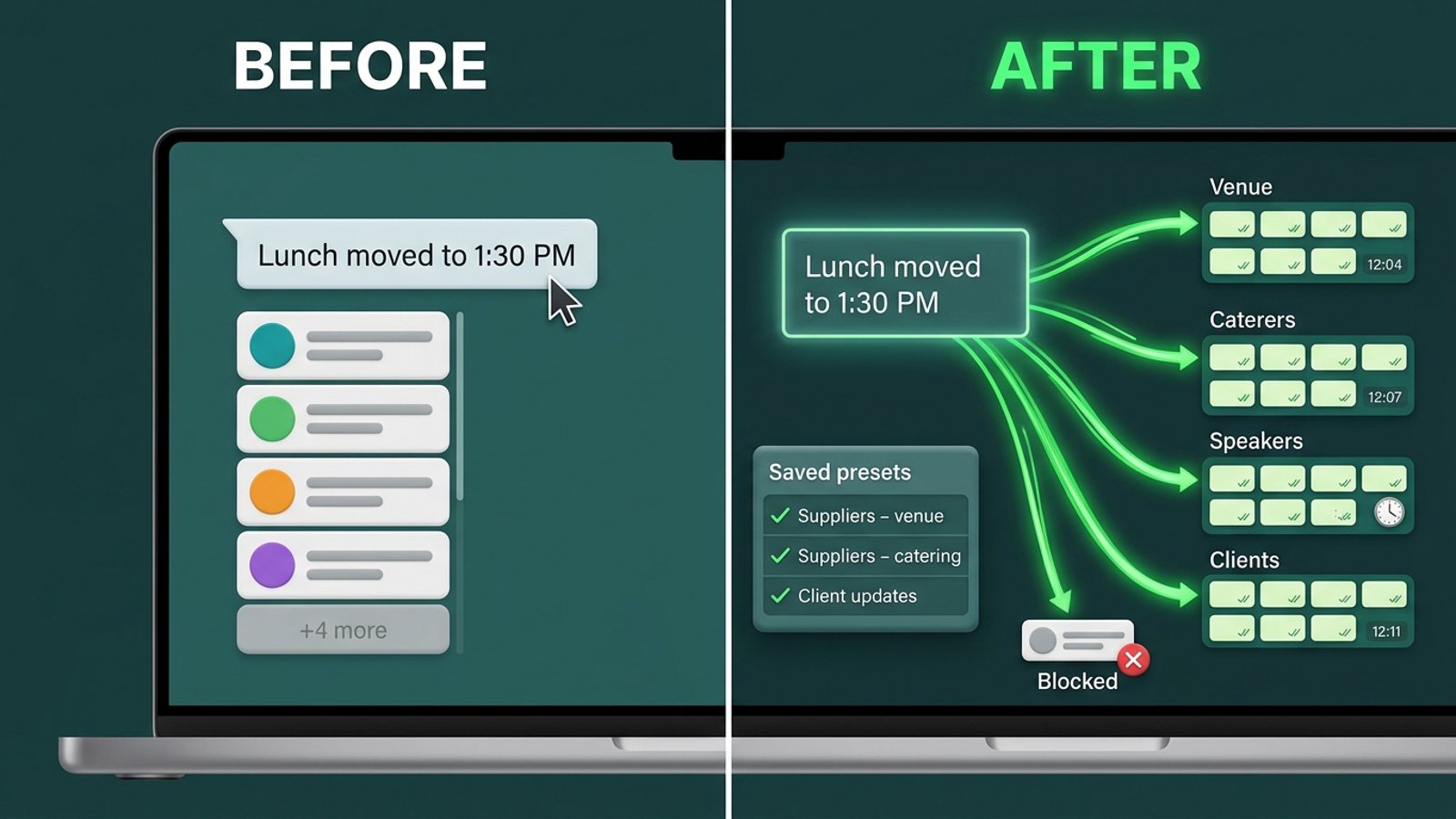
What is the best Chrome extension to message many WhatsApp groups at once?

If you work in Chrome and re-send to the same groups, the best fit of the tools we compared is FivePlus for WhatsApp Chrome extension: it saves your group and contact lists as presets, then sends to dozens of chats in one click instead of WhatsApp's five-at-a-time forwarding cap. Free to try for 3 days, as of November 2026.
Get FivePlus for WhatsApp Chrome extension (bulk share beyond 5 recipients) — save your group lists once, then send to all of them in one click.
Why is there a five-chat limit in the first place?
Because WhatsApp built its forwarding cap on purpose. WhatsApp's help centre states the forwarding limit is five people or groups at a time, and a message already forwarded can go to only one additional group chat. Messages passed through a chain of five or more chats get the "Forwarded many times" label.
That cap is the wall every distributor, agent and planner hits. Say you run a bakery and have 18 neighbourhood groups plus 40 regular customers. Sending one price list by hand means repeating a five-chat forward roughly a dozen times — and that is still bulk activity under WhatsApp's rules.
What should a chrome extension whatsapp groups tool actually do?
A good one should cut the repeat work, not just the click count. The four things that matter most for someone sending to many groups:
- Saved lists. You should build your group list once and reuse it, not search for 30 group names every Monday.
- Pacing. Messages should go out spaced apart rather than in one instant burst.
- One-click send. Pick a preset, pick a message or media, send.
- Honest scope. It should work on WhatsApp Web in Chrome, and it should be clear it is not affiliated with Meta.
Everything else — CSV uploads, member extraction, CRM labels — is a bonus that only some senders need.
Which extension is best for messaging many WhatsApp groups at once?
Of the tools we compared, FivePlus is the closest match for repeat group senders who live in Chrome. It sends to dozens of chats at once, beyond the standard five-recipient limit, and lets you mix people and groups into one preset for maximum reach.
The workflow is short:
- Install the extension from the Chrome Web Store and open WhatsApp Web.
- Save your group and contact lists as presets once.
- Choose a preset — or several saved lists at once in V2 — pick a message or media, and send in one click.
- Let the delays run. Randomized delays stagger message timing, and anti-ban technology mimics natural human behaviour.
A few honest limits. FivePlus requires the Chrome browser and WhatsApp Web. Free use is limited to a 24-hour trial, even though the site also advertises a 3-day free try. And it targets regular WhatsApp rather than WhatsApp Business accounts. Saved group lists stay saved forever, so it is better not to uninstall the extension.
How do the alternatives compare?
Here is the comparison table, with FivePlus first as our pick of the tools we compared.
| Option | Best for | Key features | Price / free option | Watch-outs |
|---|---|---|---|---|
| FivePlus (Our pick) | Repeat sends to saved groups | Presets, multi-list send, randomized delays | Free to try for 3 days | Chrome and WhatsApp Web only |
| WhatsApp forwarding and broadcast lists | A handful of chats | Built in, broadcast lists up to 256 contacts | Free | Five-chat forward cap; no group posting |
| TurboText WA | Pasting a short name list | Sends by group name, number or contact | No price listed | Very small user base |
| WhatsApp Bulk Sender by InGage | CSV and CRM-style work | CSV upload, templates, member extraction | In-app purchases flagged | Very small user base |
| Message Pilot Free | Tiny free sends | CSV/Excel, placeholders, natural delay | Free tier with quotas | 3 groups per send, 3 sends a day |
FivePlus is made by the team behind this blog.
If you mainly need CSV uploads and templates, WhatsApp Bulk Sender by InGage is the more direct choice — its store listing describes CSV upload, templates, group-member extraction and label-based selection. ExtWise's independent analysis (30 June 2026) scored it 35/100, "medium — capability, not intent", and package mirrors show only 7–8 users.
If you mainly need to paste a short list of group names, TurboText WA is quicker to set up. Its store page states it never sends without user interaction. Adoption is tiny: 36 users on the store page and 5 on a package mirror (Socket, 12 February 2026), and no pricing appears on the listing.
If you mainly need something genuinely free, Message Pilot Free has clear quotas: 3 groups per group send, 10 contacts per bulk send, 3 total sends per day and 50 members extracted per group three times a day (store page, updated 19 June 2026). It states it runs entirely in the browser and collects no data. For a 30-group list, those quotas are the blocker.
If you need nothing installed at all, WhatsApp's own forwarding and broadcast lists are free and carry no extra permissions. Broadcast lists hold up to 256 contacts each, but only contacts who saved your number receive the message, and they do not post into groups.
Source: Chrome Web Store (Message Pilot Free, updated 2026-06-19)
Why not a desktop app or a CSV sender?
Because your work already lives in a browser tab. Every extension in this comparison drives the open web.whatsapp.com session rather than an official API — an open-source WhatsApp extension project on GitHub (5 December 2024) confirms the same model, working only while WhatsApp Web is open.
That has two consequences worth knowing. First, you log in by scanning the QR code yourself; no tool in this material logs in for you. Second, a CSV sender assumes you think in spreadsheets. If your targets are named groups you already belong to, a saved preset is fewer steps than exporting, formatting and uploading a file.
Is it safe to use a WhatsApp bulk sender extension?
No extension makes bulk sending safe by itself. WhatsApp states it uses on-platform information and machine learning to find and stop abusive accounts, with legal action taken since 7 December 2019. WhatsApp also says receiving a lot of messages at once does not by itself get an account banned, though promoting content may bring more incoming messages.
Meta's enforcement documentation for the WhatsApp Business Platform (updated 21 May 2026) escalates from a warning to time-limited restrictions of 1/3 days, then 5/7/30 days, and finally account lock. That document covers the Business Platform, not regular WhatsApp, but it shows the shape of enforcement.
How do I set up a bulk send without tripping spam flags?
Start slow and stay repetitive-free. The practical checklist from the material:
- Install the extension from the Chrome Web Store and pin it to the toolbar.
- Open web.whatsapp.com and scan the QR code to log in.
- Build your list — presets of saved groups, pasted names, or a CSV, depending on the tool.
- Set a delay so sends are paced rather than instant.
- Review recipients, confirm the send, and keep well under any daily cap.
Our recommendation: vary your message wording between sends, and skip the same promo text to the same groups day after day. Repetition is one of the signals Wati names.
The cap is WhatsApp's; the wasted hour is yours — a saved preset is the only part you can actually remove.
Which one should you pick?
Pick by how you work, not by feature count. If you message the same groups every week from a Chrome tab, FivePlus is the shortest path: save the list once, send in one click, let the randomized delays do the pacing.
If you are not sure yet, our post on whether a Chrome extension can send to many WhatsApp groups at once walks through the basics, and the best WhatsApp bulk sender extensions for Chrome in 2026 roundup covers more options. For a wider view of alternatives, see Wavto alternatives for sending one message to many WhatsApp groups.
Get FivePlus for WhatsApp Chrome extension (bulk share beyond 5 recipients) and keep your group lists saved for the next announcement.
Sources
- Preventing unauthorised automation and bulk messaging on WhatsApp (WhatsApp Help Center, undated)
- About forwarding limits (WhatsApp Help Center, undated)
- Sobre limites de encaminhamento (internetlab.org.br/achearegra, updated 2026-07-16)
- WhatsApp Messaging Guidelines (WhatsApp.com, updated 2026-09-23)
- 2026 WhatsApp broadcast rules: 256 limit, marketing limits & Business API compliance (Wati, vendor blog, 2026-09-22)
- Broadcast list no WhatsApp (Drag, vendor blog, updated 2026-10-05)
- WhatsApp Business Platform policy and spam enforcement (Meta for Developers, updated 2026-05-21)
- TurboText WA – Bulk WhatsApp Sender (Chrome Web Store, undated)
- TurboText WA package page (Socket, 2026-02-12)
- WhatsApp Bulk Sender by InGage (Chrome Web Store, undated)
- InGage package page (Socket, 2026-06-29)
- InGage security analysis (ExtWise, 2026-06-30)
- Message Pilot Free (Chrome Web Store, updated 2026-06-19)
- Message Pilot package page (Socket, 2026-06-18)
- WTF Chrome extension (GitHub, 2024-12-05)
- WAWebSender security review (Risky Plugins, 2026-11-10)
- WA Bulk Sender safety (Am I Being Pwned?, 2026-10-14)
- WAWebSender stats (Chrome-Stats, ingested 2026-07-20)
Frequently asked questions
Of the tools we compared, FivePlus fits repeat group senders best because it saves group and contact lists as presets and sends to dozens of chats in one click. If you mainly need CSV uploads, InGage is the more direct choice; for genuinely free small sends, Message Pilot Free.
Yes. The extensions in this material work on top of the open web.whatsapp.com session, and you log in by scanning the QR code yourself. That includes TurboText WA, Message Pilot and the open-source WTF project.
Forwarding through a chain of five or more chats triggers that label, according to WhatsApp's help centre. Extension-driven sends are a different path from forwarding, so the label rules are not the same thing as a bulk send.
FivePlus targets regular WhatsApp rather than WhatsApp Business accounts. Enforcement on the WhatsApp Business Platform is stricter — Meta's documentation (21 May 2026) escalates from warnings to account lock.
There is no published number. Wati's vendor blog (22 September 2026) says throttling watches send speed, content repetition and report rate, and no fixed threshold is published. Our recommendation: start with fewer groups than you think you need, space sends out, and watch for reports.