What is the best bulk WhatsApp sender for MLM distributors?
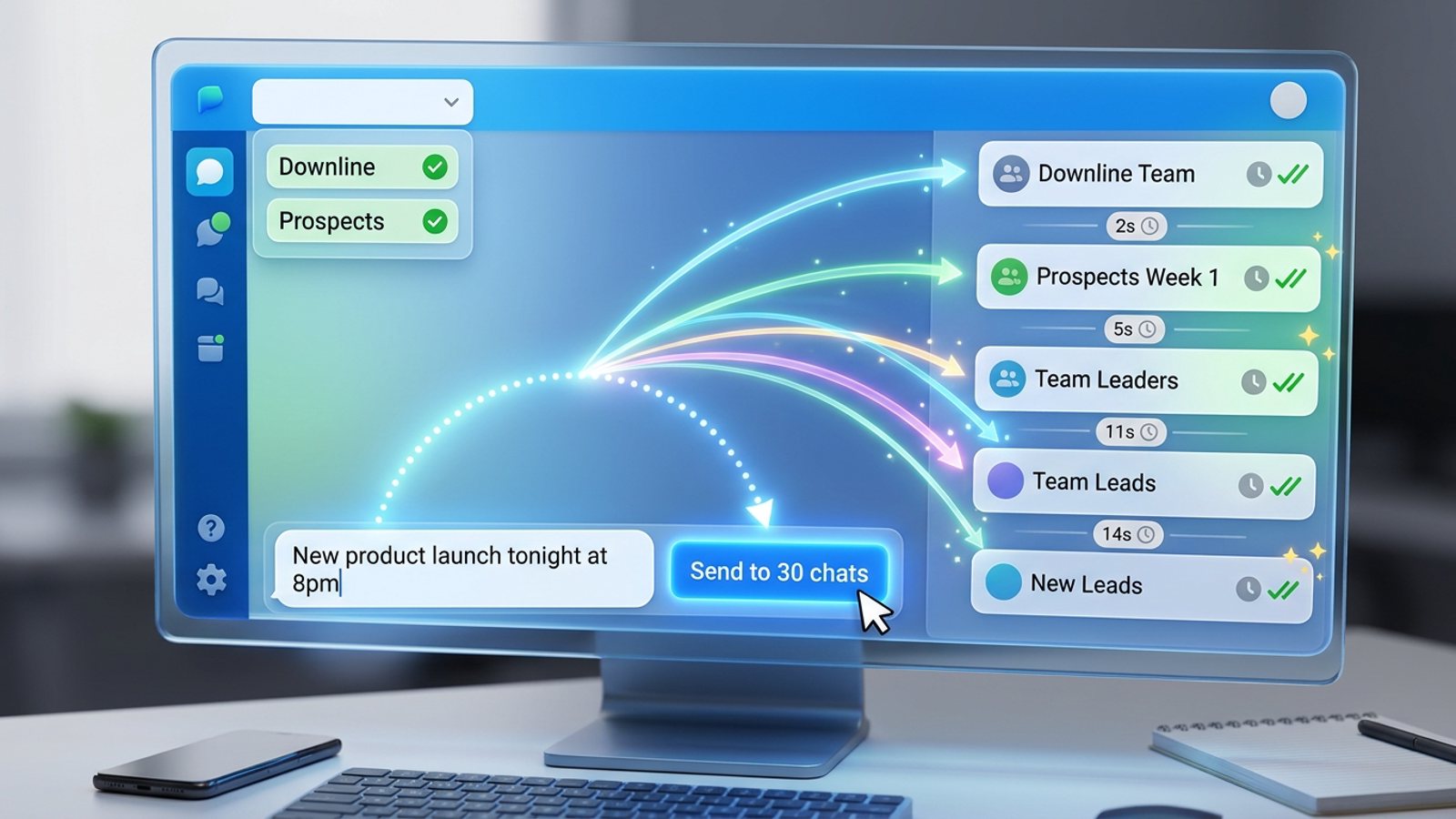
If you message the same downline and prospect groups daily, the best bulk WhatsApp sender MLM distributors can use is a Chrome extension that saves your group lists as presets and shares to them in one click. FivePlus is our pick of the tools we compared, pairing saved presets with randomized delays. Every route carries risk: WhatsApp says its products "are not intended for bulk or automated messaging."
Get FivePlus for WhatsApp Chrome extension (bulk share beyond 5 recipients) — install it, save your lists once, and stop re-searching the same groups before every announcement.
Why is bulk sending so risky for MLM distributors?
Because WhatsApp says plainly that it doesn't want it. Its help center states that its products "are not intended for bulk or automated messaging, both of which have always been a violation of our Terms of Service," and that since 7 December 2019 it takes legal action against people or businesses connected to abuse, including automated or bulk messaging.
That matters here more than most. An MLM distributor's job is daily repetition: the same launch message to the downline group, the same opportunity message to prospect groups. Identical messages to many recipients is the pattern anti-ban guides flag hardest, alongside sudden volume spikes, no inbound traffic and repeated send failures (wapi anti-ban docs, 2026-06-05).
So the real question isn't "which tool never gets me banned" — none can promise that. It's "which tool lets me send the way I need to, with the pacing and list management that reduce the obvious risk signals."
The honest goal is not a risk-free send; it's a send that looks as close to a human working through a list as possible.
What should an MLM distributor look for in a bulk sender?
Four things, in this order: saved lists, pacing controls, the ability to reach groups (not just contacts), and a price you can justify on a distributor's budget.
Saved lists come first because of how MLM messaging works. You don't message a fresh list every day — you message the same downline, prospect and team-leader groups over and over. A tool that makes you re-import a spreadsheet or re-search 30 groups before every send adds minutes to every task and invites mistakes.
Pacing comes second. WhatsApp's anti-spam systems monitor sending speed, content repetition and report rates in real time, according to Wati (22 Sep 2026, a vendor source), and suspicious behaviour can lead to throttling or permanent bans even below the 256 cap. Wati's 28 Oct 2026 blog says speed, repeated content and report rate should be treated as risk signals, not known thresholds.
Groups, not just contacts. A broadcast list cannot include a WhatsApp group (WavesFlo, 16 Sep 2026), and WhatsApp's forward reaches up to 5 chats at once — 1 group if the message was itself forwarded. If your downline lives in groups, a contacts-only tool misses the point.
How does FivePlus handle daily downline and prospect sends?
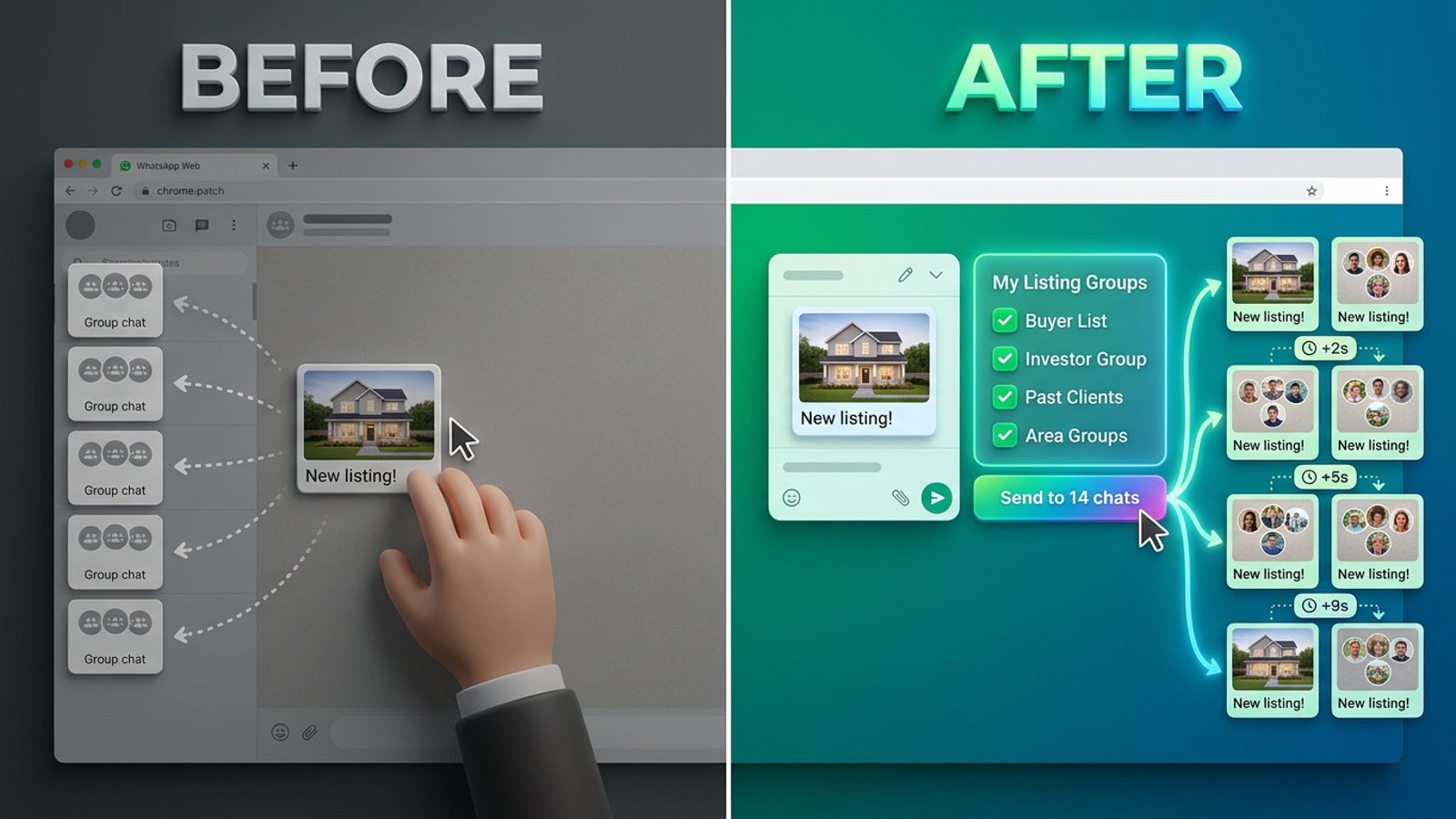
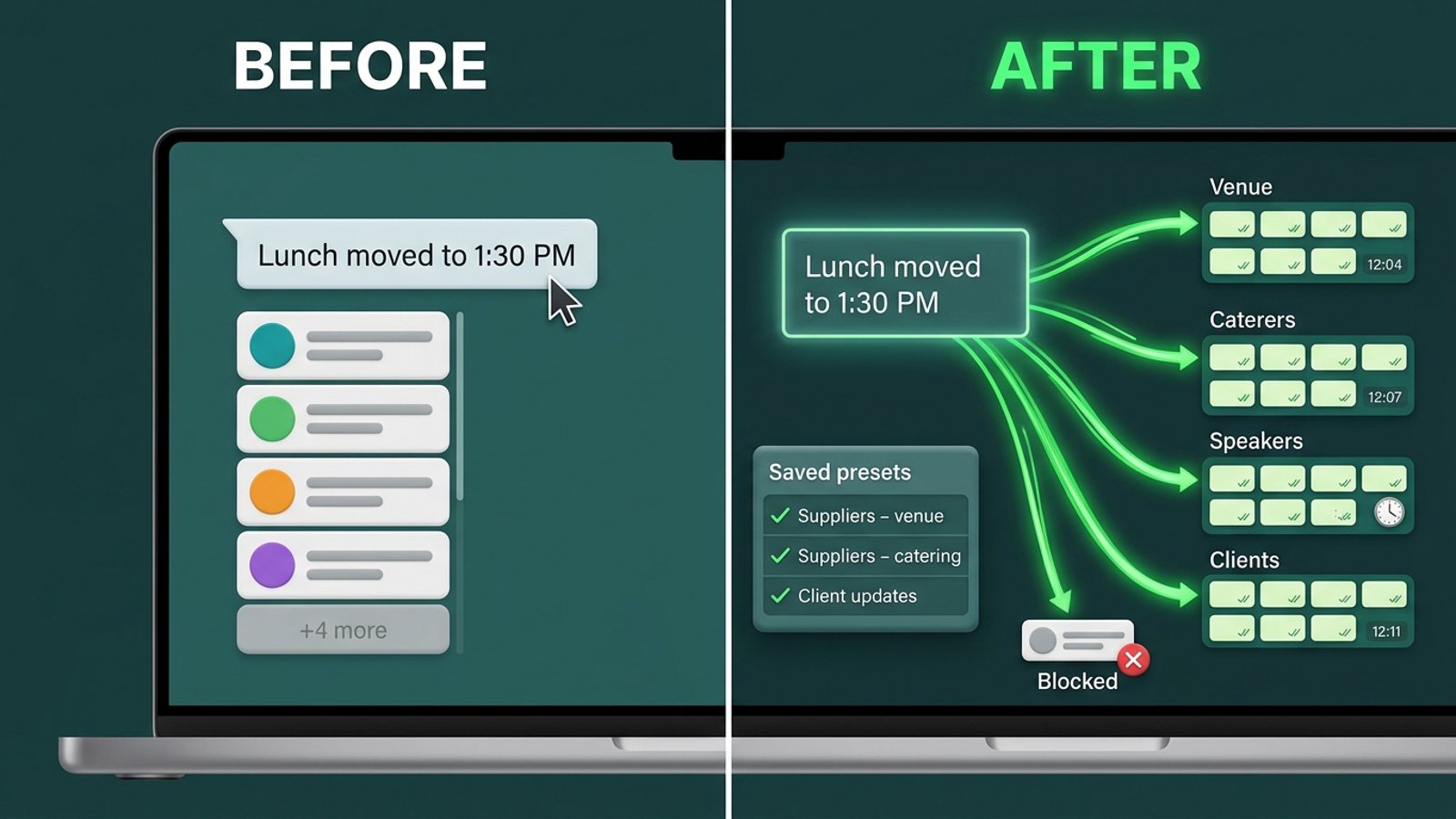
It saves your group and contact lists as presets once, then shares a message or media to them in one click — beyond WhatsApp's standard five-recipient limit. For a distributor sending the same announcement to the same 20 or 30 groups every week, that's the whole job.
Here's the workflow:
- Install the extension from the Chrome Web Store and open WhatsApp Web.
- Save your lists as presets — downline, prospects, team leaders — once.
- Pick a preset (or several at once in V2), choose your message or media, and send in one click.
- Let randomized delays spread the messages out so the timing looks natural.
You can mix people and groups into one preset for maximum reach, so a single send can hit your team-leader group and your top ten prospects together. Anti-ban technology mimics natural human behaviour, and the randomized delays stagger timing rather than firing everything at once.
Saved group lists are kept forever, per the owner — so if you pause and come back, your presets are still there. The owner's advice is not to uninstall the extension if you want to keep them handy.
Which bulk WhatsApp sender is best? The options compared
Five options, honestly weighed. FivePlus goes first because it's our pick for the saved-preset workflow this audience needs — not because it wins every column.
| Option | Best for | Key features | Price / free option | Watch-outs |
|---|---|---|---|---|
| FivePlus (Our pick) | Daily sends to saved groups | Saved presets, one-click bulk share, randomized delays | Free to try for 3 days | Chrome + WhatsApp Web only |
| WhatsApp Business App broadcasts | Free, official 1:1 outreach | Broadcast lists, free app | Free | 256-contact cap, no groups |
| WATI | Compliant customer messaging | Shared inbox, broadcasts, chatbots | From $39/month plus Meta fees | Not group posting |
| 360dialog | Raw API access | Flat per-number licence | €49/$59 per number/month | No inbox or dashboard |
| Manual copy-paste | Very small lists | Nothing to install | Free | 5-chat forward limit |
FivePlus is our pick of the tools we compared for this job: it's the one built around saved lists you reuse, which is how MLM messaging actually works. Get FivePlus for WhatsApp Chrome extension (bulk share beyond 5 recipients) and set up your first preset in a few minutes.
WhatsApp Business App broadcast lists are the free, official route. A broadcast is private one-to-many — each recipient sees an ordinary 1:1 chat — and it's capped at 256 saved contacts per list (ChatbotX, 29 Jul 2026). The catch for you: a broadcast list cannot include a WhatsApp group, and delivery fails silently if the recipient hasn't saved your number. The Business App is also free with one number across at most 5 devices and no chat assignment between team members (SleekFlow, 15 Sep 2026).
WATI is an official WhatsApp Business Platform provider — compliant bulk customer messaging with a shared team inbox, broadcasts, chatbots and AI agents (eChai Ventures, 9 Nov 2026). As of November 2026, WATI's own US landing page (22 Aug 2026) shows $49→$39 and $99→$79 per month tiers with extra users at $12/$24 per month; prices vary by region, so check WATI's page for your country, and prices can change. Meta's per-message fees sit on top. The honest limitation: it's customer messaging under template rules and the 24-hour window (Respond.io, 19 Nov 2026), not posting to your WhatsApp groups.
360dialog is the cheapest transparent raw API access — a flat per-number licence with no markup on Meta's fees (TMCnet, 11 Aug 2026). As of September 2026 its docs list Regular at €49/$59 per number per month and Premium at €99/$119, plus Meta's messaging fees. But there's no inbox, no automation builder and no dashboard — you bring your own software. That's a developer's tool, not a distributor's.
Manual copy-paste on WhatsApp Web is free and needs nothing installed. It's also the slowest option, and repeated identical pasting is precisely the "identical messages to many recipients" pattern anti-ban guides flag. If you mainly need a handful of personal messages a day, manual is the more direct choice — no tool required.
FivePlus is made by the team behind this blog.
Can you send one message to more than 5 WhatsApp groups at once?
Not with WhatsApp's built-in tools. WhatsApp's own forward limit is 5 chats at once, and only 1 group if the message was itself forwarded (WavesFlo, 16 Sep 2026). Broadcast lists don't solve it either — they can't include a group at all.
That leaves three routes: repeat the send by hand, use an extension that automates the repetition, or move to the official Business Platform (which reaches customers, not your groups). For a distributor with 25 downline and prospect groups, the manual route means five rounds of copy-paste per announcement, every day.
This is where a bulk WhatsApp sender extension earns its place: it does the repetition you'd otherwise do by hand, and the better ones add delays so the sends don't land back-to-back. The Free Bulk WhatsApp Sender & Contact Exporter listing (updated 18 Nov 2026) says WhatsApp's algorithm can detect back-to-back messages with zero delay, and that it varies greetings and adds 5–15 second random delays — a vendor claim, but it describes the right instinct.
What's the safest way to run a daily MLM send?
Slow, varied and tested. An unofficial WhatsApp Web automation library states that WhatsApp can change its limits for automated sending without notice, so pacing reduces risk but doesn't make a risky pattern safe (open-wa docs, 19 Nov 2026).
Here's a pattern that keeps the obvious risk signals down:
- Group your contacts inside WhatsApp into downline, prospect and team-leader lists.
- Save each list once as a preset so you never re-search groups before a send.
- Vary the greeting and set randomized delays between sends.
- Test small first — a handful of groups — and watch for reports or delivery failures.
- Scale up only if the test looks clean, and keep a regular cadence rather than bursts.
A worked example: say you run a wellness brand with 18 downline groups, 9 prospect groups and one team-leader group. Instead of 28 manual pastes, you save three presets and send to the downline preset with a varied greeting and delays. Next morning, the prospect preset. The list never gets rebuilt.
Is the official WhatsApp Business Platform cheaper for an MLM downline?
Rarely, for group messaging — because it can't do group messaging. The Business Platform is built for business-initiated customer messages, and a message to someone who hasn't messaged you in the last 24 hours must use a Meta-approved template; the 24-hour service window opens when the user messages you (Respond.io, 19 Nov 2026; ChatbotX, 29 Jul 2026).
On cost, Meta moved to per-message pricing from 1 July 2025, and service messages — previously free since November 2024 — became chargeable from 1 October 2026, with 1,000 free service messages per number per month (Wati Help Center, 6 Oct 2026; Respond.io, 19 Nov 2026). Ballpark 2026 marketing cost runs roughly $0.01–$0.16 per delivered message by recipient country, with provider markup commonly pushing the all-in cost to 2x–5x Meta's raw rate (IDT Express, 14 Jul 2026). Rates are set by the recipient's country calling code and Meta updates them periodically (Route Mobile, 19 Aug 2026).
For a distributor with a few hundred contacts, that's real money per campaign — and it still doesn't post to your groups. If you mainly need compliant one-to-one customer messaging with a team inbox, WATI is the more direct choice.
Do broadcast lists reach WhatsApp groups?
No. A broadcast list cannot include a WhatsApp group (WavesFlo, 16 Sep 2026), and delivery fails silently if the recipient hasn't saved your number (ChatbotX, 29 Jul 2026). That's the single biggest reason broadcast lists fall short for downline work, where so much of the conversation lives in groups.
What broadcasts do well: they're free, official, and each recipient sees a private 1:1 chat rather than a group thread. For a small prospect list of people who've saved your number, that's genuinely useful. For 20 downline groups, it isn't the tool.
How much does a bulk WhatsApp sender cost for MLM use?
It ranges from free to roughly $60–$120 per number per month plus per-message fees, depending on the route. FivePlus is free to try for 3 days, and the owner confirms all plans include unlimited sharing with no monthly sending limit — check the site for current pricing, as of November 2026, since prices can change.
The comparison that matters isn't sticker price, it's cost per usable send. A free broadcast list that silently fails for half your contacts costs you the campaign. A $59-per-number API licence with no dashboard costs you the time to build one. For most distributors, the practical budget question is: how many minutes per day does the tool give back?
Before you pick a tool, follow WhatsApp's terms and remember that risks and rules can change over time — this article is not legal advice. If saved presets and one-click group sharing fit how you work, get FivePlus for WhatsApp Chrome extension (bulk share beyond 5 recipients) and set up your downline list once. For more workflows like this, see the FivePlus blog, or compare notes on spreadsheet senders vs saved-preset extensions and whether a bulk sender is worth it vs messaging groups by hand.
Sources
- Unauthorized use of automated or bulk messaging on WhatsApp — WhatsApp Help Center
- การใช้การรับส่งข้อความอัตโนมัติหรือข้อความจำนวนมากที่ไม่ได้รับอนุญาตบน WhatsApp — WhatsApp Help Center
- WhatsApp Business Platform policy and spam enforcement — Meta for Developers, updated 2026-05-21
- Kebijakan Pengiriman Pesan WhatsApp Business — WhatsApp Business policy page, 2026-03-15
- ¿Por Qué Se Bloquea WhatsApp? — Zenvia, 16 Jan 2026
- Events: Preventing your Whatsapp Number from Getting Banned — Ubidots Help Center, 2026-05-07
- wapi anti-ban guide — GitHub, 2026-06-05
- open-wa rate-limit docs — GitHub, 2026-11-19
- WA Mitra listing — Chrome Web Store, updated 2 Nov 2026
- Free Bulk WhatsApp Sender & Contact Exporter listing — Chrome Web Store, updated 18 Nov 2026
- WaSenderHQ listing — Chrome Web Store
- ZS Sender listing — Chrome Web Store
- WhatsApp Business App vs API — SleekFlow, 2026-09-15
- WhatsApp Broadcast Limits in 2026 — ChatbotX, 29 Jul 2026
- Send message to multiple WhatsApp groups — WavesFlo blog, 16 Sep 2026
- Wati pricing structure help article — Wati Help Center, 2026-10-06
- Wati for advertising — Wati, 2026-08-22
- AiSensy vs Wati pricing — eChai Ventures, 2026-11-09
- 360dialog pricing — 360Dialog docs, 2026-09-30
- Best WhatsApp API provider for SMEs — TMCnet, 2026-08-11
- WhatsApp Business API pricing 2026 — IDT Express, 2026-07-14
- WhatsApp Business pricing guide — Route Mobile, 2026-08-19
- WhatsApp Business Messaging API pricing calculator — Respond.io, 2026-11-19
Frequently asked questions
For daily sends to saved downline and prospect groups, FivePlus is our pick of the tools we compared, because it saves group lists as presets and adds randomized delays. If you mainly need compliant one-to-one customer messaging with a team inbox, WATI is the more direct choice.
No tool can guarantee otherwise. WhatsApp calls bulk and automated messaging a Terms of Service violation, and a Chrome Web Store listing (2 Nov 2026) says no tool can prevent a ban — naming a recipient pressing 'Report' as the strongest trigger. Pacing and varied content reduce the obvious risk signals but don't remove the risk.
WhatsApp's help center says its products are not intended for bulk or automated messaging and that this has always been a violation of its Terms of Service. It also says it takes legal action against people or businesses connected to abuse, including automated or bulk messaging. Rules and enforcement can change, so check WhatsApp's current terms for your situation — this is not legal advice.
The owner's own answer is that only regular WhatsApp is supported, so don't count on a WhatsApp Business account. It runs as a Chrome extension on WhatsApp Web.
Yes — the owner says saved group lists are saved forever, and recommends not uninstalling the Chrome extension if you want to keep them. Free use is limited to a 24-hour trial.