What are the top 5 bulk WhatsApp tools for network marketers?

There is no official "best" bulk WhatsApp tool for network marketers — WhatsApp says bulk and automated messaging has always violated its Terms of Service, so the honest shortlist is by job, not by winner. For one-click sends to many existing groups and contacts, a saved-preset extension like FivePlus fits best.
If you need the same announcement in a dozen WhatsApp groups before your next call, pick the tool that matches that job. Get FivePlus for WhatsApp Chrome extension (bulk share beyond 5 recipients) if one-click sharing to saved lists is the job in front of you.
What should network marketers look for in a bulk WhatsApp tool?
Start with the job, not the feature list. Network marketers usually send the same message to people who already know them — their downline, their customers, their prospect groups — so three questions matter: can it reach more than five chats at once, can it remember my group lists, and does it slow the send down enough to look human?
Here is what to check before you install anything:
- Does it go beyond five chats? WhatsApp's forwarding limit is five people or groups at a time, and a forward that has already been forwarded can go to only one more group chat (WhatsApp Help Center, undated).
- Does it save your lists? Searching for the same 20 groups every morning is where the time goes.
- Does it stagger the timing? WhatsApp says it uses machine learning and user reports to detect unauthorised bulk or automated messages, so speed and repetition are risk signals (Wati, 22 Sep 2026).
- Does it respect opt-ins? Sending to people who never asked raises spam reports, blocked numbers and eventually bans (Respond.io, 28 Sep 2026).
What are the top 5 bulk WhatsApp tools for network marketers?
The five below are compared by the job they do best, not ranked as a single winner. FivePlus comes first because one-click sharing to saved group lists is the most common network-marketing job — the same announcement into many groups you already belong to.
1. FivePlus — our pick for beyond-5 one-click preset sharing
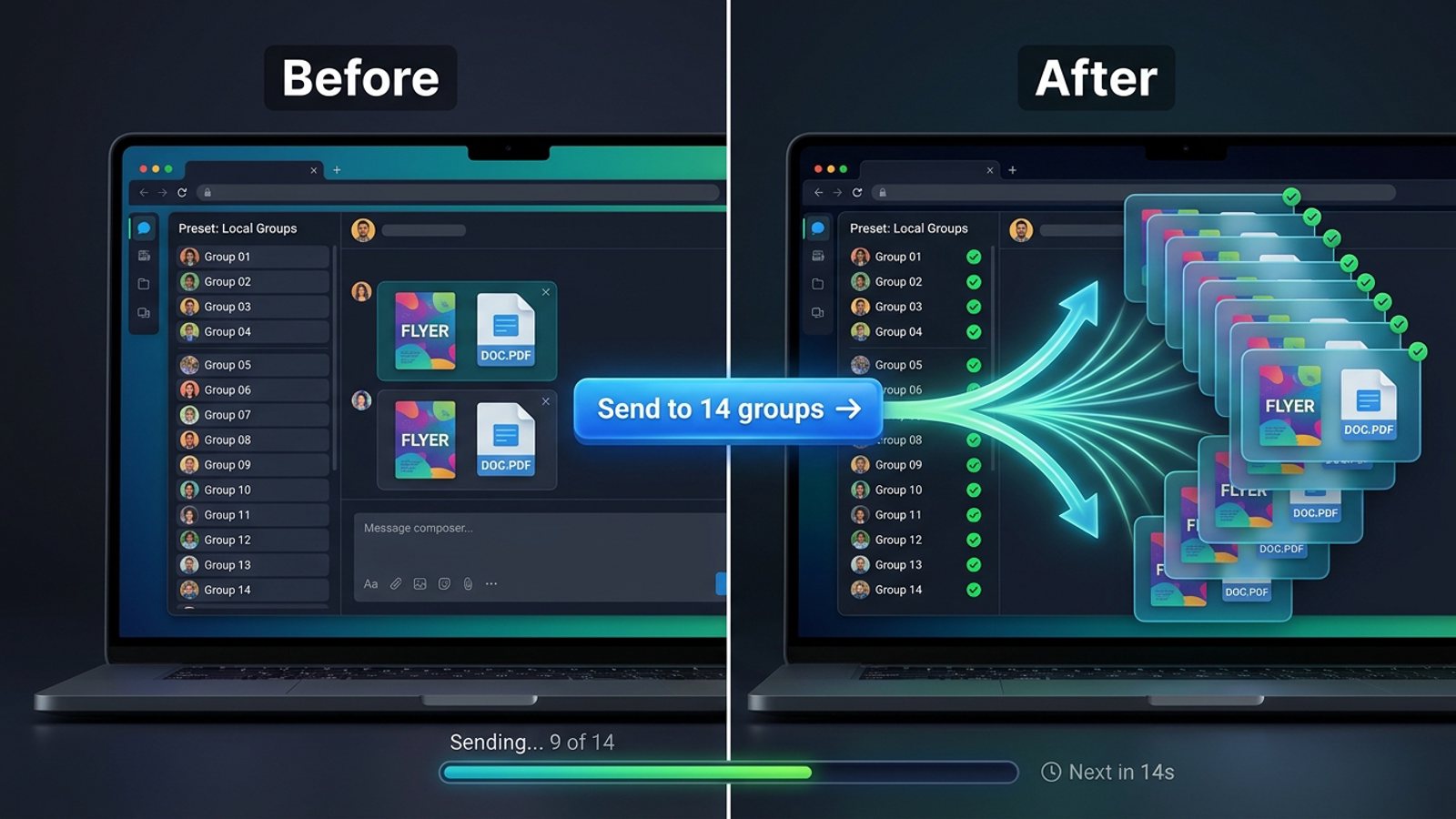
FivePlus is a Chrome extension for WhatsApp Web that sends a message, announcement or media to many saved groups and contacts in one click, instead of the standard five at a time. You save your group and contact lists as presets once, then reuse them — and you can mix people and groups into one preset for maximum reach.
The features that matter for network marketers:
- Unlimited forwarding to dozens of chats at once, beyond the 5-recipient limit.
- Saved group lists you set up once and reuse, so you never search for the same groups again.
- Randomised delays that stagger message timing, plus anti-ban technology that mimics natural human behaviour.
- V2 multi-list sending, so you can send to several saved lists at once.
- No login required — it works on WhatsApp Web in the Chrome browser.
The honest limits: it needs the Chrome browser and WhatsApp Web, and free use is limited to a 24-hour trial. The owner confirms all plans include unlimited sharing with no monthly sending limit, and saved group lists are saved forever — so it is better not to uninstall the extension. FivePlus is not affiliated with Meta; WhatsApp is a trademark of Meta Platforms, Inc.
2. WhatsApp broadcast lists and Communities — the free, official route
Broadcast lists send each recipient a separate private 1:1 chat, so recipients don't see each other and replies come only to you (Zenvia, updated 21 Oct 2026; Respond.io, 7 Oct 2026). They are free and need no template approval.
The catch is the limits. Broadcast lists hold at most 256 contacts each, and only recipients who have saved your number receive them (Zenvia, updated 21 Oct 2026; Wati, 22 Sep 2026). You also can't create a broadcast list on WhatsApp Web or Desktop — only send to lists already made on your phone (Zenvia, updated 21 Oct 2026). Wati reports WhatsApp is rolling out monthly broadcast limits in some countries, so the practical limit is whatever your account shows. For group announcements, WhatsApp's Help Center suggests bringing groups into a Community and posting once in the announcements group (9bot, 8 Oct 2026).
If you mainly need free, private, one-to-one delivery to a few hundred people who saved your number, broadcast lists are the more direct choice.
3. SKEDit — best for scheduled and drip sends
SKEDit schedules messages to contacts, groups or broadcast lists on WhatsApp, WhatsApp Business, SMS, Telegram and email, and attaches files and voice notes. It supports CSV import and name placeholders, an "ask me before sending" option, and drip campaigns (SKEDit facts page, checked 13 Oct 2026).
Pricing as of November 2026, and prices can change: SKEDit is free to start; Software Advice lists from $2.99/month flat rate, and PC-Welt reports a free tier of up to 15 queued messages with a Max upgrade at €9.49/month. Both are third-party pages and may be out of date. The main limitation is platform: SKEDit's facts page lists Android 8.0+ only, with iPhone listed separately.
If your priority is "send this follow-up at 9am three days from now", SKEDit is the more direct choice.
4. CSV spreadsheet-upload Chrome senders — best for personalised lists
Tools like ZS Sender and WA Bulk Message Sender take a CSV of numbers or contacts and send with variables like {name}. ZS Sender offers CSV import, variables, preview, attachments, delays and batching, and runs locally in the browser with no servers (ZS Sender Privacy Policy, 12 Aug 2026).
Pricing as of November 2026, and prices can change: ZS Sender is free to install; WA Bulk Message Sender (SafePace) lists Pro at $4.99/mo for one WhatsApp number and Pro Max at $9.99/mo for five numbers, both adding group import/export. ZS Sender's user numbers are tiny — Socket lists 21 users (12 Aug 2026) and ExtPose 30 installs (15 Sep 2026) — worth weighing if you want a tool with a track record.
If your list lives in a spreadsheet and every message needs a first name in it, a CSV sender is the more direct choice. Our post on spreadsheet sender vs saved-preset extension walks through the trade-off.
5. Manual copy-paste — free, and honestly the safest
Copy, paste, send, repeat. It costs nothing in cash and adds no tool risk beyond WhatsApp itself. But forwarding is capped at five chats at a time, and a chain of five or more gets labelled "Forwarded many times" (WhatsApp Help Center, undated). At 20 groups it is slow and error-prone, and the repeated identical text is exactly what spam detection looks for.
If your list is tiny and your messages are one-offs, manual is genuinely fine. If you are doing this daily, it is the job you are trying to escape.
How do the five options compare?
| Option | Best for | Key features | Price / free option | Watch-outs |
|---|---|---|---|---|
| FivePlus (Our pick) | One-click sends to saved groups | Presets, delays, multi-list | 24-hour free trial | Chrome + WhatsApp Web only |
| Broadcast lists | Free 1:1 sends to saved contacts | Private chats, no templates | Free | 256 per list, phone only |
| SKEDit | Scheduled and drip sends | Scheduling, CSV, placeholders | Free tier; paid from $2.99/mo | Android 8.0+ only |
| CSV Chrome senders | Personalised spreadsheet sends | CSV import, variables, delays | Free install; paid from $1.9/mo | Cannot change WhatsApp's checks |
| Manual copy-paste | Tiny lists, one-off messages | No tools, no cost | Free | 5-chat cap, slow, "Forwarded many times" |
FivePlus is made by the team behind this blog. Of the tools we compared, it is our pick because it does the one thing network marketers do most — send the same message to more than five existing groups and contacts in one click — with saved presets and randomised delays built in. Get FivePlus for WhatsApp Chrome extension (bulk share beyond 5 recipients) if that is your job.
For a wider view of extension options, see our round-up of the best WhatsApp bulk sender extensions for Chrome in 2026.
Is bulk messaging on WhatsApp actually allowed?
No — WhatsApp states its products are not intended for bulk or automated messaging and that this has always violated its Terms of Service, and it says it can take legal action against abusers (WhatsApp Help Center, undated). Using unofficial WhatsApp automation of any kind, even for personal use, violates those Terms (GitHub deploy-openclaw docs, 27 Jan 2026).
The one officially supported route for bulk messaging at scale is the WhatsApp Business API, which uses Meta-approved templates and opt-in, with no 256-person list cap (Wati, 22 Sep 2026, vendor blog). It is paid: since 1 October 2026, Meta charges per delivered message for templates and for service messages inside the open 24-hour customer service window, with 1,000 free service messages per number per month and all incoming messages free (Respond.io pricing calculator, 19 Nov 2026). Rates vary by message category and the recipient's country calling code, and Meta updates them periodically (Route Mobile, 19 Aug 2026).
So the practical picture for a network marketer: broadcast lists and Communities are the free official option, the Business API is the paid official option, and desktop and extension tools sit outside the Terms. Every option above has that in common — which is why the next question matters.
Will a bulk sender get my WhatsApp account banned?
No tool can promise a ban-free send, and any tool claiming an "anti-ban mode" that bypasses WhatsApp's limits is a red flag — an extension can organise your sending with delays, pause/resume and saved scripts, but it cannot change how WhatsApp counts or judges your messages (MSG.AI, 11 Oct 2026). The only free option with no ban risk from the tool itself is a broadcast list (unlimitedmessaging.app, 5 Nov 2026).
What you can control is the risk signals. WhatsApp advises keeping blocks and reports low by getting users to start the chat, telling people who you are and why you're contacting them, and offering an easy opt-out — even if they shared their details with you (WhatsApp Help Center, undated).
Our recommendation: send to groups where you are already a member and people know your name, keep messages varied rather than copy-pasted word for word, spread sends across the day, and honour opt-outs immediately. Fewer, better-targeted sends beat volume every time.
Say you run a team of 30 distributors. Instead of blasting 200 contacts at 9am, send the product update to your three active team groups first, then the customer reorder list an hour later, then the warm prospects list after lunch. Same message, three smaller sends, far fewer reports.
Which tool should a network marketer actually choose?
Match the tool to the job you do most. If you send the same announcement into many existing groups and contacts who already know you, FivePlus is our pick of the tools we compared: save your lists once, pick a preset, send in one click, and let randomised delays stagger the timing. It runs on Chrome with WhatsApp Web, has a 24-hour free trial, and all plans include unlimited sharing with no monthly sending limit — prices as of November 2026, and prices can change.
If you need scheduled follow-ups, SKEDit is the more direct choice. If your list lives in a spreadsheet, a CSV sender is. If you want free and official, broadcast lists and Communities are. If you are sending at real scale with opt-in and a budget, the Business API is the compliant route.
Whatever you pick, follow WhatsApp's Terms and keep your opt-outs clean. Get FivePlus for WhatsApp Chrome extension (bulk share beyond 5 recipients) to share beyond five recipients in one go.
Sources
- Unauthorized use of automated or bulk messaging on WhatsApp (WhatsApp Help Center, undated)
- About forwarding limits (WhatsApp Help Center, undated)
- About account restrictions (WhatsApp Help Center, undated)
- WhatsApp broadcast list guide (Zenvia, updated 21 Oct 2026)
- 2026 WhatsApp bulk messaging rules: 256 cap and throttling (Wati, 22 Sep 2026)
- WhatsApp Business Platform policy and spam monitoring (Meta for Developers, updated 21 May 2026)
- WhatsApp Business API pricing calculator (Respond.io, 19 Nov 2026)
- WhatsApp business pricing guide (Route Mobile, 19 Aug 2026)
- WhatsApp Business banned account: reverse and avoid it (Respond.io, 28 Sep 2026)
- How to message multiple WhatsApp groups at once (9bot, 8 Oct 2026)
- WhatsApp message limit per day 2026 (MSG.AI, 11 Oct 2026)
- Free bulk WhatsApp sender: which ones won't get you banned? (unlimitedmessaging.app, 5 Nov 2026)
- WhatsApp Terms of Service & legal considerations (GitHub deploy-openclaw docs, 27 Jan 2026)
- SKEDit facts: plans, prices, platforms and limits (SKEDit, checked 13 Oct 2026)
- SKEDit review (Software Advice, undated)
- WhatsApp-Nachrichten zeitverzögert verschicken (PC-Welt, 24 Dec 2025)
- ZS Sender WhatsApp Bulk Sender from CSV (Chrome Web Store, undated)
- ZS Sender Privacy Policy (12 Aug 2026)
- Socket extension listing for ZS Sender (12 Aug 2026)
- ExtPose listing for ZS Sender (15 Sep 2026)
- WA Bulk Message Sender (SafePace) (Chrome Web Store, updated 22 Oct 2026)
Frequently asked questions
Five chats at a time. A forward that has already been forwarded can go to only one more group chat, and a chain of five or more is labelled "Forwarded many times" (WhatsApp Help Center, undated).
Not with broadcast lists — those work for contacts, not groups. WhatsApp's Help Center suggests bringing groups into a Community and posting once in the announcements group instead (9bot, 8 Oct 2026).
It depends on the job. For one-click sharing to many saved groups and contacts beyond five, FivePlus is our pick of the tools we compared; for scheduled sends, SKEDit; for spreadsheet personalisation, a CSV sender; for free and official, broadcast lists or the Business API.
Pricing is per delivered message, by category and the recipient's country calling code, since 1 October 2026, with 1,000 free service messages per number per month and all incoming messages free (Respond.io, 19 Nov 2026). Meta updates rates periodically, so check Meta's official page for current numbers.
In FivePlus, the owner confirms saved group lists are saved forever, which is why it is better not to uninstall the extension. For other tools, check their own documentation before you cancel.