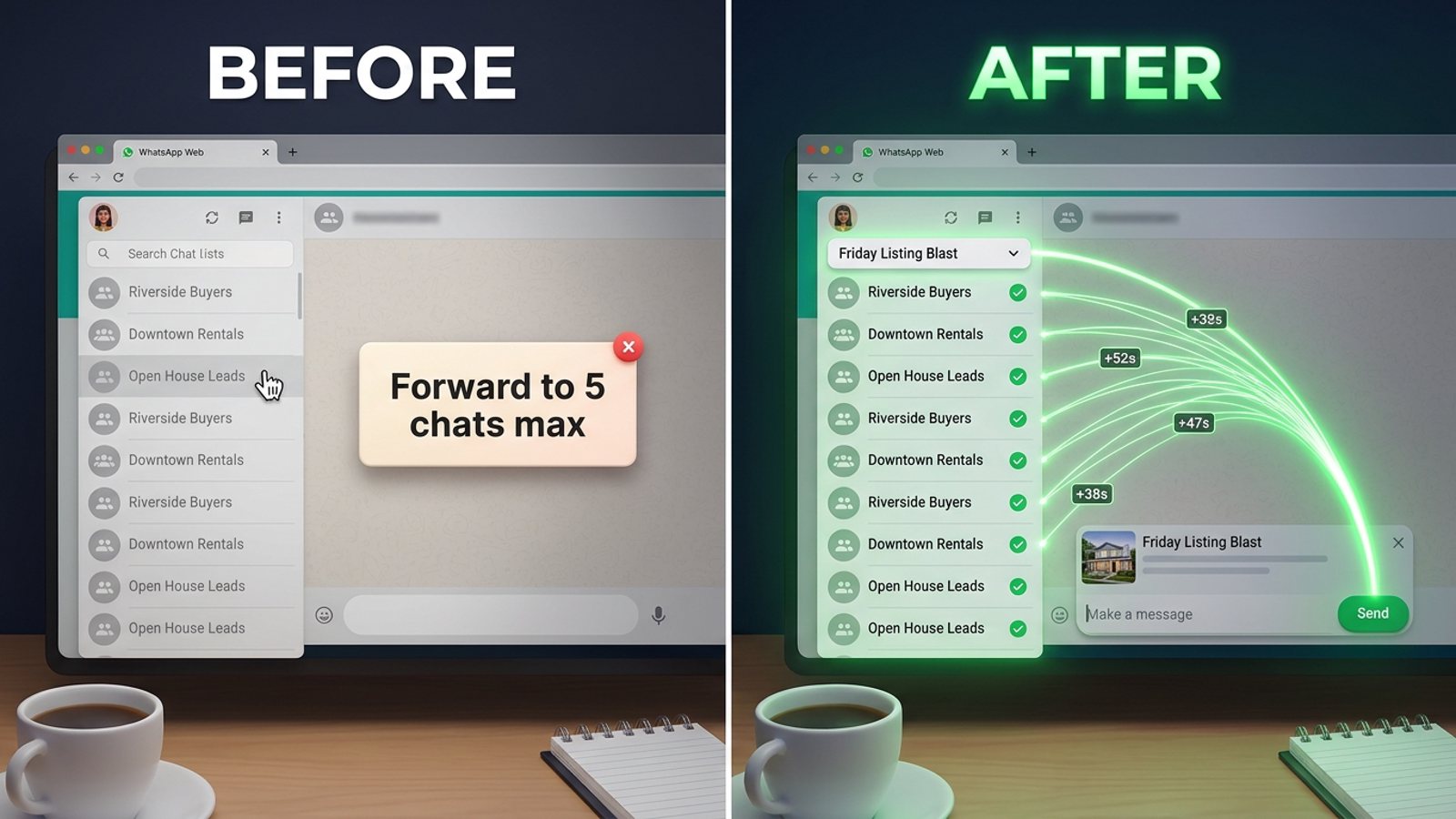
Spreadsheet sender vs saved-preset extension: which is better?

If your list changes every campaign and already lives in a CSV or Google Sheet, a spreadsheet sender saves retyping and lets you personalise per row — at the cost of a file upload every time. If you send to the same groups and contacts week after week, a saved-preset extension that keeps those lists inside WhatsApp Web is faster to reuse: set the list once, then send.
What is the difference between a spreadsheet sender and a saved-preset extension?
A spreadsheet sender imports a list from a CSV, XLSX or Google Sheet for each campaign and sends row by row. A saved-preset extension stores your group and contact lists inside WhatsApp Web once, then sends to that preset in one click whenever you need it.
That single difference — where the list lives — decides which tool suits you. Everything else follows from it: setup time per campaign, how much cleaning you do, and how fast you can fire off the same announcement again next week.
Which one should you pick if you already have a contact sheet?
Pick the spreadsheet sender if your sheet is genuinely new each time — a fresh event list, a new batch of leads, a different city. Pick saved presets if you look at your sheet and think "it's basically the same 30 groups as last month."
Ask yourself one question: how often do you send to the same groups? If the answer is weekly or more, the upload step becomes a tax you pay over and over for no new benefit.
How much setup does each route take per campaign?
A spreadsheet campaign needs a clean file every time. A saved-preset campaign needs nothing after the first setup.
Spreadsheet route, per campaign:
- Export or clean the sheet — files must be CSV or XLSX, UTF-8, and older .xls files are rejected by at least one API tool (wamatrix.io, 7 Oct 2026).
- Fill every variable cell — a blank variable column sends an empty placeholder, per the same source.
- Map columns to variables like {name} or {number}, then preview before sending — ZS Sender's listing describes this flow.
- Set delays or batching so messages don't go out in one unnatural spike.
Saved-preset route, per campaign:
- Pick your preset (or several, in FivePlus V2).
- Attach the message or media.
- Send.
The first campaign costs you the same either way. The tenth campaign costs you minutes on presets and a file-clean on the spreadsheet side.
Can you reuse the same group list every week without re-uploading?
Yes — that's the whole point of saved presets, and it's where the spreadsheet model falls down for recurring sends.
With a spreadsheet sender, each campaign starts from a fresh file upload, as the WhatsApp Bulk Sender listing describes. With FivePlus, you save your group and contact lists as presets once and reuse them; saved lists stay saved even if you stop using the tool, though the owner recommends keeping the extension installed so they stay in place.
Do you still need a spreadsheet if your groups are the same every week?
No. A sheet earns its keep when you need per-row personalisation or a changing audience. If the audience is fixed, the sheet is just a middleman between you and the send button.
Say you run a bakery with 12 supplier groups and 40 regular customers. Every Friday you post the weekend special. A spreadsheet means exporting, checking, uploading and mapping — twelve times a year of pure overhead. A preset means one click.
If you want that one-click habit, you can get FivePlus for WhatsApp Chrome extension (bulk share beyond 5 recipients) and set your lists up once.
What are the options, side by side?
Here's how the routes compare, with FivePlus first because it's the tool this blog is built around.
| Option | Best for | Key features | Price / free option | Watch-outs |
|---|---|---|---|---|
| FivePlus (Our pick) | Recurring sends to the same groups | Saved presets, multiple lists at once, randomised delays, 5+ chats per send | Free to try for 3 days (as of November 2026; prices can change) | Chrome + WhatsApp Web only |
| WaSenderHQ | Sheet-first marketers | CSV/Sheets import, typing simulation, delay sliders | Free tier up to 50 contacts; Pro $19.99 one-time on Chrome (as of November 2026) | Free tier caps imports at 50 |
| Bulk Sender (generic) | Occasional CSV campaigns | CSV/TXT/XLSX import, variables, scheduling | 20 free sends, then $5/month (as of November 2026) | Fresh upload each campaign |
| WhatsApp Business broadcast lists | Small saved customer lists | Free, built in | Free with the Business app | 256-recipient cap; contacts must have saved you |
| Manual forwarding | One-off sends | No tool needed | Free | Forwarding capped at 5 chats at a time |
FivePlus is made by the team behind this blog.
A note on the WaSenderHQ price: its Chrome listing shows Pro Lifetime at $19.99 one-time, while a Firefox listing from 24 May 2026 shows $9.99. Treat $19.99 as the current Chrome figure and check before buying.
If you mainly need row-by-row personalisation from a big, changing sheet, WaSenderHQ is the more direct choice. If you mainly need to fire the same announcement to the same groups every week, presets are the shorter path.
Which is safer for your WhatsApp account?
Neither route is risk-free, and no tool can promise otherwise. WhatsApp's Help Center states its products are not intended for bulk or automated messaging and that doing so violates its Terms of Service.
What you can control is how your sending looks. Respond.io (a vendor blog, 28 Sep 2026) names sending too many messages in a short time as a common trigger for restrictions and recommends throttling to avoid unnatural spikes. Wati (also a vendor blog, 22 Sep 2026) says Meta treats send speed, content repetition and report rate as risk signals rather than known thresholds.
FivePlus builds randomised delays into every send so messages are staggered rather than fired in one burst. That's a mitigation, not a guarantee.
Messaging rules and risks can change, and this is not legal advice — always follow WhatsApp's terms.
How do you set up saved presets the first time?
Set up once, benefit every week. The whole job takes one sitting.
- Install the extension from the Chrome Web Store and open WhatsApp Web.
- Save your lists — group lists, contact lists, or a mix of both in one preset.
- Name each preset by campaign or audience so you can find it fast.
- Pick a preset, attach your message or media, and send in one click.
- Let the randomised delays spread the messages out naturally.
From then on, a weekly announcement is a three-step job. If you want to see how this stacks up against other tools first, our round-up of the best WhatsApp bulk sender extensions for Chrome in 2026 covers the wider field.
What mistakes should you avoid with either route?
The mistakes are different for each route, and both cost you time or risk.
Spreadsheet mistakes:
- Blank variable cells sending empty placeholders.
- Using an old .xls file when the tool wants CSV or XLSX.
- Re-uploading the same list every week instead of saving it.
Preset mistakes:
- Never updating a preset when a group changes — you'll message a dead group.
- Sending the identical text at the identical time every week, which is exactly the repetition pattern Wati flags as a risk signal.
- Treating delays as a licence to send anything to anyone.
Our recommendation: refresh your presets monthly and vary your message wording between sends.
Ready to stop uploading the same list? Get FivePlus for WhatsApp Chrome extension (bulk share beyond 5 recipients) and save your groups once. For more practical guides, the FivePlus blog has you covered.
Sources
- Unauthorized use of automated or bulk messaging on WhatsApp (WhatsApp Help Center, undated)
- 2026 WhatsApp 群發訊息規則 (Wati, vendor blog, 22 Sep 2026)
- Whatsapp Business Banned Account (Respond.io, vendor blog, 28 Sep 2026)
- WhatsApp Business policy enforcement (Meta for Developers, updated 21 May 2026)
- Best Practices (Periskope docs, 28 Oct 2026)
- How to Message Multiple WhatsApp Groups at Once (9bot, 8 Oct 2026)
- WaSenderHQ Chrome Web Store listing (undated)
- WaSenderHQ Firefox listing (24 May 2026)
- WhatsApp Bulk Sender Chrome Web Store listing (undated)
- ZS Sender Chrome Web Store listing (undated)
- Your customer list is in Excel (wamatrix.io, vendor blog, 7 Oct 2026)
- How to Send Bulk WhatsApp Messages from Excel or CSV (Chatmitra, vendor blog, 25 Oct 2026)
Frequently asked questions
It depends on your reuse pattern. If your lists change every campaign and you need per-row personalisation, a spreadsheet sender is the better fit. If you message the same groups weekly, a saved-preset extension like FivePlus is faster because there's no upload step.
Yes, and some marketers do. Keep a sheet for one-off campaigns with new contacts, and keep presets for your recurring groups. The two habits don't conflict — they just cover different jobs.
No. A fixed audience is exactly what presets are for. Save the list once and send from it each time; the sheet adds an upload step with no benefit.
WhatsApp's Help Center says its products aren't intended for bulk or automated messaging and that doing so violates its Terms of Service. Tools that send through your WhatsApp Web session don't change that. Follow the terms, keep lists opt-in, and accept that rules and risks can change — this is not legal advice.
Of the tools we compared, FivePlus is our pick for recurring group sends because it combines saved presets, sending to multiple lists at once and randomised delays. If you need per-row personalisation from a large, changing sheet, WaSenderHQ is the more direct choice. If you want the official route for scale, the WhatsApp Business API is the compliant path, with template approval and per-message costs.