How do I send event details to 15 WhatsApp groups in one click?
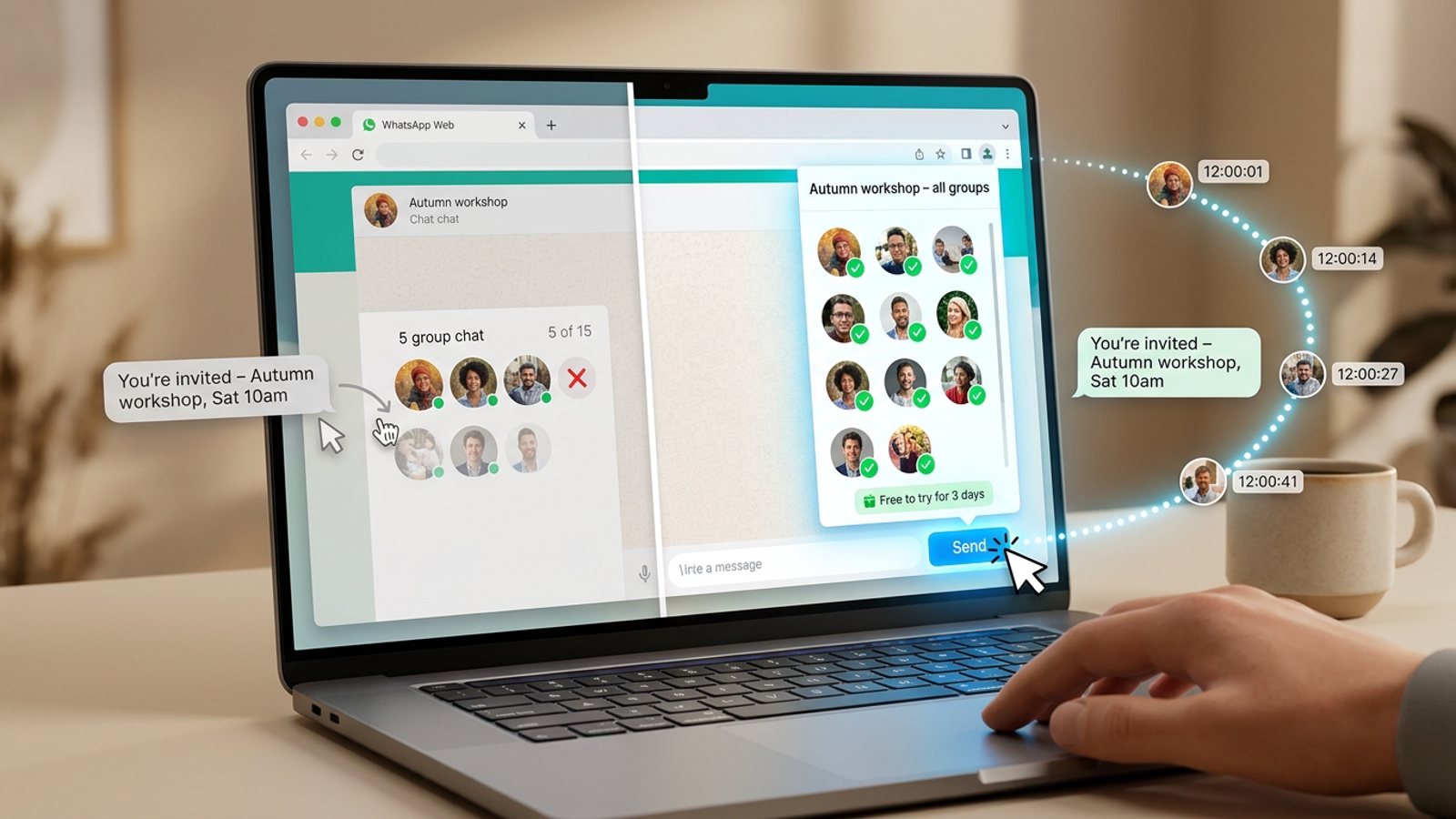
You can't do it with WhatsApp's own tools: forwarding stops at 5 people or groups at a time, and broadcast lists reach contacts, not groups. To send event details whatsapp groups in one click, use a bulk WhatsApp sender extension on WhatsApp Web — save your 15 attendee groups as one list, then send the message or invite file in a single go, with randomized delays between groups.
If you'd rather skip the setup, get FivePlus for WhatsApp Chrome extension (bulk share beyond 5 recipients) and send your event details to all 15 groups from one saved list.
Can WhatsApp send to more than 5 groups at once?
No. WhatsApp's Help Center says you can forward a message to up to five people or groups at a time, and a message that was already forwarded can only go to one additional group chat.
For an event planner with 15 attendee groups, that's three forwarding rounds per announcement — and every round risks the "Forwarded many times" label that WhatsApp applies to chains of five or more chats. WhatsApp's own advice for reaching a wide network is to create a group or share a link instead.
So the question becomes: what actually gets one message into 15 existing groups quickly?
Why don't WhatsApp broadcast lists solve this?
Because broadcast lists reach people, not groups. WhatsApp's Help Center describes a broadcast list as a saved set of contacts — each list holds up to 256 people, and messages only arrive if the recipient has saved your number.
In a group, every member sees the message. A broadcast creates separate private conversations instead. Two more limits matter for event work:
- Broadcast lists aren't supported on WhatsApp Web, according to API vendor Z-API's documentation.
- Sinch's 2025 vendor guide notes broadcast lists have no personalisation, analytics, integrations or scheduling.
How do I send one message to 15 WhatsApp groups in one click?
Use a bulk sender that runs on top of WhatsApp Web. The technique is the same in any tool:
- Write the master copy. One message, one invite file — a PDF, image or short video — prepared before you touch the tool.
- Save the 15 groups as a list. Do this once and you never search for them again before the next event.
- Select the list and attach the message. On WhatsApp Web in Chrome, open the extension, pick the saved list, paste the text or attach the media.
- Send in one click. The tool works through the groups for you instead of you opening each chat.
- Set randomized delays. Space the groups out rather than firing all 15 in one second.
- Watch the log and pause on errors. If anything looks wrong, stop and check before continuing.
That's the honest version of "one click": one action from you, with the tool pacing the actual sends.
How do you do it with FivePlus?
Install the extension, open WhatsApp Web, save your attendee groups as a preset, then send. FivePlus is a Chrome extension that bulk-shares WhatsApp messages to more than 5 groups and contacts at once — built for exactly this job.
- Unlimited forwarding: send to dozens of chats at once, beyond the standard 5-recipient limit.
- Saved group lists: save your group lists once and reuse them. In V2 you can send to several saved lists at once.
- Mix people and groups into one preset for maximum reach — handy if some attendees get a direct message and others are in groups.
- Randomized delays stagger message timing, and anti-ban technology mimics natural human behavior.
- No login required — it runs on WhatsApp Web in Chrome.
Saved lists stay saved even if you cancel, so it's worth keeping the extension installed rather than removing it between events.
How do you stagger sends so they look human?
Use randomized delays rather than a fixed interval, and don't send all 15 groups in one burst. The open-source open-wa library (November 2026) says WhatsApp can change its limits for automated sending without notice — a queue spaces traffic but "doesn't make a risky pattern safe."
That's the key honesty point: no pacing setting guarantees anything. Delays reduce the "everything at once" pattern; they don't remove risk.
Will bulk sending get my WhatsApp account restricted?
It can. WhatsApp's Help Center states plainly that its products "are not intended for bulk or automated messaging, both of which have always been a violation of our Terms of Service," and that it uses on-platform information and machine learning to identify and ban accounts trying to evade its systems.
A restricted account can still chat with existing contacts and groups, but can't start new chats, create groups, add members or use linked devices. The restriction lifts automatically after the set time.
Our recommendation: send only to groups whose members expect to hear from you, keep the message genuinely useful, and if you see a restriction notice, stop and let it lift before retrying. Rules and enforcement can change, so check WhatsApp's terms yourself — this isn't legal advice.
The fastest route to 15 groups is a saved list plus staggered sending — not a bigger burst.
What are the best options for sending event details to many WhatsApp groups?
Here's how the realistic choices compare, with FivePlus first because it's the tool built for this exact job.
| Option | Best for | Key features | Price | Watch-outs |
|---|---|---|---|---|
| FivePlus (Our pick) | Event planners sending to 15+ existing groups | Saved lists, one-click bulk send, randomized delays | Free to try for 3 days | Chrome + WhatsApp Web only |
| WhatsApp forward to 5 | One-off shares to a tiny network | Built in, zero setup | Free | 5 per forward; 3 rounds for 15 groups |
| WhatsApp Business broadcast lists | Private updates to opted-in contacts | Up to 256 contacts per list | Free in the Business app | Contacts only, not groups; no Web support |
| WhatsApp Business Platform + Groups API | Businesses wanting a Meta-sanctioned channel | Official, programmatic, templates | Per message, by country | Official Business Account needed; 8 per group |
| RitPost | Cautious users who want a semi-manual send | Imports and saves your group list | Not shown in the listing | You press Enter for each of the 15 groups |
FivePlus is our pick of the tools we compared because it does the specific thing this article is about: one saved list, one click, more than 5 groups, with staggered timing. Get FivePlus for WhatsApp Chrome extension (bulk share beyond 5 recipients).
FivePlus is made by the team behind this blog.
If you mainly need a fully compliant, audited channel, Meta's Groups API is the more direct choice — but read the next section before you assume it fits an event.
What about the official WhatsApp Business Platform?
It's official and priced per message, but it doesn't send to your existing attendee groups. Meta's Groups API documentation (updated October 2026) describes invite-only groups capped at 8 participants — a business cannot add participants directly — and it requires an Official Business Account.
Pricing works per delivered recipient: a marketing template delivered to 5 group members is billed as 5 messages, per Meta's pricing docs. IDT Express (July 2026) puts ballpark marketing rates at roughly $0.01–$0.16 per message depending on country, with provider markups often pushing all-in cost to 2x–5x. Route Mobile (August 2026) notes Meta updates rates periodically, so only Meta's own pricing page is reliable.
WATI sits on top of this stack with group and broadcast tooling; its pricing wasn't in the material we reviewed, and the Cloud API's template approval and 8-member cap still apply.
For a 15-group event announcement to groups you already run, the API is a different product, not a shortcut.
Can I send a PDF invite, an image or a video to all the groups?
Yes — prepare one file and attach it to the bulk send. WhatsApp's Help Center lists attachment limits including documents up to 2 GB, with video defaulting to a 100 MB maximum at 720p (64 MB at 480p on slower connections).
Our recommendation: keep the invite a single lightweight PDF or image. A smaller file sends faster across 15 groups and is easier for attendees to open on a phone.
For related setups, see how to message 30 WhatsApp groups at once without getting banned and whether a tool can remember your WhatsApp group list for repeat sends.
Sources
- About forwarding limits (WhatsApp Help Center, undated) — https://faq.whatsapp.com/1053543185312573/?locale=ml_IN
- About bulk messaging (WhatsApp Help Center, undated) — https://faq.whatsapp.com/5957850900902049/?locale=en_US
- About account restrictions (WhatsApp Help Center, undated) — https://faq.whatsapp.com/717472490411581/
- How to use broadcast lists on the WhatsApp Business app (WhatsApp Help Center, undated) — https://faq.whatsapp.com/cxt/?anid=21ee00d0-a46e-4348-9731-fede810f4ba0&lg=en&lc=US&cmsid=653415899610349&entrypointid=missingcontacts&platform=android
- WhatsApp Broadcast vs Group (Drag, updated 2026-10-05) — https://www.dragapp.com/pt-br/blog/lista-de-transmissao-no-whatsapp/
- WhatsApp Broadcast for Business guide (Sinch, 2025-08-12) — https://sinch.com/blog/whatsapp-broadcast-business-guide/
- Groups API (Meta for Developers, updated 2026-10-15) — https://developers.facebook.com/documentation/business-messaging/whatsapp/groups?via=ea16e2
- Groups API Pricing (Meta for Developers, updated 2026-09-10) — https://developers.facebook.com/documentation/business-messaging/whatsapp/groups/pricing#1
- How Much Does the WhatsApp Business API Cost in 2026? (IDT Express, 2026-07-14) — https://www.idtexpress.com/blog/how-much-does-the-whatsapp-business-api-cost-in-2026/#1
- WhatsApp business pricing guide (Route Mobile, 2026-08-19) — https://routemobile.com/blog/whatsapp-business-pricing/
- WhatsApp Groups API guide (WATI, 2026-09-17) — https://www.wati.io/zh-hant/blog/gcr-seo-whatsapp-groups-api-%E5%95%86%E6%A5%AD%E6%87%89%E7%94%A8%E5%85%A8%E6%94%BB%E7%95%A5%E4%BC%81%E6%A5%AD%E5%A6%82%E4%BD%95%E9%83%A8%E7%BD%B2%E8%88%87%E9%81%B8%E6%93%87/
- Z-API broadcast docs (GitHub, 2026-09-27) — https://github.com/z-api/z-api-docs/blob/0b8d420f1f592a7b5e55d28f3e9412ed785880d6/i18n/en/docusaurus-plugin-content-docs/current/broadcast/introduction.md
- open-wa rate limits and account risk (GitHub, 2026-11-19) — https://github.com/open-wa/wa-automate-nodejs/blob/8350ff9a3679f8f5932b19347583edd7ce80cd10/apps/docs/content/docs/operations/rate-limits.mdx
- WhatsApp forward messages explained (Times of India, 2026-06-06) — https://timesofindia.indiatimes.com/technology/tech-tips/whatsapp-forward-messages-explained-sharing-limits-key-rules-and-other-thing-to-know/amp_articleshow/131564778.cms#1
- Free Bulk WhatsApp Sender listing (Chrome Web Store, undated) — https://chromewebstore.google.com/detail/free-bulk-whatsapp-sender/ckmdfkibdcpbdefcnjndhdkiplmmjibg#1
- RitPost listing (Chrome Web Store, undated) — https://chromewebstore.google.com/detail/ritpost-%E2%80%93…
Frequently asked questions
WhatsApp's own forwarding is free but capped at 5 groups per send. FivePlus is free to try for 3 days, after which paid use applies — prices can change, so check the site. The Cloud API charges per message.
No, not for group sends. That requirement applies to broadcast lists, where messages only reach people who have saved your number.
Stop sending. WhatsApp says restrictions lift automatically after the set time, and your account can still chat with existing contacts and groups in the meantime. Re-read WhatsApp's terms before you retry.
Broadcast lists have no scheduling, per Sinch's 2025 guide. Some extensions add scheduling — check each tool's own listing before you rely on it.
For sending one message or media file to more than 5 existing groups from WhatsApp Web with staggered timing, FivePlus is built for it. If you need a Meta-sanctioned, per-message-billed channel and can work within 8-person invite-only groups, the official Groups API is the honest alternative.