How do I send a brochure to 40 WhatsApp groups in one go?
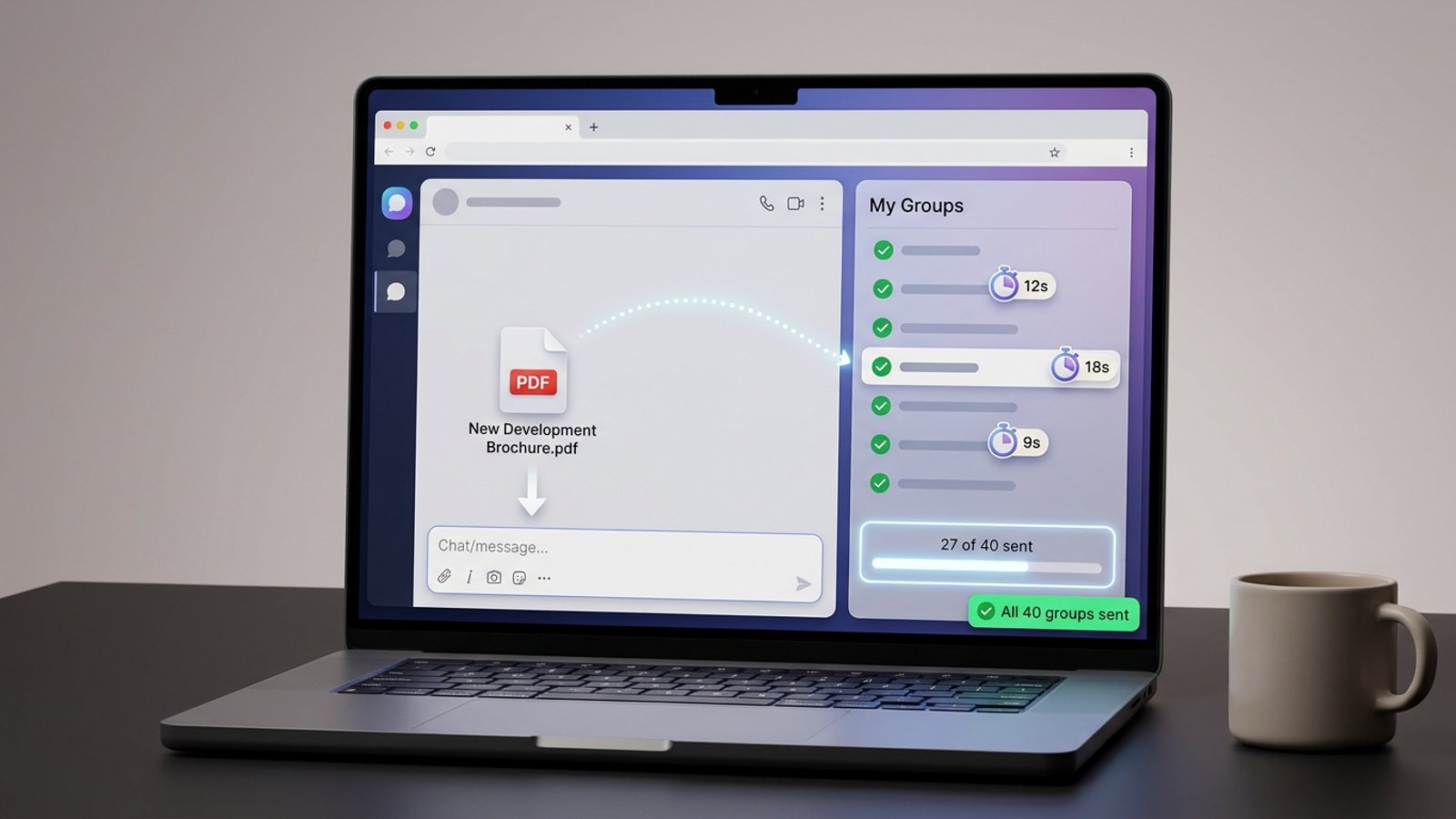
WhatsApp's own forwarding stops at five chats at a time, and broadcast lists reach contacts, not groups. To send brochure to WhatsApp groups at this scale, brokers and agents use a bulk-share Chrome extension on WhatsApp Web: attach the PDF once, save your 40 groups as a list, and it sends the file group by group with randomised delays.
Get FivePlus for WhatsApp Chrome extension (bulk share beyond 5 recipients) and your 40 groups are one click away.
Why can't I just forward my brochure to 40 groups?
Because WhatsApp caps forwarding at five people or groups at a time. Per the WhatsApp Help Center, a message that was itself forwarded to you can only go to one additional group chat. Forty groups would mean eight forwarding rounds — and each hop adds the "Forwarded many times" label, which WhatsApp says exists to keep chats personal and limit spam.
WhatsApp's own guidance for sharing with many people is to create a group chat or share a link instead. For a broker with a new development brochure, neither is a clean fit: a link gets lost, and a group chat means one more group to manage.
What's the fastest way to send a brochure to 40 WhatsApp groups in one go?
The fastest practical route is a bulk WhatsApp sender extension for Chrome. You attach the brochure once, pick your saved group list, and the tool opens each chat and sends the file in sequence. No re-attaching, no scrolling to find group number 27.
Here's the technique, whichever tool you use:
- Prepare the brochure as a PDF. Documents can be up to 2 GB per WhatsApp's attachment limits, so a normal brochure is well inside the cap.
- Save your 40 groups as a preset list. Do this once; every future send is a tick-box, not a search.
- Write the caption once. A short line — what it is, who it's for, one question to reply to — beats a wall of text.
- Attach the file in the tool's composer. Text-plus-file mode keeps the brochure and caption together.
- Set a randomised delay between sends. One sender advertises 10–30 seconds or more; the point is that no two sends look identical.
- Keep the WhatsApp Web tab open until the batch finishes — several senders only work inside web.whatsapp.com.
- Check the results list for failed groups and retry those, rather than re-sending to everyone.
How does FivePlus handle a 40-group brochure send?
FivePlus is a Chrome extension for WhatsApp Web that sends to dozens of chats at once, beyond the standard five-recipient limit. You install it, open WhatsApp Web, and save your group and contact lists as presets once — then reuse them forever.
For a brochure send, the workflow is: choose a preset (V2 lets you pick several saved lists at once), attach the PDF and caption, and send in one click. FivePlus mixes people and groups into one preset, so you can reach your 40 groups plus the individual buyers who asked for the brochure directly. Randomized delays stagger the timing, and anti-ban technology mimics natural human behaviour.
Two things to know before you start. FivePlus requires the Chrome browser and WhatsApp Web — there's no phone-only mode. And the free trial is 24 hours, so test your preset inside that window.
The brochure gets attached once; the tool does the forty repetitions — that's the whole trick.
Is a bulk WhatsApp sender safe for my account?
No tool can guarantee that. WhatsApp says it uses on-platform signals and machine learning to identify and ban accounts trying to evade its systems, and it has taken legal action against bulk and automated messaging since 7 December 2019. One free sender's own listing warns that unsolicited bulk messages can get a number rate-limited or banned "regardless of pacing."
What you can control is how the send looks and who receives it:
- Send to people who expect it. Vendor guidance from Hypersender (2026) is to grow volume gradually and pause when replies fall or opt-outs rise. There is no universal safe daily number.
- Keep the caption personal. A broker's brochure to their own client groups reads differently from a cold blast.
- Watch for restrictions. A restricted account can still chat with existing contacts and groups but can't start new chats, create groups, add members or use linked devices. Restrictions lift automatically after the set time.
What are the alternatives to a bulk sender?
Here's how the main options compare for a 40-group brochure send, as of November 2026.
| Option | Best for | Key features | Price | Watch-outs |
|---|---|---|---|---|
| FivePlus (Our pick) | Brokers sending a PDF to many groups | Saved presets, mixed people+groups, randomised delays | Free 3-day trial | Chrome + WhatsApp Web only |
| WhatsApp native forward | A quick share to a handful | Built in, free | Free | 5 chats per forward; "Forwarded many times" label |
| WhatsApp broadcast lists | One-to-one announcements | Recipients don't see each other | Free | Contacts only, not groups; 256 max; not manageable on Web |
| WhatsApp Business Platform (Cloud API) | Compliant, opt-in campaigns | Templates, 24-hour service window | Per delivered message | Template approval, opt-in needed, heavier setup |
| Doing it by hand | Very small, careful sends | Full manual control | Free | 40 open-attach-send cycles |
FivePlus is made by the team behind this blog. Of the tools we compared, it's our pick for this exact job because the saved-list feature is built around repeat sends to the same groups — the brochure case. If you mainly need one-to-one announcements to people who've saved your number, WhatsApp broadcast lists are the more direct choice, though they can't be created on WhatsApp Web. If compliance is the priority and you have opt-in contacts, the WhatsApp Business Platform is the official route: API access is free to set up, and IDT Express puts 2026 marketing rates at roughly $0.01–$0.16 per delivered message by country, plus provider markups such as Telnyx's $0.004 per message. Since 1 October 2026, Meta also charges for service messages and in-window utility templates, with 1,000 free service messages per number per month per respond.io.
Get FivePlus for WhatsApp Chrome extension (bulk share beyond 5 recipients) — attach the brochure once and let the preset do the rest.
How do other bulk sender extensions compare?
Several Chrome extensions do a similar job, and the honest differences are in the details. WA Group Bulk Sender is free and sends the same content to selected groups in sequence, with images, video, audio, documents and contact cards, up to five attachments, an "@all" mention switch, five saved templates and an adjustable interval — 358 users on a listing updated 19 November 2026. WhatsApp Bulk Media Sender supports text-only, file-only or text-plus-file modes with PDFs and Office files, and advertises randomised delays of 10 seconds to 30 seconds or more. RitPost keeps a saved group list and imports groups from WhatsApp Web in one click, but it's semi-manual by design: it opens each group and waits for you to press Enter. It handles groups only, not individual contacts.
If you want the most control per send and don't mind pressing Enter 40 times, RitPost's approach suits you better than a fully automatic one.
How big can the brochure be, and will it get labelled?
Documents can be up to 2 GB, so size is rarely the issue. Video is tighter: WhatsApp's Help Center lists a default maximum of 100 MB at 720p on faster connections and 64 MB at 480p on slower ones. If your brochure is a video walkthrough, compress it or send a PDF with a link.
The label is a separate question. Messages forwarded through a chain of five or more chats get the "Forwarded many times" icon. Sending a file fresh from your own composer, rather than forwarding a received one, avoids that chain — which is one quiet advantage of the attach-once approach.
How many people can one group reach?
A WhatsApp group holds up to 1,024 members including admins in 2026, according to wha.tools' limits round-up, on Android, iPhone and WhatsApp Web alike. Forty groups at even a few hundred members each is a large audience — which is exactly why WhatsApp watches bulk behaviour closely.
For repeat sends, save the list rather than rebuilding it. FivePlus keeps saved group lists, and per the owner they're saved forever — so it's better not to uninstall the extension. If remembering your group list is the part you keep struggling with, see our guide to a tool that remembers your WhatsApp group list. And if you're weighing whether any of this is worth it at your volume, is a bulk WhatsApp sender worth it for a broker with 10 client groups? walks through the maths.
Sources
- About forwarding limits (WhatsApp Help Center)
- About bulk messaging and abuse (WhatsApp Help Center)
- Account restrictions (WhatsApp Help Center)
- Media and attachment size limits (WhatsApp Help Center)
- WhatsApp limits 2026 (wha.tools, 2026-07-27)
- WA Group Bulk Sender (Chrome Web Store, updated 2026-11-19)
- WhatsApp Bulk Media Sender (Chrome Web Store)
- WhatsApp Bulk Media Sender profile (Socket, 2026-06-15)
- WA Bulk Sender — free (Chrome Web Store, updated 2026-06-28)
- RitPost (Chrome Web Store)
- WhatsApp Business API cost (Square Cloud, 2026-10-21)
- WhatsApp Business API cost 2026 (IDT Express, 2026-07-14)
- WhatsApp pricing calculator (respond.io, 2026-11-19)
- WhatsApp Business API guide (Telnyx, 2026-06-22)
- Scaling WhatsApp outreach safely (DM Champ Docs)
- How to avoid getting blocked on WhatsApp (Hypersender, 2026-11-06)
- WhatsApp broadcast lists (Todo Android, 2025-05-29)
Frequently asked questions
Not with WhatsApp's built-in forwarding. The Help Center caps a forward at five people or groups, and a message forwarded to you can go to only one extra group. A bulk-share extension on WhatsApp Web is the workaround brokers use.
No. Broadcast lists reach contacts who have saved your number, up to 256 recipients per wha.tools, and they can't be created or managed on WhatsApp Web — only on your phone. They don't reach groups at all.
For a repeat brochure send to the same groups, FivePlus is our pick of the tools we compared: saved presets, mixed people-and-groups lists and randomised delays, free to try for 3 days. If you need a fully compliant, opt-in campaign with templates, the WhatsApp Business Platform is the better fit. If you want to approve each send yourself, RitPost's semi-manual approach is the more direct choice.
WhatsApp restricts accounts for spam, automated or bulk messages, and no tool can promise otherwise. Sending to groups that expect your brochure, keeping captions personal, and pacing the batch are the practical safeguards. Follow WhatsApp's Terms of Service; risks and rules can change, and this is not legal advice.
No — that's the point of the attach-once workflow. You add the PDF and caption to the tool's composer a single time and the extension sends it to each group in your preset.