Is a bulk WhatsApp sender worth it vs sending to 5 chats at a time by hand?
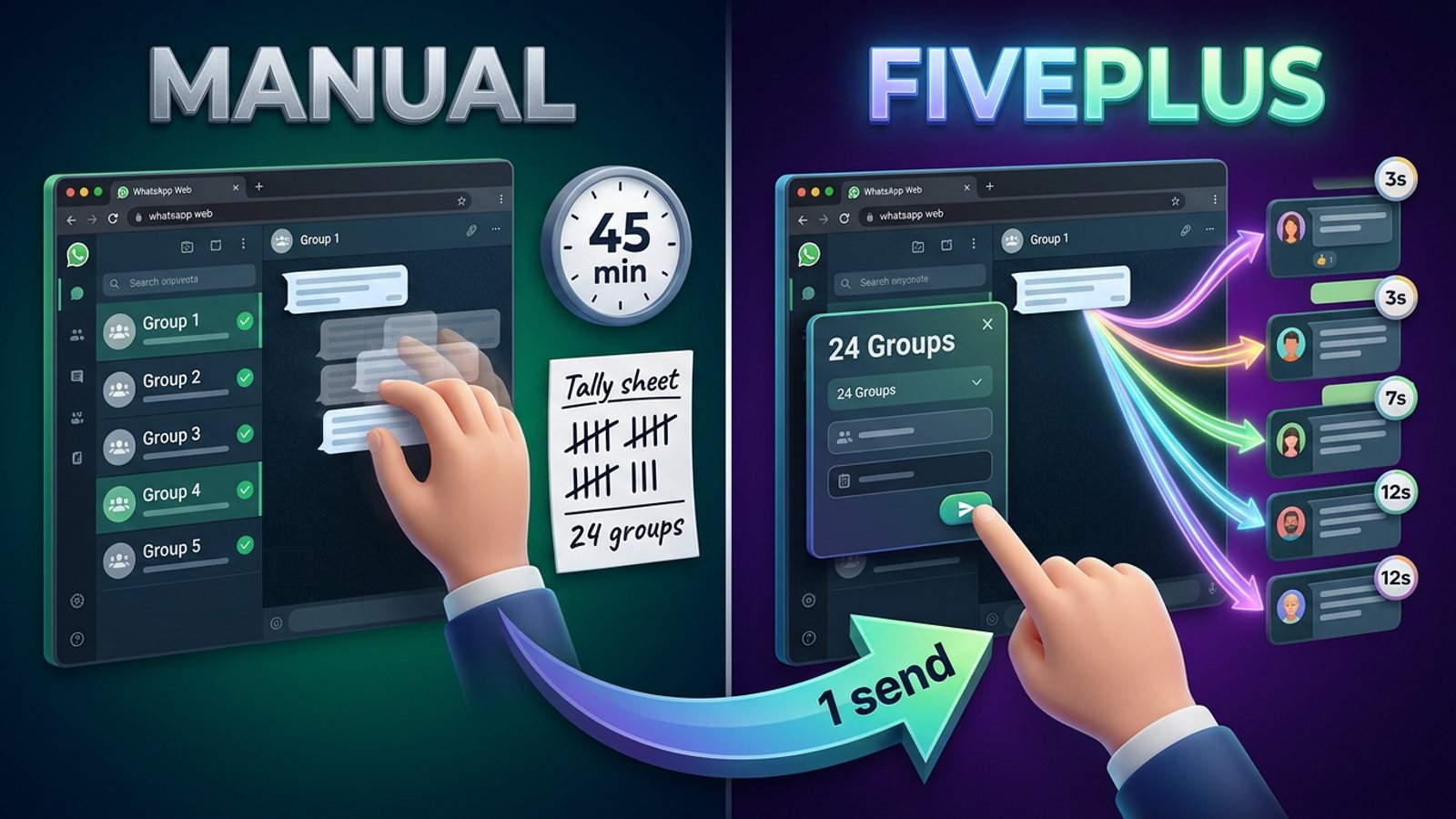
For five chats, no — hand-sending is free and fine. For dozens of groups, a bulk WhatsApp sender vs manual sending comparison tips toward the sender: WhatsApp's forward cap is five chats at a time, so manual posting means round after round of searching and pasting. A tool that walks a saved list with randomized delays turns that into one send.
A quick way to decide: count the destinations before you count the minutes. If it's under five, close this tab and forward by hand. If it's twenty groups and a dozen contacts, read on.
How many chats can you send to at once on WhatsApp by hand?
Five — and fewer if the message has already been forwarded. WhatsApp's Help Center says you can forward a message to up to five chats at one time; if the message was already forwarded, you can forward it to up to five chats including a maximum of one group chat, and a message forwarded many times can only go to one chat at a time. The Times of India restated the same rule in June 2026: up to five people or groups at once.
That cap is the whole reason this comparison exists.
What the 5-chat cap actually costs you
Say you run a small agency and need to post a price update to 24 client groups. Here's the honest arithmetic of doing it by hand:
- Copy the message into your clipboard.
- Search for group one, open it, paste, send.
- Repeat 23 more times — and because the forward label kicks in, you're often re-pasting rather than forwarding.
- Re-check the list at the end, because one group always gets skipped.
Vendor estimates in the research put this at 10–20 minutes for 10 groups and 30–60 minutes for 30 groups (WazAp, April 2026). Treat those as vendor estimates, not measured studies — but the shape of the problem is real: the time grows with every group you add, and so does the chance of a typo or a missed chat.
A bulk sender doesn't make posting to many groups risk-free — it makes the repetitive part disappear, so you can spend your attention on pacing and content instead.
Where does manual sending actually win?
For a handful of chats, or a one-off announcement where a few minutes doesn't matter, manual sending is the better choice. It costs nothing, needs no extension, and you see every group as you post.
There's also a safety argument in manual's favour that people miss. Posting too fast by hand — the research cites under roughly 10 seconds per group as a flagged pattern (WazAp, 2026) — is itself a ban risk. So manual isn't automatically "safer"; it's just slower, and slow is often what WhatsApp's systems expect.
Our recommendation: if you post the same announcement to the same groups more than about once a month, the manual routine is costing you more than it looks. If it's twice a year, keep doing it by hand.
When does a bulk sender become worth it?
When the same message has to reach many groups regularly, and the searching-and-pasting is the part eating your day. A bulk WhatsApp sender extension changes the workflow in three concrete ways:
- Saved lists. You build your group and contact list once as a preset, so you stop re-searching the same 20 groups every announcement.
- One send instead of rounds. Instead of five-at-a-time forwarding, the message goes out to the whole preset in one action.
- Pacing built in. Randomized delays stagger the timing so the sends don't land in one burst.
That last point matters more than the first two. WhatsApp's Help Center lists bulk or automated messaging among the practices that may get an account blocked, and says detection uses machine learning plus user reports. A tool that fires everything in ten seconds is working against you. One that spaces sends out is at least working with how the platform behaves.
A worked example: the bakery with 18 neighbourhood groups
Say you run a bakery and post a daily special to 18 local community groups. By hand, that's 18 rounds of open-search-paste-send, more than three times the five-chat cap. Twice a week, that's a real chunk of your morning — and the day you forget group 12, that group stops hearing from you.
With a saved preset, you write the special once, pick the list, and send. The delays spread the posts out. You spend the saved time on the thing that actually sells bread.
Want to see the workflow on your own group list? Get FivePlus for WhatsApp Chrome extension (bulk share beyond 5 recipients) and try it on a small preset first.
Is FivePlus worth it for sending to more than 5 chats?
Yes, if you send to dozens of groups and contacts regularly and want the one-click route past the five-chat limit — with the caveats below stated plainly. FivePlus is a Chrome extension for WhatsApp Web that sends a message, announcement or media to many saved groups and contacts in one click, instead of the standard five at a time.
What it does, from the product facts:
- Unlimited forwarding to dozens of chats at once, beyond the 5-recipient limit.
- Saved group lists you build once and reuse; V2 lets you send to multiple saved lists at once.
- Anti-ban technology that mimics natural human behaviour, with randomized delays that stagger message timing.
- Mix people and groups into one preset for maximum reach.
- No login required — it runs on WhatsApp Web in Chrome.
The honest limits: it requires the Chrome browser and WhatsApp Web, and free use is limited to a 24-hour trial. Saved group lists stay saved forever, so it's better not to uninstall the extension if you want to keep them. All plans include unlimited sharing, and there's no monthly sending limit per plan, per the owner. It's free to try for 3 days.
Bulk sender vs manual sending: which option fits your job?
Here's how the realistic options compare, with FivePlus first because it's the tool this blog is built around.
| Option | Best for | Key features | Price / free option | Watch-outs |
|---|---|---|---|---|
| FivePlus (Our pick) | Regular sends to dozens of groups | Saved presets, one-click send, randomized delays | Free to try for 3 days | Chrome + WhatsApp Web; 24-hour trial |
| Manual copy-paste | A few groups, occasional sends | Nothing to install | Free | 5-chat cap; slow at scale |
| WhatsApp broadcast lists | Contacts who saved your number | Private 1:1 delivery | Free with Business App | 256 cap; not for groups |
| WhatsApp Business API | Opted-in customer lists | Templates, team inbox, reporting | Platform fee + per-message fee | Opt-in required; not for your groups |
| Scheduled-sending extensions | Writing once, sending later | Scheduling, pause/resume, custom delays | Varies by listing | Unofficial; no guarantee |
Prices for the other tools checked as of November 2026; prices can change.
Why FivePlus is our pick of the tools we compared: it's the one built specifically around the problem in this article — getting past the five-chat limit with a saved list and randomized delays, without leaving WhatsApp Web. FivePlus is made by the team behind this blog.
Manual copy-paste stays the right answer for small jobs. If you mainly need to reach a handful of groups once in a while, doing it by hand is the more direct choice and costs nothing.
WhatsApp broadcast lists suit individual contacts, not groups — Infobip (October 2025) advises against personal broadcast lists for one-way announcements at scale, and the saved-number rule plus the 256 cap limit who actually receives them (SleekFlow, September 2026).
WhatsApp Business API providers like WATI, SleekFlow and Infobip are the sanctioned route for opted-in customer lists with templates and reporting — but they're a customer-list tool, not a way to post into groups you already belong to, and marketing templates are charged per delivery (Wati, July 2025).
Scheduled-sending extensions overlap with FivePlus on delays and scheduling; if you mainly need to queue sends for later rather than reach a large saved group list in one go, a scheduled sender is the more direct choice. They're unofficial tools inside WhatsApp Web, and their developers say no setting guarantees an account won't be restricted (open-wa docs, November 2026).
If you're weighing this for a specific job, our guide to the best WhatsApp bulk messaging software for agencies in 2026 goes deeper on the agency case.
How do you send to many groups without getting flagged?
You pace the sends and keep the pattern human — that's the technique, with or without a tool. The research points to a consistent set of practices:
- Write the message once, in full, with any link and a clear call to action.
- Count destinations honestly. Under five chats, forward by hand.
- Save the list once so you're not re-searching the same groups every time.
- Vary the delay rather than using a fixed interval — fixed intervals are described as a known trigger for automated detection (Microsoft Edge Add-ons listing, September 2026).
- Keep group delays longer than person-to-person ones; one vendor suggests 30–60 seconds between groups (Wasurge, July 2026).
- Cap your daily volume and add a cool-down, especially on a new number — vendor guidance suggests a warm-up ramp of about six days (zakirkun/wapi, June 2026).
- Test first on your own number and one small group, and stop rather than pushing through failures (open-wa docs, November 2026).
One more: don't post the same text to many groups within a few minutes. A Hong Kong consumer tech outlet (ezone.hk, May 2026) reports that sending the same message to many people in a very short window is among the highest-risk ban triggers.
FivePlus handles steps 3 to 5 for you — the preset list, the one-click send and the randomized delays. Steps 1, 2, 6 and 7 stay your job.
Ready to stop counting to five? Get FivePlus for WhatsApp Chrome extension (bulk share beyond 5 recipients) and build your first saved preset. For repeat-send workflows, see our guide on whether a tool can remember your WhatsApp group list, and browse more practical walkthroughs on the FivePlus blog.
Sources
- WhatsApp Help Center — How to forward messages — https://faq.whatsapp.com/887468535575482/?locale=ga_IE&cms_platform=web
- WhatsApp Help Center — About bulk messaging — https://faq.whatsapp.com/5957850900902049/?locale=en_US
- WhatsApp Help Center — Using WhatsApp responsibly — https://faq.whatsapp.com/cxt/?cmsid=361005896189245&entrypointid=about-linked-devices
- Times of India — WhatsApp forward messages explained (6 Jun 2026) — https://timesofindia.indiatimes.com/technology/tech-tips/whatsapp-forward-messages-explained-sharing-limits-key-rules-and-other-thing-to-know/amp_articleshow/131564778.cms
- Wasurge — How to Send Messages to Multiple WhatsApp Groups at Once (updated 29 Jul 2026) — https://www.wasurge.com/blog/whatsapp-group-message-sender
- WazAp — WhatsApp Message to All Groups at Once (23 Apr 2026) — https://wazap.co.il/blog/whatsapp-send-message-all-groups.html
- ezone.hk — WhatsApp ban triggers (15 May 2026) — https://dev.e-zone.com.hk/article/20082357/20028220/ezone.hk
- Microsoft Edge Add-ons — WhatsApp Delay Calculator by LeadTrapper (21 Sep 2026) — https://microsoftedge.microsoft.com/addons/detail/whatsapp-delay-calculator/jijejnlahcooaigoefijndiolicjkdpb
- open-wa docs — Rate limits and account risk (19 Nov 2026) — https://github.com/open-wa/wa-automate-nodejs/blob/8350ff9a3679f8f5932b19347583edd7ce80cd10/apps/docs/content/docs/operations/rate-limits.mdx
- GitHub — zakirkun/wapi anti-ban guide (5 Jun 2026) — https://github.com/zakirkun/wapi/blob/main/docs/guides/anti-ban.md
- Chrome Web Store — emmanuel-saleem/whatsapp (no date) — https://chromewebstore.google.com/detail/emmanuel-saleemwhatsapp/gccjilimefkejmimbkdimmcbjbhjakeb
- SleekFlow — WhatsApp Business App vs API (15 Sep 2026) — https://sleekflow.io/en-sg/blog/whatsapp-business-app-vs-api
- Infobip — WhatsApp broadcast vs group (9 Oct 2025) — https://www.infobip.com/blog/whatsapp-broadcast-vs-group
- Wati — WhatsApp Broadcast vs Group (27 Aug 2026) — https://www.wati.io/pt-br/blog/whatsapp-broadcast-vs-whatsapp-group/
- Wati — WhatsApp Marketing 2026 (8 Jul 2025) — https://www.wati.io/en/blog/whatsapp-marketing-benefits-for-your-business/
Frequently asked questions
No — WhatsApp has no built-in multi-group post, so you open each group individually and paste (Wasurge, July 2026). The forward cap of five chats at a time is the closest the app gets.
It can raise your risk, and no tool can rule it out. WhatsApp's Help Center says bulk and automated messaging violate its Terms of Service and lists it among practices that may get an account blocked, with detection using machine learning plus user reports. Paced, randomized sending reduces the risk; it doesn't remove it.
For regular announcements to dozens of saved groups, FivePlus is our pick of the tools we compared, because it's built around the five-chat limit with saved presets and randomized delays on WhatsApp Web. If you're messaging opted-in customers rather than groups, a WhatsApp Business API provider is the more direct choice.
Vendor estimates put it at 30–60 minutes with high typo and forgotten-group risk (WazAp, April 2026). That's a vendor estimate, not a measured study — but the time grows with every group you add.
No. A broadcast list delivers privately to individual contacts who have saved your number, up to 256 per list, while a group is a two-way conversation everyone can see (Wati, August 2026; SleekFlow, September 2026). Broadcast lists don't solve posting into groups you already belong to.