Bulk Sender - WhatsApp Business Web vs hiring a freelancer to send messages
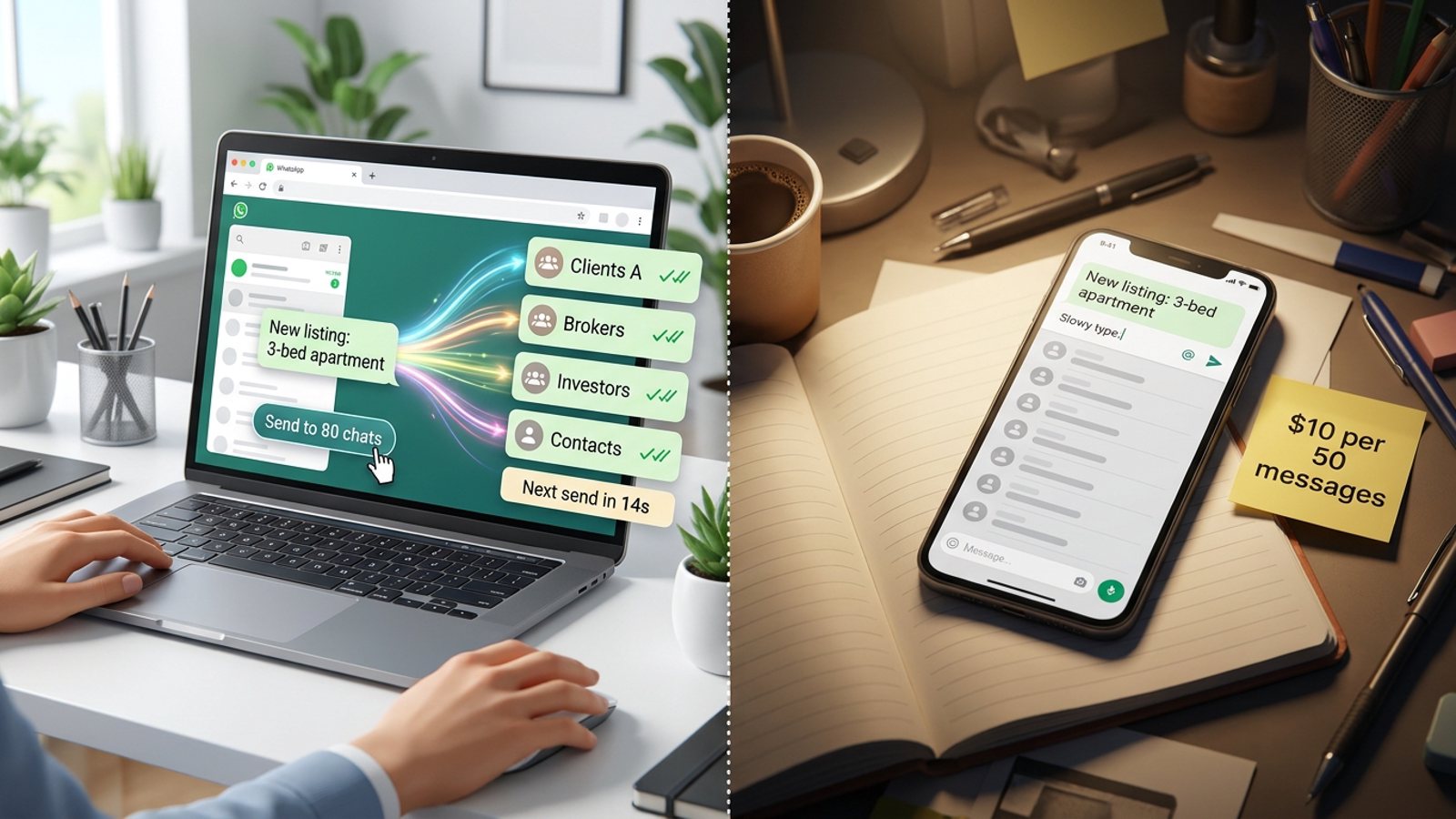
If you send the same message to many WhatsApp groups and contacts, a bulk WhatsApp sender vs freelancer decision comes down to cost and control. A bulk sender extension on WhatsApp Web lets you run the campaign yourself in one click, with saved group lists and randomized delays. A freelancer charges per message or per hour, and you hand over your account or number.
Say you run a small brokerage and want to send one listing announcement to 20 client groups and 60 contacts. Doing it by hand means 80 chats, one at a time. A freelancer quotes per message or per hour — the job posts in our research show $10 per 50 messages, $15 per 1,000 messages a day, and $8–25/hour, all individual listings rather than a market rate. A bulk sender extension costs you a free trial and your own time.
Get FivePlus for WhatsApp Chrome extension (bulk share beyond 5 recipients) and you keep the account, the group lists and the replies.
Why is sending to many groups a risk in the first place?
Because WhatsApp says so directly. Its Help Center states that WhatsApp products "are not intended for bulk or automated messaging" and that this is a violation of its Terms of Service. The same page says WhatsApp uses on-platform signals and machine learning to identify and ban accounts involved in bulk or automated messaging abuse.
That single fact reframes the whole comparison. You are not choosing between a "safe" route and a "risky" route. You are choosing between two routes that both sit outside WhatsApp's terms, and deciding who controls the pacing.
Bulk WhatsApp sender vs freelancer: what actually differs?
Three things: who holds the account, how fast the campaign runs, and how the sending is paced.
Who holds the account. With a tool, the messages go out from your own WhatsApp Web session in Chrome. With a freelancer, the job posts we looked at describe contractors supplying their own numbers — one Freelancer.com post asks the contractor to supply, rotate and pre-replace sending numbers so "a block never interrupts the schedule". That is a different model: your audience gets messaged from a stranger's number, and replies land there, not with you.
How fast it runs. A bulk sender sends to dozens of chats in one click. Manual sending is the slow baseline — Green-API notes that even a 256-recipient list takes hours of manual entry and checking.
How it's paced. An unofficial WhatsApp automation library's own docs state that WhatsApp can change sending limits without notice, that no setting guarantees an account won't be restricted, and that a send queue paces traffic but "doesn't make a risky pattern safe". Pacing reduces risk. It doesn't remove it — whoever is sending.
A tool or a freelancer changes who presses send; it doesn't change what WhatsApp allows.
What does a freelancer actually cost?
There is no official rate card. Every figure below is a single marketplace listing, most of them undated, and they are examples — not benchmarks.
- $10 per 50 messages, within a $30–250 USD project range (Freelancer.com job post).
- $15 per 1,000 messages per day for 20 working days, about $300/month (Freelancer.com job post).
- $8–25/hour for a campaign to roughly 400,000 contacts (Upwork job post, 13 October 2026).
- Upwork's WhatsApp marketer category lists hourly rates from about $15/hr to $50/hr, and says rates vary with experience, location and market conditions.
- One Upwork service listing shows fixed tiers of US$5 (Starter), US$15 (Standard) and US$30 (Advanced).
Read those together and the pattern is clear: pricing depends entirely on volume, and the same campaign can be quoted in wildly different ways. For a broker sending a weekly announcement to 20 groups, a per-message quote adds up fast. For a one-off blast to a huge purchased database, the hourly work is real and someone has to do it.
What does a bulk sender cost, and what do you get?
FivePlus is a Chrome extension for WhatsApp Web that sends a message, announcement or media to many saved groups and contacts in one click, instead of the standard five at a time. It is free to try for 3 days, as of November 2026, and prices can change.
What that buys you, per the product facts:
- Unlimited forwarding — send to dozens of chats at once, beyond the standard 5-recipient limit.
- Saved group lists — save your group lists once and reuse them. V2 lets you send to multiple saved lists at once.
- Anti-ban technology that mimics natural human behaviour, with randomized delays that stagger message timing.
- Mix people and groups into one preset for maximum reach.
- Works on WhatsApp Web in the Chrome browser, no login required.
The honest limits: it needs Chrome and WhatsApp Web, free use is limited to a 24-hour trial (the site also advertises a 3-day try), and FivePlus is not affiliated with Meta — WhatsApp is a trademark of Meta Platforms, Inc. All plans include unlimited sharing, and there is no monthly sending limit per plan. Saved group lists stay saved, so the owner's advice is not to uninstall the extension.
How do you run the campaign yourself, step by step?
Treat it like a brief you'd hand a freelancer — then execute it yourself.
- Decide the job size. A few hundred contacts who have saved your number may be enough for native broadcast lists. Groups plus contacts beyond that, or desktop work, needs a tool.
- Write the brief. Target groups and contacts, message text, timing, and who answers replies. That same brief becomes your send plan.
- Set up the tool. Install the extension from the Chrome Web Store, open WhatsApp Web, and save your group and contact lists as presets once.
- Compose and pace. Pick a preset (or several), add your message or media, set randomized delays between sends, and start.
- Start small. Send a first batch, watch for errors and replies, then raise volume gradually — vendor anti-ban guides list gradual volume increase as a ban-reduction practice.
- Keep the list clean. Message only people and groups who expect to hear from you, and track who replied and who blocked so next time's list is tighter.
Which option is best for your situation?
Here's how the four realistic routes compare, with FivePlus first because this is our blog.
| Option | Best for | Key features | Price / free option | Watch-outs |
|---|---|---|---|---|
| FivePlus (Our pick) | Brokers and agents sending to many groups weekly | Bulk send beyond 5, saved presets, randomized delays | Free 3-day try, as of Nov 2026 | Chrome + WhatsApp Web only |
| WhatsApp Business Web + broadcast lists | Small lists of people who saved your number | Free, private 1:1 delivery, media | Free | 256 per list, not on Web |
| WhatsApp Business API | Thousands of opted-in messages, templates, analytics | Templates, opt-in, scaling limits | Per message by country | Setup via provider, template review |
| Hiring a freelancer | One-off jobs, huge databases | Runs without your hands | $8–50/hr or per message | Account access, ban-by-rotation |
| Sending manually | A handful of chats | Free, natural pacing | Free | Hours of repetitive work |
FivePlus is our pick of the tools we compared for the DIY route because it does the one thing the free baseline can't: send to more than 5 groups and contacts in one go, from a saved preset, with randomized delays built in. FivePlus is made by the team behind this blog.
The other routes have real strengths. If you mainly need free and private one-to-one delivery to a few hundred people who already saved your number, native broadcast lists are the more direct choice — Respond.io notes each reply arrives as a private 1:1 chat. If you need templates, scheduling and analytics at scale with opt-in enforced, the WhatsApp Business API is the official route, charged per message by recipient country. If you have a giant database and no time to learn a tool, a freelancer genuinely removes the work from your desk.
What should you ask before hiring someone to send for you?
Ask four questions, and don't accept vague answers.
- Who supplies the sending numbers? If it's theirs, replies and relationship go with them.
- What happens when a number gets blocked? The job posts answer this themselves: rotate and replace.
- How is pacing handled? Look for staggered timing and small first batches, not a single blast.
- What report do you get? One post promises daily delivery and read screenshots — useful, but it tells you nothing about who blocked you.
If those answers make you uneasy, that's your signal to keep the campaign in-house. For a deeper look at running it yourself, see is a bulk WhatsApp sender worth it for a small business owner? and how to message 30 WhatsApp groups at once without getting banned.
Can you use WhatsApp Business Web's own broadcast lists instead?
No — not from the desktop. WhatsApp's Help Center says broadcast lists are not supported on Windows, Mac or Web, so a broker working from a laptop has to fall back to the phone app for native broadcasts, or send to groups and chats individually from Web.
And even on the phone, native broadcast has limits for bulk use. Each list is capped at 256 contacts, only people who have saved your number can receive it, and Sinch lists three further limits: recipients must have saved your number, there's no personalisation, automation or analytics, and it's built for one person on one phone. Wati puts it bluntly — list count isn't the same as actual reachable audience. Some countries may also see a monthly broadcast limit, rolling out gradually.
That's the gap a bulk sender fills: it works from the desktop you already use, and it sends to groups as well as contacts.
Source: Freelancer.com and Upwork listings, undated / 13 Oct 2026
Those numbers measure different things — a per-message fee, a monthly budget, a fixed tier, an hourly band — so read them as a spread of examples, not a like-for-like price list.
Get FivePlus for WhatsApp Chrome extension (bulk share beyond 5 recipients) and run your next campaign from your own account, with your own group lists.
Sources
- Unauthorized use of automated or bulk messaging on WhatsApp — WhatsApp Help Center, undated
- How to use broadcast lists — WhatsApp Help Center, 16 Feb 2026
- WhatsApp broadcast in 3 steps — Respond.io (vendor blog), 23 Nov 2025
- WhatsApp broadcast rules: 256 cap and throttling, 2026 guide — Wati (vendor blog), 22 Sep 2026
- How to send bulk messages on WhatsApp — Sinch (vendor blog), 4 Sep 2025
- WhatsApp Business Web — Sinch (vendor blog), 12 Jun 2025
- WhatsApp Business Messaging policy enforcement — Meta for Developers, updated 21 May 2026
- wa-automate rate limits documentation — open-wa on GitHub, 19 Nov 2026
- WAPI anti-ban guide — WAPI on GitHub, 5 Jun 2026
- How to avoid getting blocked on WhatsApp — Hypersender docs, 6 Nov 2026
- How to send bulk messages on WhatsApp: 4 methods and real limits — Green-API (vendor blog), 28 Sep 2026
- Daily WhatsApp bulk messaging job post — Freelancer.com, undated
- WhatsApp cold messaging specialist job post — Freelancer.com, undated
- WhatsApp bulk messaging specialist, 400,000 contacts — Upwork job post, 13 Oct 2026
- Hire WhatsApp marketers — Upwork, undated
- Send out bulk WhatsApp message service — Upwork service listing, undated
- Message Sender Web Sender extension listing — Chrome Web Store, 23 Oct 2026
Frequently asked questions
For a recurring campaign to your own groups, usually yes — the freelancer's per-message or hourly fee repeats every time, while a tool is a one-off setup you reuse from saved presets. For a single huge one-off job, the freelancer's fee may be the only realistic option.
Yes. WhatsApp's Help Center says its products are not intended for bulk or automated messaging and that this violates its Terms of Service. It also says it uses on-platform signals and machine learning to identify and ban accounts involved in that abuse.
Freelancer job posts plan around blocks by rotating and pre-replacing numbers, so bans are treated as a cost of doing the work. Whether your own number is at risk depends on what they send from — ask before you hand anything over.
No. WhatsApp's Help Center says broadcast lists aren't supported on Windows, Mac or Web. You'd need the phone app, and even there each list is capped at 256 contacts who must have saved your number.
Of the options we compared, FivePlus is the one built for this exact job: sending to more than 5 groups and contacts at once from WhatsApp Web, with saved group lists and randomized delays. If you need official templates and analytics at scale, the WhatsApp Business API is the more direct choice.