Best WhatsApp bulk message sender software in 2026
There is no single best WhatsApp bulk message sender in 2026 — it depends on how the tool sends. For one-click messages to many groups and contacts from WhatsApp Web, a Chrome extension with saved lists and randomized delays (like FivePlus) is the practical pick. For spreadsheet personalisation, Rocket Sender or WAMessager fit. For official, opt-in template campaigns, use a WhatsApp Business Platform provider such as Brevo.
If you're ready to stop searching for groups one by one, get FivePlus for WhatsApp Chrome extension (bulk share beyond 5 recipients) and set up your first preset today.
How many WhatsApp messages can I send per day in 2026?
As of October 2026, WhatsApp publishes no daily message cap, according to WavesFlo's 16 September 2026 guide. Reach is limited in other ways instead.
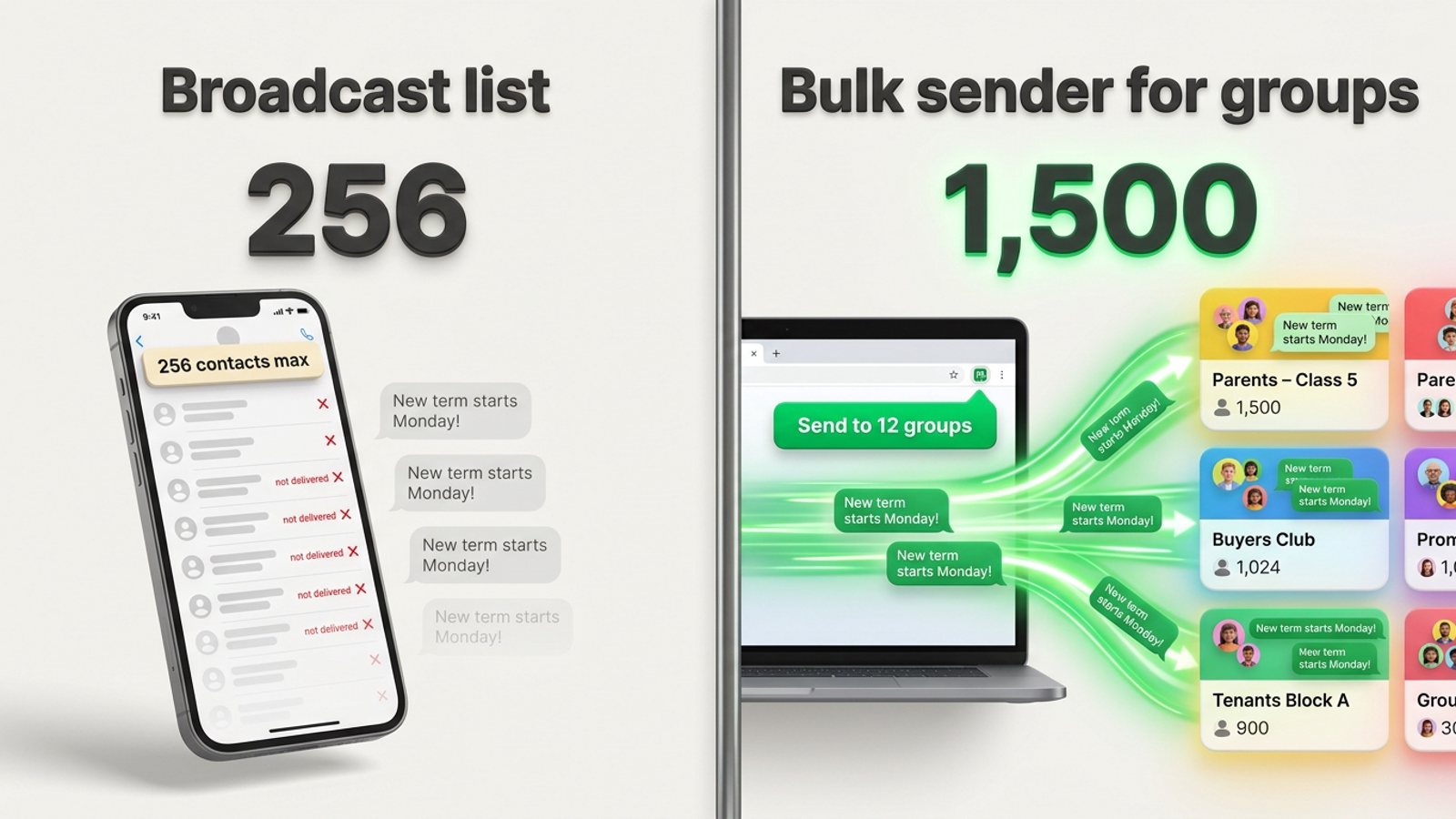
Those limits include five chats per forward, 256 contacts per broadcast list, up to 35 free broadcasts a month where rolled out, and a monthly cap on new chats with people who haven't replied, per the same WavesFlo guide. WhatsApp Web and Desktop are linked devices on the same account, so messages sent from Web count exactly like messages from your phone, per MSG.AI (11 October 2026).
That matters for choosing software: a tool that claims to "bypass the 256 limit" is a red flag, MSG.AI notes. The limit isn't the thing you should be trying to beat.
What are the main types of WhatsApp bulk message sender software?
Bulk WhatsApp marketing tools generally fall into three groups, according to Respond.io (24 September 2026): WhatsApp Business App broadcast lists (free, 256 contacts per list), unofficial bulk senders (cheap or free, against WhatsApp's terms, high ban risk), and the official WhatsApp API accessed through Business Solution Providers.
For a 2026 buyer, it helps to split that middle group further by how the tool actually sends:
- Saved in-app lists (presets): you build lists once inside the extension and reuse them. FivePlus works this way.
- CSV/Excel uploads: you import a spreadsheet, personalise with its fields, and send. Rocket Sender and WAMessager lean this way.
- Scheduling-first tools: you queue messages for later rather than sending in one burst.
- Official API providers: template-based, opt-in messaging through the WhatsApp Business Platform, such as Brevo.
Which WhatsApp bulk message sender is best in 2026? Our comparison
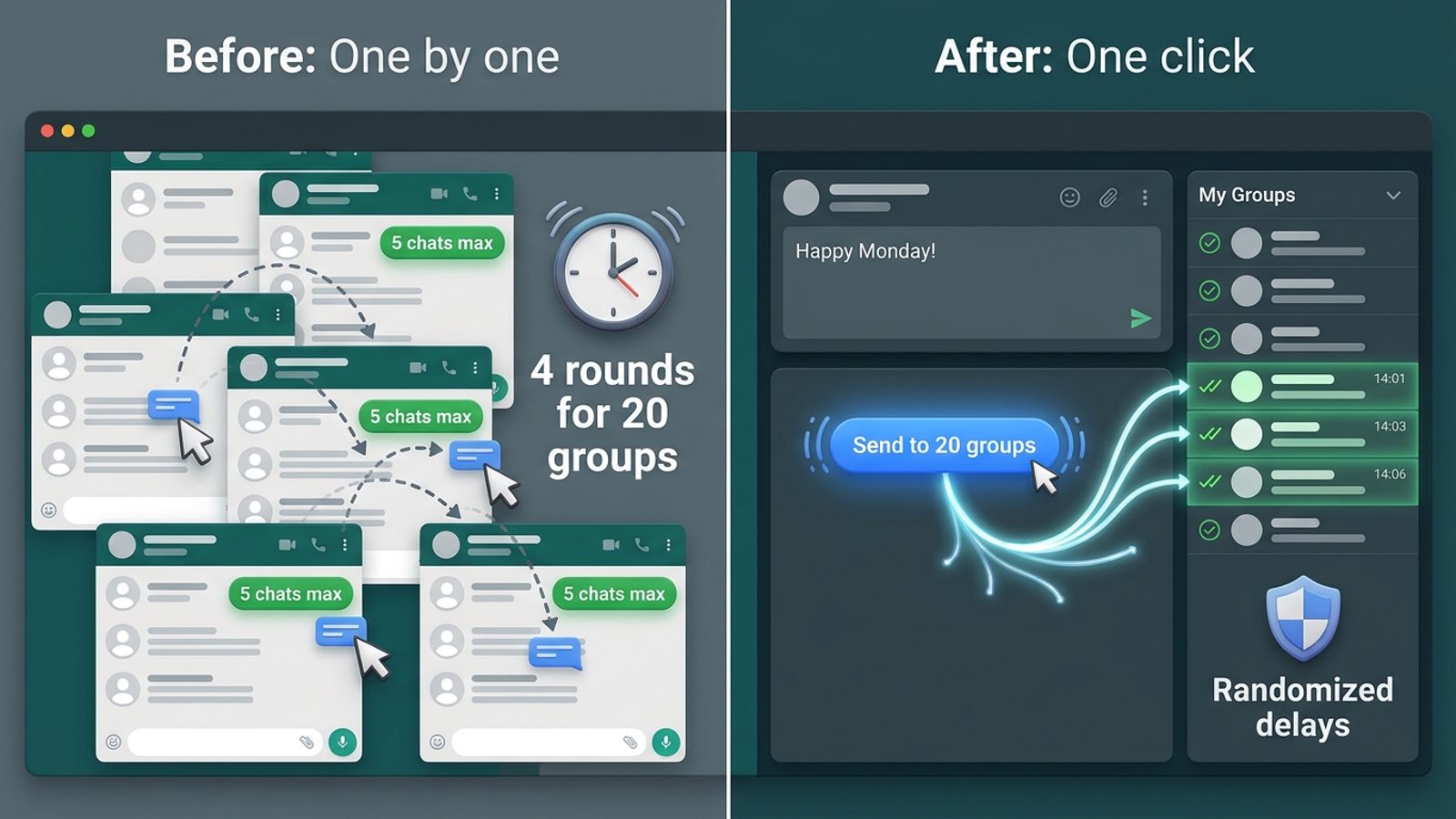
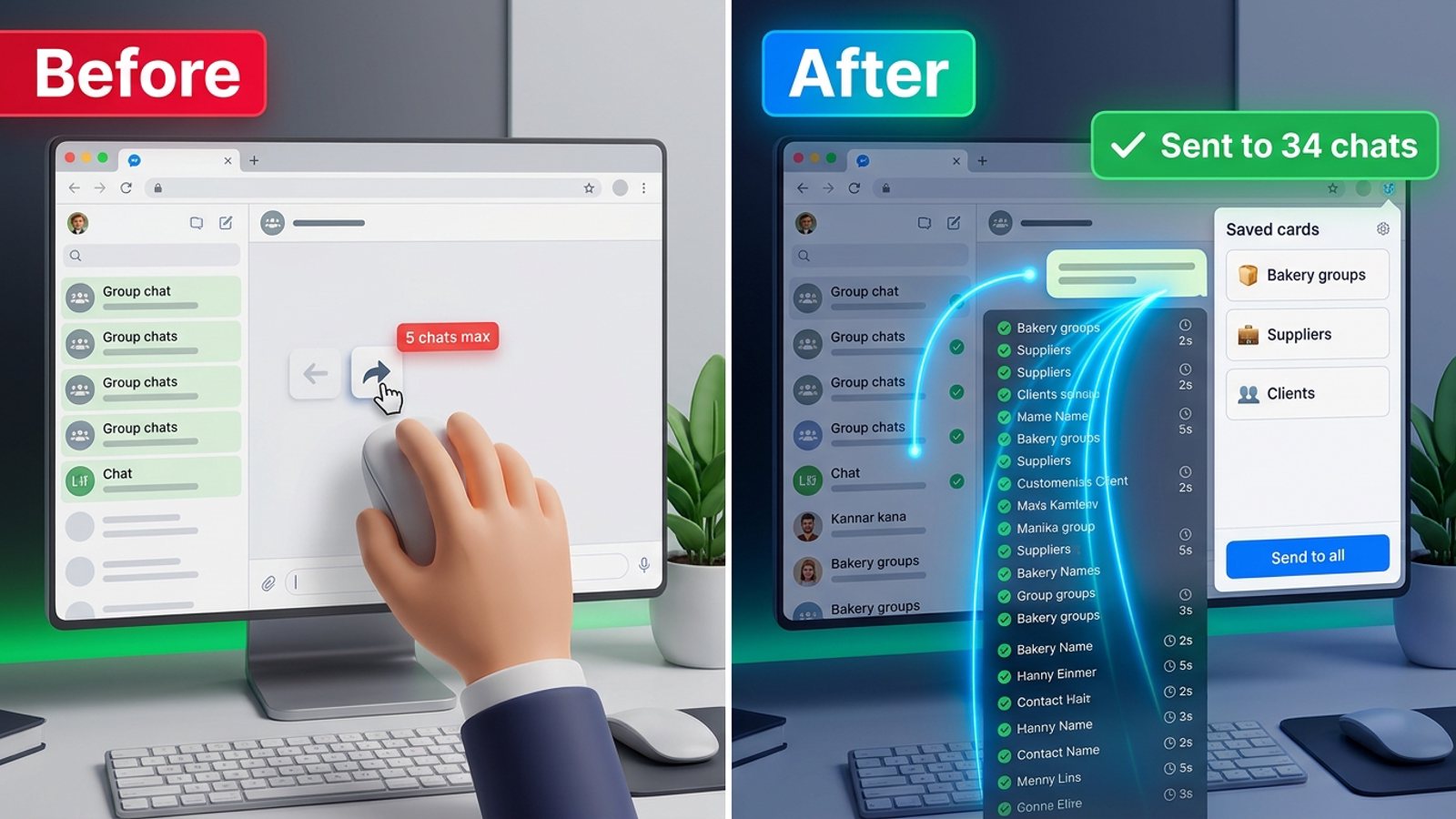
FivePlus is our pick of the tools we compared for one-click sending to many groups and contacts from Chrome and WhatsApp Web. It's a bulk WhatsApp sender extension that saves your group and contact lists as presets, mixes people and groups into one list, and sends to dozens of chats at once — beyond the standard five-recipient limit.
It adds randomized delays to stagger message timing, and its anti-ban technology is designed to mimic natural human behaviour. V2 lets you send to multiple saved lists at once. There's no login required, and you can try it free for 3 days (as of November 2026; prices can change).
FivePlus is made by the team behind this blog.
| Option | Best for | Key features | Price / free option | Watch-outs |
|---|---|---|---|---|
| FivePlus (Our pick) | One-click presets on Chrome/WhatsApp Web | Saved lists, mixed groups + contacts, randomized delays, multi-list sending in V2 | Free to try for 3 days (as of Nov 2026) | Needs Chrome and WhatsApp Web; not affiliated with Meta; no ban guarantees |
| Rocket Sender | Spreadsheet personalisation | Excel/CSV import, variables, randomised intervals, pause/resume, reports | Free, no account needed (as of Nov 2026) | Runs on WhatsApp Web, no API |
| WAMessager | Free daily sending without saving numbers | Custom delays, formatting, send without saving contacts | Free plan of 50 messages/day (as of Nov 2026) | Paid tier pricing not shown on the store listing |
| Brevo | Official API, opt-in campaigns | Meta BSP, templates, CRM, email + SMS in one | Credits are a paid add-on (as of Nov 2026) | Professional plan quoted from $499/month; template approval needed |
| WhatsApp Business App broadcast lists | Free, small saved audiences | 256 contacts per list, up to 5 devices | Free (as of Nov 2026) | Only reaches people who saved your number; no groups |
The rest of this article explains who each one suits, and where it falls short.
Why is FivePlus our pick for one-click sending?
Because it solves the exact job most agents, marketers and planners have: the same announcement needs to go to many groups and contacts, right now, without hunting through the chat list.
Here's how it works:
- Install the extension from the Chrome Web Store and open WhatsApp Web.
- Save your group and contact lists as presets once — you never search for them again.
- Choose a preset (or several in V2), pick a message or media, and send in one click.
- Let randomized delays spread the messages out to look natural.
Say you run a bakery with 20 supplier and customer groups and want to announce a new opening time. By hand, that's 20 searches, 20 pastes and a lot of tapping. With a saved preset, it's one selection and one click — and the delays handle the pacing for you.
Saved group lists are kept forever, so it's better not to uninstall the Chrome extension if you want to keep them. All plans include unlimited sharing, and there's no monthly sending limit per plan.
If that fits how you work, get FivePlus for WhatsApp Chrome extension (bulk share beyond 5 recipients) and stop rebuilding the same list every week.
Which tools suit spreadsheet senders better?
If your message needs a different name, order number or detail for every recipient, a spreadsheet-first tool is the more direct choice.
Rocket Sender is a free Chrome extension for WhatsApp Web, launched 30 December 2025 per its fastlaunch.io listing. It imports xlsx/xls or manual lists, personalises with spreadsheet fields, adds attachments, sets randomised intervals, lets you monitor and pause the queue, and exports sent, failed and not-sent results to Excel, per Product Hunt (9 August 2026). It needs no separate account or payment, per FindYourSaaS (12 August 2026). It runs on WhatsApp Web with no API, so the same account rules apply.
WAMessager is a Chrome extension that lets you send without saving numbers, add custom delays after each message, and use bold, italic, strikethrough and emoji formatting. Its free-forever plan covers 50 messages a day with no feature blocking, per its Chrome Web Store listing. That listing also shows 4.7 stars from 322 ratings and 50,000 users. A vendor IndiaMART listing quotes ₹599/month for a desktop bulk sender, though the paid tier isn't shown on the store page.
Which tools suit official API campaigns?
If you're running ongoing, opt-in marketing with approved templates, the official WhatsApp Business Platform is the compliant route — and the pricing works differently.
Brevo is described by Respond.io (24 September 2026) as an official Meta Partner and WhatsApp BSP with no-code campaign building, automation, CRM contact management and rich-media campaigns alongside email and SMS. It supports recipients in over 130 countries, with some countries blocked, per Brevo's Help Center (31 March 2025).
The cost is the catch. Brevo's WhatsApp credits are a paid add-on not included in subscriptions, never expire, and messages won't send if you run out, per Brevo's Help Center. A third-party breakdown (Kanal, 23 October 2026) quotes the Professional plan from $499/month, or $449.08/month on yearly billing, plus credit packs. Brevo's landing page shows "First 1,000 messages free" and then per-country rates.
Meta's own pricing changed on 1 August and 1 October 2026, charging per delivered template message by category, recipient country and volume tier, per Meta for Developers (30 June 2026). The official Cloud API has no Meta monthly fee and gives each number 1,000 free service replies per month, per Square Cloud (21 October 2026).
Source: Kanal; SourceForge; Respond.io
For comparison, WASender AI is a free Chrome extension with Excel import, name personalisation, attachments and batching, and SourceForge lists a starting price of $50/month/user with a free trial. Its Chrome Web Store listing advertises "100% Delivery Rate" and "minimizing the risk of bans" — treat those as vendor marketing, not verified results.
Is using a WhatsApp bulk sender against WhatsApp's terms?
WhatsApp states plainly that its products are not intended for bulk or automated messaging, both of which have always violated its Terms of Service, per its Help Center. It also says it has taken legal action against companies it believes assist misuse since 7 December 2019.
Respond.io (24 September 2026) warns that unofficial bulk senders "violate WhatsApp's terms, carry high ban risk, and often lack reliable reply handling," and says it does not recommend them. The API route is designed for opt-in, template-based messaging instead.
Our recommendation: keep your lists to people who expect to hear from you, avoid identical repeated content, and answer replies rather than only broadcasting. Adding non-contacts directly to groups is scored by WhatsApp as a spam action, and recipients can report you from inside the group, per Periskope's docs (28 October 2026).
The tool you choose matters far less than who's on your list and how you treat them — pacing and consent do the heavy lifting.
What about the free built-in option?
WhatsApp Business App broadcast lists are free, but capped at 256 contacts per list, and only recipients who have saved your number receive the broadcast, per Respond.io (7 October 2026). Broadcast lists also don't work for groups, per the WhatsApp Help Center (via 9bot, 8 October 2026).
That makes them fine for a small, loyal customer list and poor for reaching many groups at once. If your job is group announcements, an extension with saved presets is the more direct fit.
Which one should you pick?
Match the tool to the shape of your sending:
- Same message to many groups, now: FivePlus, with saved presets and randomized delays.
- Personalised spreadsheet campaigns: Rocket Sender or WAMessager.
- Ongoing opt-in marketing at scale: Brevo or another Business Solution Provider.
- A small saved audience, no budget: WhatsApp Business App broadcast lists.
If you're an agency juggling several clients, our guide to the best WhatsApp bulk messaging software for agencies in 2026 goes deeper. Realtors can compare options in our roundup of the top bulk WhatsApp senders for realtors.
Ready to send to more than five at once? Get FivePlus for WhatsApp Chrome extension (bulk share beyond 5 recipients).
Sources
- Unauthorized use of automated or bulk messaging on WhatsApp (WhatsApp Help Center, undated)
- WhatsApp Help Center — legal action (undated)
- About forwarding limits (WhatsApp Help Center, undated)
- WhatsApp forward limit: how many chats at once (WavesFlo, 4 Oct 2026)
- WhatsApp message limit per day (2026) (WavesFlo, 16 Sep 2026)
- WhatsApp Message Limit Per Day (2026) (MSG.AI, 11 Oct 2026)
- 2026 WhatsApp 群發訊息規則 (Wati, 22 Sep 2026)
- 2026 年最佳 WhatsApp 群发营销软件 (Respond.io, 24 Sep 2026)
- WhatsApp broadcast guide (Respond.io, 7 Oct 2026)
- How to Message Multiple WhatsApp Groups at Once (9bot, 8 Oct 2026)
- Best Practices (Periskope docs, 28 Oct 2026)
- Pricing on the WhatsApp Business Platform (Meta for Developers, 30 Jun 2026)
- Brevo Help Center — WhatsApp pricing (undated)
- Supported countries and pricing for WhatsApp messages (Brevo Help Center, 31 Mar 2025)
- WhatsApp marketing landing page (Brevo, undated)
- Brevo pricing: plans, SMS and WhatsApp costs (2026) (Kanal, 23 Oct 2026)
- Rocket Sender (Product Hunt, 9 Aug 2026)
- Rocket Sender for WA Web (FindYourSaaS, 12 Aug 2026)
- Rocket Sender (fastlaunch.io, 29 Dec 2025)
- WA Bulk Message Sender – WAMessager (Chrome Web Store, undated)
- WA Whatsapp Bulk Sender (IndiaMART, undated)
- WASender FREE Bulk Messaging Plugin (Chrome Web Store, 8 Sep 2025)
- WASender AI Alternatives (SourceForge, undated)
- Official WhatsApp API: what it is and its cost (Square Cloud, 21 Oct 2026)
Frequently asked questions
No tool can guarantee that. Extensions can pace sends with delays, but WhatsApp judges speed, content repetition and report rates, per MSG.AI (11 October 2026) and Wati (22 September 2026). Randomised delays reduce the risk of triggering anti-spam behaviour; they don't remove it.
A broadcast list sends a private 1:1 message to up to 256 saved numbers. A group message reaches everyone in that group. A bulk sender is an extension or API that sends on your behalf across many chats at once.
The API route is designed for opt-in, template-based messaging and is the compliant path for marketing at scale, per Respond.io (24 September 2026). Extensions are unofficial and carry account risk. Which you need depends on whether you're sending a one-off announcement or running ongoing campaigns.
WhatsApp labels a chain of five or more chats 'Forwarded many times', and a message already carrying that label can only go to one chat, per WavesFlo (4 October 2026). Our recommendation: send fresh text rather than forwarding an existing chain, and keep content varied.
Of the tools we compared, FivePlus is our pick for one-click sending to many groups and contacts from Chrome and WhatsApp Web. If you mainly need spreadsheet personalisation, Rocket Sender is the more direct choice; if you need official, opt-in template campaigns, Brevo is built for that.