What is the best tool to send class updates to parent WhatsApp groups?
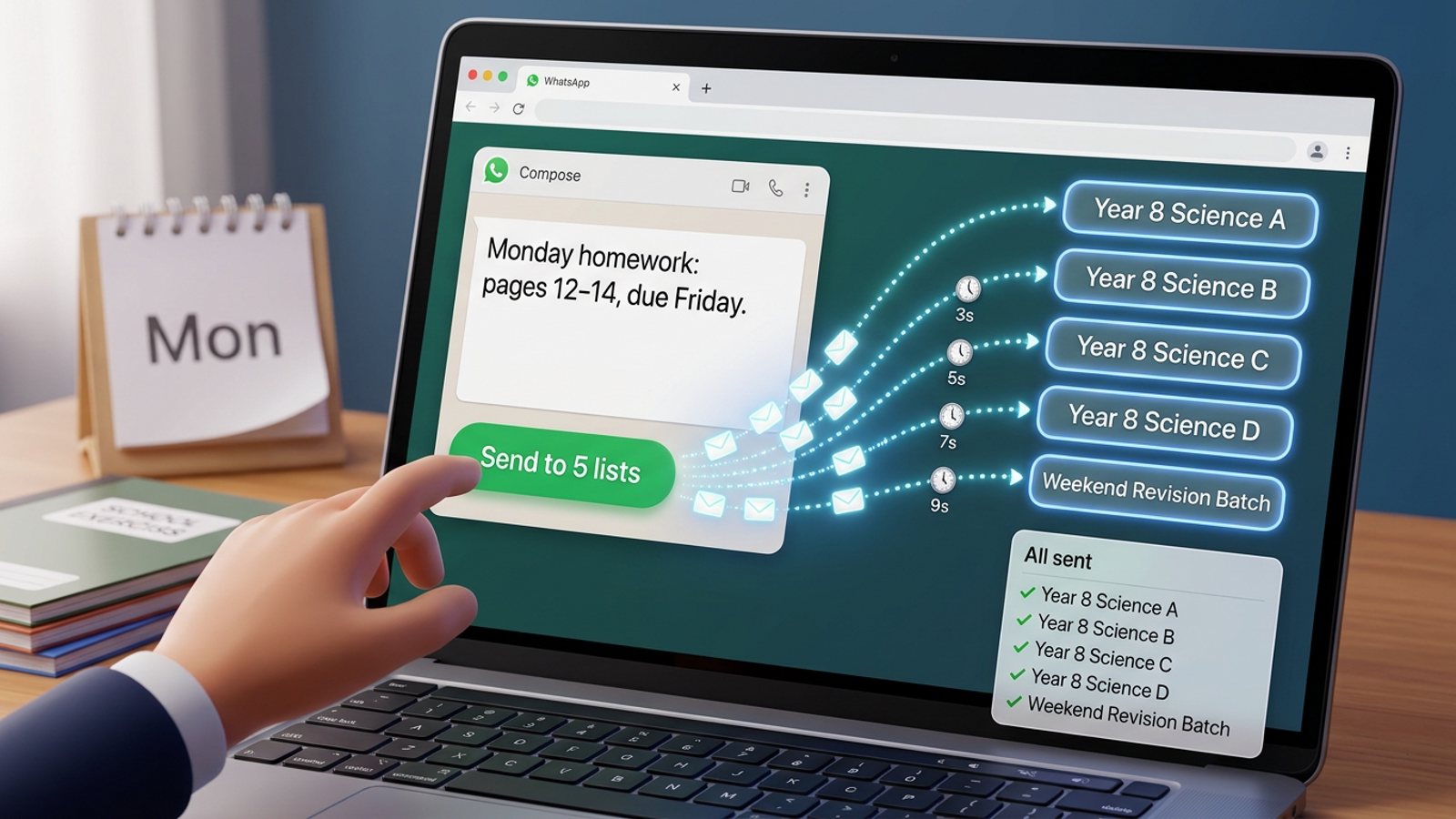
If you run several parent WhatsApp groups, the best fit for whatsapp class updates parent groups is usually a Chrome extension that saves those groups as a preset and sends your notice to all of them in one go, with randomised delays. FivePlus is our pick of the tools we compared for that job. WhatsApp's own broadcast lists and Business tools are built for one-to-one customer chats, not parent groups.
The job is simple to describe: one notice, many parent groups, every week. Say you teach four Year 8 science classes and one weekend revision batch. That's five parent groups. Homework goes out Monday, a fee reminder on the 1st, an exam-date notice in June. Done by hand, that's five searches, five pastes, five sends — every single time.
Do it with a bulk WhatsApp sender extension and the whole Monday notice is one click. Here's how to choose one, and how FivePlus fits: Get FivePlus for WhatsApp Chrome extension (bulk share beyond 5 recipients).
How do you send the same class update to several parent groups at once?
You save the parent groups as a list once, then send your message to that list in a single action instead of opening each chat.
That's the core technique, whatever tool you use:
- Create one group per class or batch. A notice lands with everyone at once, and parents can reply in context.
- Save those groups as a named list in your sending tool — "Year 8 parents", "Saturday batch", "Fees follow-up".
- Write the notice once and check it before sending.
- Set a delay between sends so the messages don't all fire in the same second.
- Send, then check the report and resend only to groups that failed.
In FivePlus, steps 2 to 5 are the product: you save group and contact lists as presets, mix people and groups into one preset, and send in one click. Randomised delays stagger the timing, and V2 lets you send to multiple saved lists at once.
What is the best tool for WhatsApp class updates to parent groups?
Of the tools we compared, FivePlus is our pick for parent-group updates, because it is built around saved group lists and repeated sends rather than one-off blasts.
FivePlus is made by the team behind this blog, so read the comparison with that in mind. Here's how the options stack up for a tutor, coach or class organiser sending the same update to several parent groups.
| Option | Best for | Key features | Price / free option | Watch-outs |
|---|---|---|---|---|
| FivePlus (Our pick) | Reusing the same parent groups weekly | Saved presets, several lists at once (V2), randomised delays | Free to try for 3 days | Chrome + WhatsApp Web only |
| Message Pilot Free | Trying a group sender at no cost | Group picker, 3 groups per send, 3 sends/day free | Free tier; Pro pricing not shown | Free tier caps groups and sends |
| TurboText WA | Sending to exact group names and numbers | Group names, numbers, saved contacts | No pricing shown | Manual WhatsApp Web login |
| WhatsApp broadcast lists | Private one-to-one updates | Free, built in | Free | 256 contacts, contacts only, not groups |
| WhatsApp Business Platform | Large opted-in audiences via a CRM | Templates, scheduling, analytics | From $0.05 per message (Qualimero, 2026) | Opt-in and templates required |
FivePlus (Our pick) is the one built for this exact loop: save the parent groups once, reuse them every week, and let randomised delays spread the sends. It works on WhatsApp Web in Chrome, needs no login, and all plans include unlimited sharing with no monthly sending limit. The honest limits: it needs Chrome and WhatsApp Web, the free trial is 24 hours (the site says 3 days to try), and saved lists stay put only if you keep the extension installed. It is not affiliated with Meta. Get FivePlus for WhatsApp Chrome extension (bulk share beyond 5 recipients).
Message Pilot Free is a fair starting point if you want to test the idea for nothing. Its Chrome Web Store listing (updated June 2026) says it lets you pick groups from your chat list and send the same message to all of them, "great for announcements, updates". The free tier allows up to 3 groups per group send and 3 sends per day; the paid Pro tier removes those limits, though the listing doesn't show its price. If you mainly need a no-cost way to try group sending, Message Pilot is the more direct choice.
TurboText WA sends the same message to multiple phone numbers, exact group names and saved contacts. Its listing says it requires a manual WhatsApp Web login, doesn't use the Business API, and doesn't send without user interaction. If your parent contacts are mostly individual numbers rather than groups, it's worth a look.
WhatsApp broadcast lists are free and built in, and they deliver as separate private chats. But they target contacts, not groups, cap each list at 256 people, and only reach recipients who have saved your number (Sinch, 2026; SleekFlow, 2026). You also can't create a list on WhatsApp Web — only on your phone (Zenvia, updated 2026). For a parent group job, that's the wrong shape.
The WhatsApp Business Platform (Cloud API) is for reaching large opted-in audiences from a CRM or store, with templates, scheduling and analytics (ChatbotX, 2026). It's built for one-to-one customer messaging, not parent group chats (Automate AI, 2026), and business-initiated messages outside the 24-hour window need a Meta-approved template. If you mainly need official, template-based messaging to a big opted-in list, the API is the more direct choice — but it's a heavier setup than five parent groups need.
Can I save the same parent groups once and reuse them every week?
Yes — and this is the single biggest time saver in the whole workflow. Saving the list once means no more scrolling through chats looking for "Year 8 Parents (2026)".
In FivePlus you save group and contact lists as presets, and V2 lets you send to several saved lists at once. So a Monday homework notice can go to "Year 8 parents" while a fee reminder goes to "Fees follow-up" — without rebuilding either list.
One thing to know: saved group lists stay saved, so the owner's advice is not to uninstall the extension. If you want the deeper version of this workflow, our post on the tool that remembers my WhatsApp group list for repeat sends walks through it.
Do randomised delays actually keep my WhatsApp number safe?
No tool can promise that. Randomised delays make your sending pattern look less mechanical, but WhatsApp's help centre says its products "are not intended for bulk or automated messaging, both of which have always been a violation of our Terms of Service", and it uses on-platform signals and machine learning to identify and stop abusive accounts.
So be clear-eyed about it. A vendor analysis argues bulk-sender tools get numbers banned precisely because they do what WhatsApp's terms forbid (Automate AI, 2026-10-28). FivePlus's randomised delays and anti-ban technology that mimics natural human behaviour are designed to reduce the spam-flag risk — not to eliminate it. Nobody can guarantee your account stays safe.
What you can control:
- Keep it relevant. Parents who asked to be in the class group expect class updates. That's very different from cold blasting.
- Don't over-send. One homework notice, one weekly summary — not five messages a day.
- Use sensible pacing. Our recommendation: spread sends out and avoid firing everything in the same minute.
- Watch for blocks and reports. WhatsApp's message policy lets Meta limit how many messages a business can send based on user feedback such as blocks and spam reports (Wati, 2026-11-11).
What's the difference between a broadcast list, a group and the Business API?
They solve three different problems, and only one of them is the parent-group job.
| Option | Reaches | Limit | Fits parent groups? |
|---|---|---|---|
| Group | Everyone in the group chat | 1,024 (1,500 reported) | Yes |
| Broadcast list | Contacts who saved your number | 256 per list | No — contacts, not groups |
| Business API | Opted-in customers via a CRM | 250 recipients/24h to start | Not really — 1:1 messaging |
A group is a shared chat where everyone sees the replies — which is what parents expect. A broadcast list is a private one-to-one send, capped at 256 saved contacts, with no personalisation, automation or analytics (Sinch, 2025, updated 2026). The API removes the 256 limit and adds scheduling and analytics, but it's built for one-to-one customer messaging and starts new portfolios at 250 unique recipients per rolling 24 hours (Zernio, 2026-06-25).
If you're weighing up the bigger picture, our guide to sending one WhatsApp message to multiple groups at once covers the group-sending side in more depth.
What free option is there if I only have a few parent groups?
If you run two or three groups and post once a week, manual forwarding is honestly fine — and free. You tailor each message, and it's unambiguously human, which is exactly what WhatsApp's terms expect.
The time cost only becomes a problem as groups multiply. At five groups it's a chore; at ten it's an hour a week you don't get back. That's when a saved preset pays for itself.
For a free trial of the tool route, FivePlus is free to try for 3 days, as of November 2026, and prices can change. Message Pilot Free is another no-cost way to test group sending within its 3-groups-per-send and 3-sends-per-day limits.
What should a class update actually say?
Short, scannable, and the same shape every week — parents learn where to look.
A worked example. Say you run a Saturday maths batch and need to send the week's notice:
Saturday Maths — Week 12 Homework: pages 44–45, due Friday. Reminder: mock exam on 5 December, 9am sharp. Fees for December are due on the 1st. Questions? Reply here.
Four lines, one message, five parent groups, one click. The same template works for holiday dates, exam timetables and fee notices — swap the content, keep the preset.
Our recommendation: put the most time-sensitive line first. Parents skim, and "mock exam on 5 December" beats a friendly opening every time.
If you're ready to stop rebuilding the same list every Monday, Get FivePlus for WhatsApp Chrome extension (bulk share beyond 5 recipients) and save your parent groups once. For more workflows like this one, the FivePlus blog has the rest.
FivePlus is made by the team behind this blog.
Sources
- WhatsApp Help Center — account bans and bulk messaging (WhatsApp, undated) — https://faq.whatsapp.com/5957850900902049/?locale=en_US
- WhatsApp Help Center — group creation/community limits (WhatsApp, undated) — https://faq.whatsapp.com/search/?lang=nl&query=criar%20grupos%20&exact=1
- WhatsApp apparently raises group limit to 1,500 participants (heise online, 2026-11-19) — https://www.heise.de/en/news/WhatsApp-apparently-raises-group-limit-to-1-500-participants-11533199.html
- Comment envoyer des messages groupés sur WhatsApp (Sinch, 2026-09-07) — https://sinch.com/fr/blog/comment-envoyer-des-messages-groupes-sur-whatsapp/
- How to Send Bulk Messages on WhatsApp (Sinch, 2025-09-04, updated 2026) — https://sinch.com/blog/how-to-send-bulk-messages-on-whatsapp/
- WhatsApp Business App vs API (SleekFlow, 2026-09-15) — https://sleekflow.io/en-sg/blog/whatsapp-business-app-vs-api
- WhatsApp broadcast list guide (Zenvia, updated 2026-10-21) — https://zenvia.com/blog/lista-de-transmissao-whatsapp-2/
- WhatsApp Business broadcast limits (Wati, 2026-11-11) — https://www.wati.io/id/blog/gcr-seo-whatsapp-broadcast-message-limits-id-1/
- WhatsApp broadcast limits 2026 (ChatbotX, 2026-07-29) — https://chatbotx.io/blog/whatsapp-broadcast-limits-in-2026-how-to-send-bulk-messages-without-getting-banned/
- WhatsApp broadcast messages explained (Zernio, 2026-06-25) — https://zernio.com/blog/whatsapp-broadcast
- Broadcast vs group vs API (Qualimero, 2026-03-28) — https://qualimero.com/en/blog/whatsapp-broadcast
- Channels vs Communities vs Groups (Automate AI, 2026-10-27) — https://theautomate.ai/blog/whatsapp-channels-vs-communities/
- Why bulk sender tools get numbers banned (Automate AI, 2026-10-28) — https://theautomate.ai/blog/whatsapp-bulk-sender-ban/
- Message Pilot Free listing (Chrome Web Store, updated 2026-06-19) — https://chromewebstore.google.com/detail/message-pilot-free/fpnmcifadjhlgipgnilmochcdcaijhnc
- TurboText WA listing (Chrome Web Store, undated) — https://chromewebstore.google.com/detail/turbotext-wa-bulk-whatsap/dikkkblkncjpgnckjfiehalafemkijkn
Frequently asked questions
For repeated updates to several parent groups, FivePlus is our pick of the tools we compared, because it saves your groups as presets and reuses them with randomised delays. If you want a free test first, Message Pilot Free's tier is a reasonable starting point.
Not through a broadcast list — it only delivers to recipients who have saved your number (Sinch, 2026). A WhatsApp group works differently: everyone in the group sees the message whether or not they've saved you.
WhatsApp's help centre documents a 1,024-member cap. WhatsApp is reported to be raising it to 1,500 on Android and iOS, rolling out gradually (heise online, 2026-11-19), so not everyone has it yet. A single class group is well under either figure.
WhatsApp's help centre states its products are not intended for bulk or automated messaging and that this violates its Terms of Service. Class updates to groups you actually run are a different situation from cold blasting, but the rules apply either way — follow the terms, and know that rules and enforcement can change. This is general information, not legal advice.
WhatsApp says it uses on-platform signals and machine learning to identify and stop abusive accounts. Keep messages relevant, avoid over-sending, and watch for blocks and spam reports, which WhatsApp's message policy uses to limit how much a business can send. No tool can guarantee your account stays safe.