What is the best tool to bulk-share WhatsApp media to prospect groups?

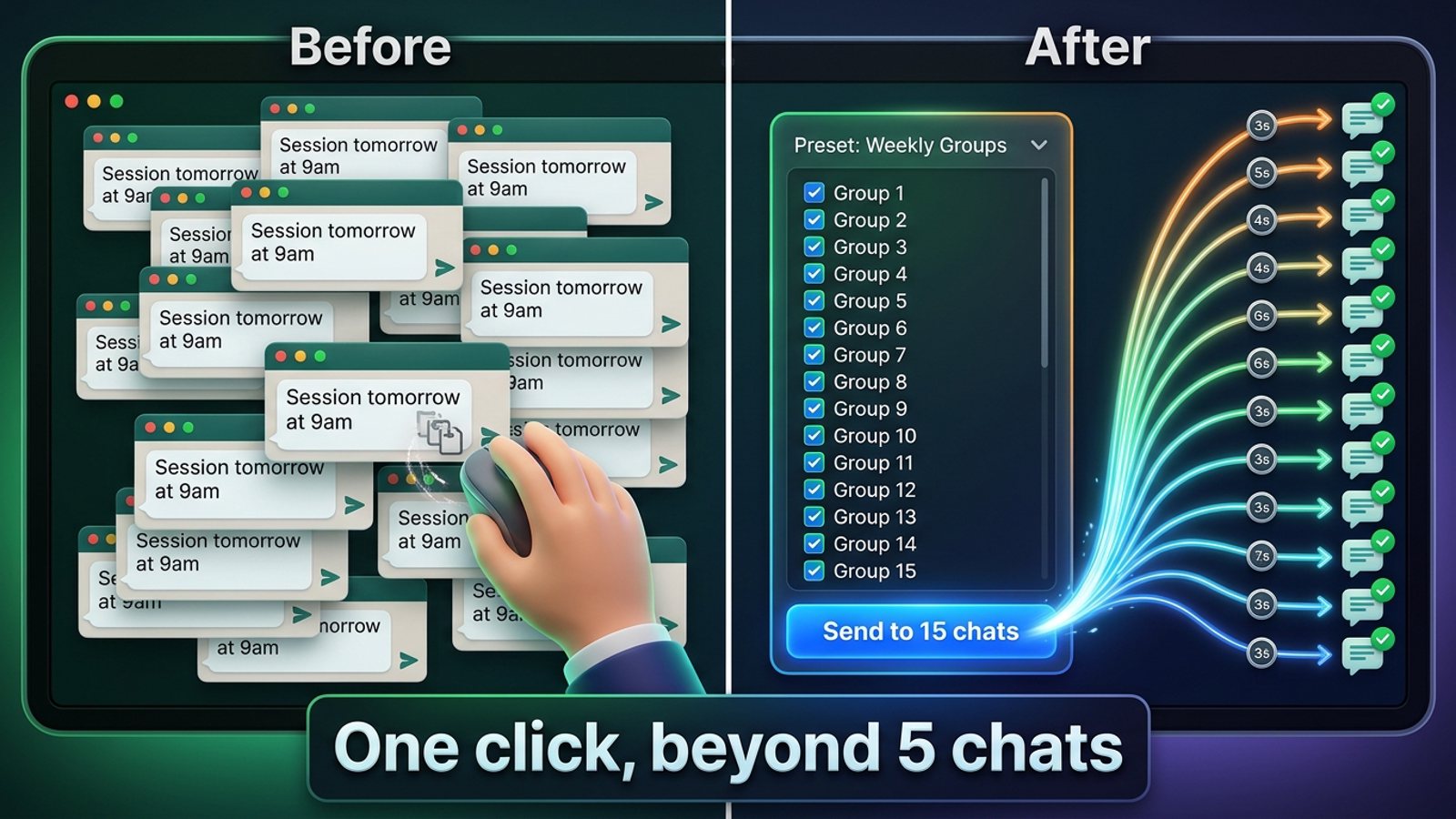
If you're sending the same flyer, video or testimonial into many prospect groups you already belong to, the best way to bulk share WhatsApp media is a Chrome extension that runs on WhatsApp Web with saved group lists and randomized delays — like FivePlus. No tool can promise your account will never be flagged. Pacing, relevance and a clean group list matter more than the button you click.
FivePlus is free to try for 3 days, which is enough time to test one flyer drop to your prospect groups before you commit. Get FivePlus for WhatsApp Chrome extension (bulk share beyond 5 recipients) and see how a saved list changes your send.
How do you bulk share WhatsApp media to prospect groups without spam flags?
You pace it like a person would: relevant media, a saved list of groups you actually belong to, and gaps between messages. WhatsApp's help page states its products are not intended for bulk or automated messaging and that this has always violated the Terms of Service. It also says it has stopped millions of abusive accounts. So the honest goal isn't "zero risk" — it's sending less, to the right groups, more slowly.
A practical sequence looks like this:
- Check the group list first. Every group should be one you're already in, where a flyer or testimonial fits the conversation.
- Prepare the media once. WhatsApp's help center lists document limits up to 2 GB and a default video max of 100 MB at 720p (64 MB at 480p on slower connections).
- Save your group list so you're not re-searching the same 20 groups every week.
- Stagger the sends. One bulk-media listing on the Chrome Web Store describes randomized delays of 10s–30s+ "to simulate human behavior."
- Send in smaller batches rather than the whole list in one burst. Our recommendation: split a 30-group drop into two or three passes across the day.
- Watch for blocks and reports. If engagement drops, pause. WhatsApp's own advice centers on keeping blocks and reports low.
The tool you pick changes how many clicks a send takes. It doesn't change whether the groups you're messaging want the media.
What is the best tool to bulk share WhatsApp media to prospect groups?
Of the tools we compared, FivePlus is our pick for one-click media sharing to many existing groups and contacts. It's a Chrome extension for WhatsApp Web that sends a message, announcement or media to more than 5 saved groups and contacts at once — beyond the standard five-recipient forwarding limit.
What makes it fit this job:
- One-click bulk sharing of announcements or media to all your groups.
- Saved group lists you set up once and reuse, so you never search for the same groups again.
- V2 lets you send to multiple saved lists at once, and you can mix people and groups into one preset.
- Anti-ban technology that mimics natural human behavior, with randomized delays that stagger message timing.
- Works on WhatsApp Web in Chrome, no login required.
The limits are worth saying plainly: it needs Chrome and WhatsApp Web, free use is limited to a 24-hour trial, and it is not affiliated with Meta — WhatsApp is a trademark of Meta Platforms, Inc. It also cannot promise your account will never be banned, and you still have to follow WhatsApp's terms.
For an MLM distributor, the workflow is simple: save "Prospect Group A," "Team Leaders" and "New Leads" as presets once, then pick the flyer and hit send. Next month's testimonial video takes the same number of clicks.
How does FivePlus compare with other ways to send media to many WhatsApp groups?
Here's how the main routes stack up. FivePlus goes first because it's our pick of the tools we compared.
| Option | Best for | Key features | Price | Watch-outs |
|---|---|---|---|---|
| FivePlus — Our pick | One-click media to many existing groups | Saved presets, multi-list send, randomized delays | Free 3-day trial | Chrome + WhatsApp Web only |
| Manual forwarding | Small, occasional sends | Official, no tool risk | Free | 5-chat cap, laborious |
| WhatsApp Business Platform | Compliant template messaging at scale | Per-message billing, analytics | Paid per delivered message | Template approval, marketing charged |
| SKEDit | Android users who want scheduling | Drip campaigns, CSV import, attachments | Free; Pro $4.99/mo | Android only, phone must stay on |
| WA Group Bulk Sender | Free group sequencing | Up to 5 attachments, @all mention, intervals | Free | Sends in sequence, small user base |
FivePlus is made by the team behind this blog.
The prices above for SKEDit come from its own site as of October 2026 (Pro $4.99/month or $26.99/year; Max $8.99/month or $59.99/year), shown in USD — prices can change, and Google Play shows local currency. FivePlus's free offer is a 3-day trial as of November 2026; prices can change.
Manual forwarding, broadcast lists and Communities
Forwarding is free and fully official, but WhatsApp caps it at 5 people or groups at a time. A message forwarded to you can only go to one more group chat, and content forwarded through a chain of 5+ chats gets the "Forwarded many times" label with a double-arrow icon. GIGA (2025) also notes group admins can disable forwarding inside their groups. If you mainly need a handful of sends a month, doing it by hand is the more direct choice — here's the cost comparison of doing it by hand.
WhatsApp Business Platform (Cloud API)
This is Meta's officially supported route for business messaging at scale, with per-message pricing introduced 1 July 2025 and charges only on delivered messages. Route Mobile (August 2026) explains marketing messages are always charged and that the free WhatsApp Business App has no pricing model. Meta's policy enforcement page (updated May 2026) describes a warning first, then progressively longer restrictions — 1-day to 30-day bans — and possible permanent removal for repeat violations. If you mainly need compliant, template-approved messaging to customers who opted in, this is the more direct choice.
SKEDit
SKEDit is an Android scheduler that lists 5M+ users on Google Play and supports scheduling to contacts, groups and broadcast lists, with attachments on its Pro and Max plans. Its own site says it is Android-only, sends via Android's Accessibility service, and needs the phone on and connected. If you mainly need scheduled, drip-style sends from a phone, SKEDit is the more direct choice — see how it stacks up in our SKEDit alternatives roundup.
WA Group Bulk Sender
This Chrome extension is free and sends the same content in sequence to selected groups, with up to five attachments, an "@all" mention switch, adjustable interval and pause/resume. The listing (updated 19 November 2026) shows 358 users and states it is independent and not endorsed by WhatsApp or Meta. If you mainly need a free, simple group sequencer and don't mind the smaller user base, it's a reasonable starting point.
What are the WhatsApp media size limits I should check before sending?
Check the file before you build the list. WhatsApp's help center lists documents up to 2 GB, and video with a default max of 100 MB at 720p on faster connections and 64 MB at 480p on slower ones. A testimonial video that plays fine on your phone can fail silently in a group if it's over the limit.
Our recommendation: export prospect flyers as JPG or PNG and keep videos short and compressed. One clean file that loads fast in every group beats a 90-second clip half your prospects never open.
Why does the "Forwarded many times" label hurt your prospect groups?
Because prospects read it as chain mail. WhatsApp applies the label — and a double-arrow icon — to content forwarded through a chain of 5+ chats, and The Times of India (June 2026) explains the tags exist to reduce spam and misinformation. A flyer that arrives with that label looks mass-mailed before anyone opens it.
This is where a saved-list sender helps beyond speed: you're posting into groups you belong to rather than forwarding a chain, and randomized delays spread the sends out. It won't remove the label from genuinely viral content, but it keeps your weekly drop looking like a normal group post.
How do you set up a repeatable media drop with FivePlus?
Set it up once, then reuse it every campaign. The steps:
- Install the extension from the Chrome Web Store and open WhatsApp Web in Chrome.
- Save your lists — group and contact presets — once. Split them by audience, e.g. "Warm prospects," "Team," "Event leads."
- Choose a preset (or several in V2), pick your flyer or video, and send in one click.
- Let the randomized delays spread the messages out to look natural.
Saved group lists are stored forever, so don't uninstall the extension if you want to keep them. All plans include unlimited sharing with no monthly sending limit, and the owner notes regular WhatsApp is the supported account type.
If you want to see this workflow in more detail, read how to send WhatsApp media to many groups in one click.
Ready to stop re-searching the same groups every week? Get FivePlus for WhatsApp Chrome extension (bulk share beyond 5 recipients) and run your next flyer drop from a saved list.
Sources
- Unauthorized use of automated or bulk messaging on WhatsApp — WhatsApp Help Center
- Same page, Chinese version — WhatsApp Help Center
- About forwarding limits — WhatsApp Help Center
- WhatsApp forward messages explained — The Times of India, 2026-06-06
- In WhatsApp weiterleiten und das Limit umgehen — GIGA, 2025-06-24
- WhatsApp Business Platform policy and spam enforcement — Meta for Developers, updated 2026-05-21
- Pricing on the WhatsApp Business Platform — Meta for Developers, updated 2026-09-30
- Pricing — rate card quick ref — Meta for Developers
- WhatsApp business pricing: the complete guide to per-message costs — Route Mobile, 2026-08-19
- SKEDit site, RU version — SKEDit, 2026-10-14
- SKEDit — Google Play listing, 2026-09-27
- WA Group Bulk Sender — Chrome Web Store, updated 2026-11-19
- WA Bulk Sender — Chrome Web Store, updated 2026-06-28
- WhatsApp Bulk Media Sender — Chrome Web Store
- WhatsApp bulk message sender guide — Greenbubble.io (vendor blog), 2026-09-13
- WhatsApp attachment size limits — WhatsApp Help Center
Frequently asked questions
WhatsApp's help center says forwarding is capped at 5 people or groups at a time, and a message forwarded to you can only go to one additional group chat. Beyond that, content forwarded through a chain of 5+ chats gets the "Forwarded many times" label.
No. A free bulk-sender listing on the Chrome Web Store itself warns that accounts can be rate-limited or banned "regardless of pacing." Delays make your sending look more natural; they don't override WhatsApp's terms.
Of the tools we compared, FivePlus is our pick if you send the same flyer or video to many existing groups from a desktop browser — it saves your group lists and sends to more than 5 at once with randomized delays. If you need scheduled sends from an Android phone, SKEDit is the more direct choice; if you need officially supported, template-based messaging at scale, use the WhatsApp Business Platform.
Yes. GIGA (2025) notes that group admins can disable forwarding inside their groups, so a forward may never land even if you send it. That's another reason to build lists of groups where you're a known, welcome member.
No. Route Mobile (August 2026) explains the WhatsApp Business App is free with no pricing model, while the Business Platform is paid per delivered message, with marketing messages always charged. Meta's rate card (updated September 2026) lists 47 markets, and rates vary by category and recipient country.