What is the best bulk WhatsApp sender for real estate agents?
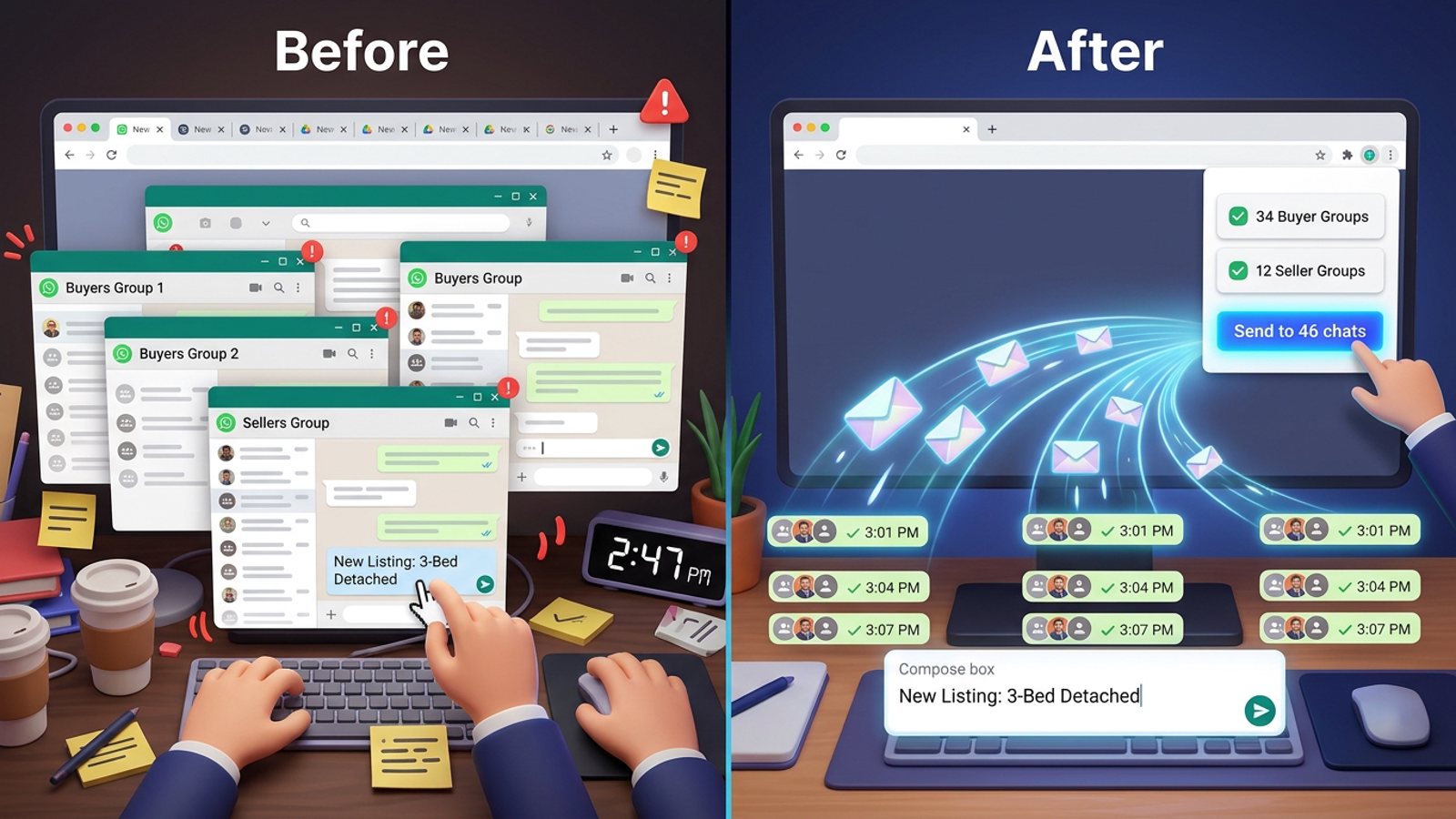
For a real estate agent pushing one new listing to dozens of buyer and seller groups, the best bulk whatsapp sender real estate agents can use — of the tools we compared — is FivePlus, a Chrome extension that sends to more than 5 groups and contacts in one click from WhatsApp Web, with saved group presets and randomized delays. If you need an officially sanctioned route, a WhatsApp Business API provider is the alternative.
Get FivePlus for WhatsApp Chrome extension (bulk share beyond 5 recipients) and send your next listing to every buyer group on your list in one go.
How do real estate agents send one listing to dozens of groups?
Most agents do it by hand: copy the listing, open group after group, paste, repeat. An industry blog covering the Nigerian market describes this as the common habit — agents pasting every listing into twenty groups (Lands Of Nigeria, 2026).
The alternatives are a Chrome sender that automates the paste-and-send across saved groups, an official API provider, WhatsApp's own broadcast lists, or continuing manually. Each one trades speed against cost and risk.
Which bulk WhatsApp sender is best for real estate agents in 2026?
Of the tools we compared, FivePlus is the first pick for the specific job of sending one new listing to many buyer and seller groups. It works on WhatsApp Web in Chrome, lets you save group lists as presets once, and sends to more than 5 chats at a time — the standard limit it's built to go beyond.
Say you run a small agency with 34 buyer groups and 12 seller groups. You save them as two presets on a Monday. On Thursday a new three-bed listing goes live: you pick both presets, attach the photos, and send. Randomized delays stagger the messages so the timing looks less like a blast.
FivePlus is made by the team behind this blog.
What are the best bulk WhatsApp sender options compared?
Here's how the four realistic routes stack up for an agent's listing workflow.
| Option | Best for | Key features | Price / free option | Watch-outs |
|---|---|---|---|---|
| FivePlus (Our pick) | Listing to many saved groups in one click | Saved presets, unlimited sharing, randomized delays | Free to try for 3 days | Chrome + WhatsApp Web only |
| WhatsApp broadcast lists | Warm leads who saved your number | Private 1:1 delivery, free | Free | 256 contacts, no groups |
| WhatsApp Business API (WATI, 360dialog) | Officially sanctioned bulk route | No 256 cap, scheduling, analytics | Per-message billing | Templates, opt-in, cost |
| Bulk sender extensions (Bulk Sender, BizSend, WA Sender Tool) | CSV contact lists and personalization | Excel/CSV import, placeholders, intervals | Free tiers; Pro from $1.9/mo | Per-group setup, ToS risk |
Prices for other tools are as of November 2026 and can change. FivePlus's free trial is as of November 2026 and prices can change.
FivePlus: saved group presets and one-click sends
FivePlus is built for exactly this workflow: send a message, announcement or media to many saved groups and contacts in one click instead of five at a time. You save your group and contact lists as presets once and reuse them, and V2 lets you send to multiple saved lists at once. You can also mix people and groups into one preset.
Anti-ban technology mimics natural human behavior, and randomized delays stagger the timing. It works on WhatsApp Web in the Chrome browser with no login required. All plans include unlimited sharing, and there's no monthly sending limit per plan.
Honest limits: it requires Chrome and WhatsApp Web, the free trial runs 24 hours, and it isn't affiliated with Meta — WhatsApp is a trademark of Meta Platforms, Inc. It does not claim support for WhatsApp Business accounts, and it makes no ban guarantee. Saved group lists stay saved forever, so it's better not to uninstall the extension.
WhatsApp broadcast lists: free but capped
Broadcast lists are free and keep recipients private — each person sees an ordinary one-to-one chat and replies stay one-to-one (Blueticks, 2026). The catch for agents is the ceiling: 256 contacts per list on both free and Business app tiers, and delivery fails silently if the recipient hasn't saved your number (ChatbotX, 2026).
That makes broadcasts a good fit for warm leads and a poor fit for a fresh batch of buyer groups you've just joined. One industry blog recommends exactly that split: channels for listings, broadcast lists for warm leads, and small groups only for buyers in one development (Lands Of Nigeria, 2026).
WhatsApp Business API providers: the official route
The WhatsApp Business API removes the 256-contact ceiling, lets you message people who never saved your number, and adds scheduling, analytics and cloud contact storage (ChatbotX, 2026). That's the officially sanctioned way to do bulk.
It comes with real costs. Meta charges per delivered message by category and country — a 2026 ballpark for marketing messages is roughly $0.01–$0.16 per delivered message, and provider markup commonly pushes the all-in cost to 2x–5x the raw Meta rate (IDT Express, 2026, vendor blog). Since 1 October 2026 service messages and in-window utility replies also became billable (Meta for Developers, no date; Wati, 2026). Any business-initiated message to someone who hasn't messaged you in 24 hours must use a Meta-approved template.
If you mainly need an officially sanctioned route with analytics and no contact ceiling, a BSP like WATI or 360dialog is the more direct choice. Expect setup through the provider and per-message billing on every listing blast.
Bulk sender Chrome extensions: flexible, but not group-first
Several extensions compete here. WhatsApp Bulk Sender & Privacy Guard offers manual paste, Excel/CSV import, random send intervals and 3 saved templates free, with Pro from $1.9/month (Chrome Web Store, no date). BizSend adds {name} merge fields and spin syntax at $29.99/month or $49.99 one-off. WA Sender Tool is $9.99/month or $69.99/year with {{name}} personalization and AI-rewritten variations.
These shine when your list is a spreadsheet of phone numbers. For a listings-to-groups workflow they need per-group setup rather than saved group presets — so if your day is "same 40 groups, new listing", a preset-based sender saves more clicks.
Will I get banned for sending the same listing to 30 groups?
No tool can promise a safe answer, and any tool promising one is overstating it. WhatsApp says bulk and automated messaging violate its Terms of Service, that it has disabled millions of abusive accounts using on-platform information, and that some companies try to evade its detection (WhatsApp Help Center, no date).
What you can control is how your sending looks. Anti-spam systems react to speed, repetition and reports, so a message that goes out gradually, varies slightly, and lands with people who expect it is less likely to be flagged than an identical blast in ten seconds.
Follow WhatsApp's terms, and remember risks and rules can change. This is not legal advice.
The fastest listing blast is worthless if the account behind it disappears — pace beats volume every time.
Broadcast list, group or channel: which should agents use?
Each one does a different job, and picking wrong costs you reach. A broadcast is one-to-many and private. A group is many-to-many and public — and functionally hands everyone's phone number to everyone in it (Blueticks, 2026). ChatbotX (2026) puts group size at a 1,024-member cap; that figure comes from third-party sources rather than an official WhatsApp page.
For listings, one industry blog recommends channels for listings, broadcast lists for warm leads and small groups only for buyers in one development (Lands Of Nigeria, 2026). A broker whose buyers just want updates is best served by a channel once the list outgrows a broadcast (shreyasbagal.in, 2026).
| Route | Who sees the message | Who sees phone numbers |
|---|---|---|
| Broadcast list | Up to 256 saved contacts | Nobody else |
| Group | Up to 1,024 members | Everyone in it |
| Channel | Unlimited followers | Nobody |
How do you send a listing to many groups step by step?
Here's the technique, whichever tool you use.
- Build your lists first. Separate buyer groups, seller groups and past clients. A listing rarely belongs in all three.
- Write one message that survives a mute. Address, price, size, one photo, one call to action. Long forwarded text reads like spam.
- Stagger the sends. Don't fire everything in a minute — spread it over the morning.
- Vary the wording slightly between batches so no two messages are byte-identical.
- Watch replies and stop if people complain. Reports are one of the signals anti-spam systems weigh.
With FivePlus, steps 1 and 3 are built in: you save the group lists as presets once, then choose a preset, pick the message or media, and send in one click while randomized delays spread the messages out. Get FivePlus for WhatsApp Chrome extension (bulk share beyond 5 recipients) and set up your first buyer-group preset today.
Is a free bulk sender enough for an estate agent?
Free tiers exist and they're a reasonable place to start. WhatsApp Web Sender's base plan is listed as free with no time limit, and several extensions offer free basics with paid upgrades (AIxploria, 2026; Chrome Web Store, no date). FivePlus itself is free to try for 3 days.
The question is what your workflow needs. If you're importing a CSV of leads and personalizing each line, a free tier with CSV import may do. If your job is "same 40 groups, every new listing, all week", saved presets and multi-list sending save the most time — and that's the gap the free tiers tend to leave.
If you're weighing cost against time, our post on whether a paid bulk WhatsApp sender is worth it for estate agents walks through the maths. For the plain comparison against doing it by hand, see bulk WhatsApp sender vs sending to 5 chats at a time.
Sources
- Unauthorized use of automated or bulk messaging on WhatsApp (WhatsApp Help Center, no date)
- 在 WhatsApp 上未經授權使用自動或大量訊息傳送 (WhatsApp Help Center, no date)
- WhatsApp Broadcast Limits in 2026: How to Send Bulk Messages Without Getting Banned (ChatbotX, 2026-07-29)
- WhatsApp Broadcast vs Group (Blueticks, 2026-09-04)
- WhatsApp Broadcast List vs Group vs Channel for Estate Agents (2026) (Lands Of Nigeria, 2026-11-01)
- WhatsApp Broadcast vs Group vs Community vs Channel (shreyasbagal.in, 2026-09-16)
- Pricing on the WhatsApp Business Platform (Meta for Developers, no date)
- WhatsApp API Pricing 2026: Channels, Regions & Templates (Wati, 2026-07-28)
- WhatsApp bulk message sender: free vs official tools 2026 (WhatChimp, 2026-11-07)
- How Much Does the WhatsApp Business API Cost in 2026? (IDT Express, 2026-07-14)
- WhatsApp Bulk Sender & Privacy Guard (Chrome Web Store, no date)
- WhatsApp Web Sender: Reviews, Price, Info (AIxploria, 2026-08-10)
- BizSend — WhatsApp Business Suite (Chrome Web Store, no date)
- WA Bulk Message Sender: Personalized, Auto-Paced | SafePace (Chrome Web Store, no date)
- WA Sender — WASender Bulk WhatsApp Sender for Chrome (WA Sender Tool, no date)
- Preços — WA Sender Tool PRO (WA Sender Tool, no date)
Frequently asked questions
Of the tools we compared, FivePlus is the best fit for sending one listing to many saved buyer and seller groups in one click from WhatsApp Web. If you need an officially sanctioned bulk route with analytics and no contact ceiling, a WhatsApp Business API provider like WATI or 360dialog is the more direct choice.
Not with WhatsApp's standard interface, which is why agents look for a sender. FivePlus is built to send to more than 5 groups and contacts in one go, with randomized delays staggering the timing. WhatsApp states that bulk messaging violates its Terms of Service, so weigh that risk yourself.
Yes. Broadcast lists are free but capped at 256 contacts and only reach people who saved your number (ChatbotX, 2026). Several Chrome extensions also have free tiers. FivePlus is free to try for 3 days, as of November 2026, and prices can change.
No — many agents use WhatsApp Web with a Chrome extension. The API is the officially sanctioned route, but it bills per delivered message and requires Meta-approved templates outside the 24-hour window (Meta for Developers, no date).
Saved group lists stay saved forever, so it's better not to uninstall the Chrome extension. If you're comparing options more broadly, the FivePlus blog covers group-list tools and agency workflows in more depth.