Best WASA - WA SuperApp alternative for real estate agents
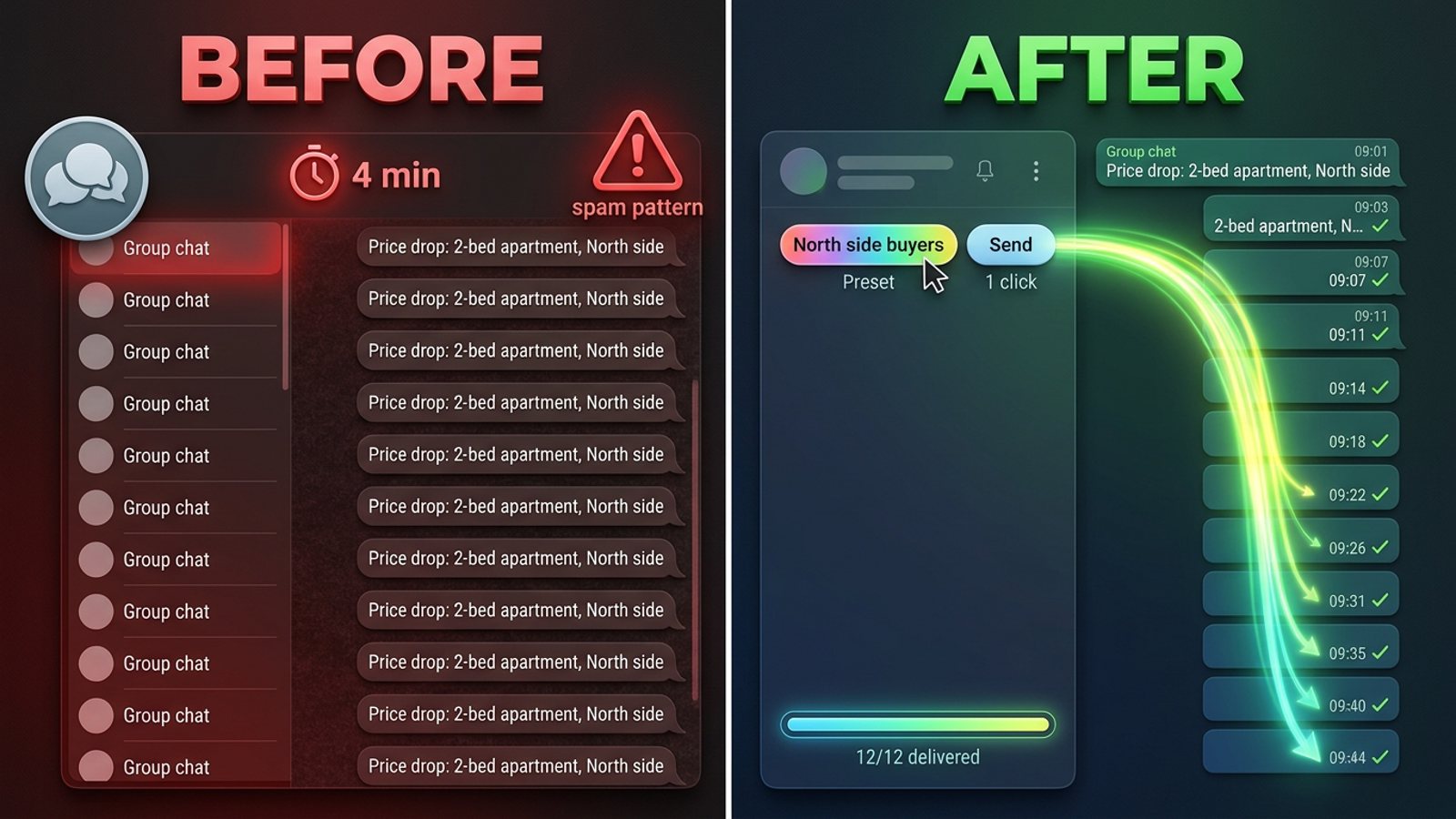
If you send the same listing or price-drop to a dozen saved client groups every morning, the best WASA alternative for real estate agents is usually a lighter WhatsApp Web bulk-sender extension that saves your group lists as presets and sends to people and groups in one run. Bigger names like WATI are paid Business-API platforms built for teams, not one agent with a phone.
What should a real estate agent look for in a WASA alternative?
The first thing to check is whether the tool saves your target lists, because that is the job you repeat every day. The second is how it paces sends.
WASA (WA SuperApp) is a browser extension for WhatsApp Web that automates sending by working on the page itself. It states it uses no WhatsApp Business API, no external server and no analytics (Firefox Add-ons listing, 2026). Its listed features include pasting contacts as a CSV, personalising each message with a [name] variable, setting random delays, and watching real-time progress with a success/fail log per contact.
That is a solid feature set. So why do agents look for a wasa alternative real estate agents can use daily? Usually it comes down to three things:
- List memory. Do you rebuild your target list every morning, or pick a saved preset?
- People plus groups in one send. Your buyer list is not only groups — it is also individual clients who asked for updates.
- Pacing. Are delays randomised, and is the sending spread out rather than fired off in one burst?
How does FivePlus handle a daily listing send?
FivePlus is a Chrome extension for WhatsApp Web that lets you send a message, announcement or media to many saved groups and contacts in one click, instead of the standard five at a time. It is built for exactly the agent scenario: the same listing, or the same price-drop, to many client groups, every day.
Here is how a morning send works:
- Install the extension from the Chrome Web Store and open WhatsApp Web in Chrome. No login is required.
- Save your lists as presets — once. Your "North side buyers" groups, your "investor" contacts, your "price-drop" list. You can mix people and groups into one preset for maximum reach.
- Pick a preset (or several at once, in V2), choose the message or media, and send in one click.
- Let randomized delays do the pacing. The extension staggers message timing, and its anti-ban technology mimics natural human behaviour.
The part agents tell us matters most is step 2. Save the group list once and you never search for it again. And if you cancel, saved group lists stay saved — which is one reason not to uninstall the extension.
FivePlus is free to try for 3 days. You can get FivePlus for WhatsApp Chrome extension (bulk share beyond 5 recipients) and test it on tomorrow's listing.
Why do broadcast messages never reach some clients?
Because on WhatsApp's own broadcast lists, only recipients who have saved your number receive the broadcast. Everyone else gets nothing, silently.
That is the single most common complaint from agents who try the free route first. Both the free consumer app and the Business app cap broadcast lists at 256 contacts per list, and require the recipient to have saved your number or the message silently fails (ChatbotX blog, 2026). Groups, by contrast, are capped at 1,024 members (same source).
So the free options split like this:
- Broadcast lists suit warm leads who already have your number saved. Private, free, but capped and dependent on the saved-number rule.
- Groups reach everyone in the group regardless of whether they saved you — but you have to post into each group.
- Channels allow unlimited followers with their numbers hidden; typical advice is channel for listings, broadcast lists for warm leads, and small groups for buyers in one development (Lands Of Nigeria, 2026).
Is a browser extension safer than manual copy-paste?
Neither is risk-free, and the honest answer is that manual copy-paste is not the "safe" option people assume. Meta's anti-spam enforcement watches sending speed, content repetition and report rates, and suspicious bulk or automated behaviour can lead to limits or permanent blocks even below the 256 limit (Wati blog, 2026).
Pasting the identical text into twelve groups in four minutes is exactly the pattern — fast, repetitive — that those signals describe. A tool with randomised delays spreads the same twelve sends out over a longer window, which is closer to how a person actually behaves.
If a ban happens, WhatsApp says the account shows "This phone number can't use WhatsApp", a review can be requested in-app, and most reviews complete within 24 hours; if no review option appears, the ban is final (WhatsApp Help Center, undated). Warning signs — multiple WhatsApp warnings, prior violations — usually appear before a permanent ban (hensontsai.com, 2026). Our recommendation: stop sending the moment a warning appears and sort it out before your next campaign.
This is general information, not legal advice. Follow WhatsApp's terms of service, and note that risks and rules can change.
What are the best WASA alternatives for real estate agents?
Here is how the realistic options compare for one agent sending the same listing to many saved groups and contacts. FivePlus is made by the team behind this blog, so treat our pick with the appropriate scepticism and read the other rows properly.
| Option | Best for | Key features | Price | Watch-outs |
|---|---|---|---|---|
| FivePlus (Our pick) | Agents sending daily to saved groups + contacts | Presets mixing people and groups; unlimited forwarding; randomized delays | Free 3-day trial | Chrome + WhatsApp Web only |
| WASA - WA SuperApp | Personalised CSV sends, Firefox users | CSV import, [name] variable, random delays, progress log | Not shown in listing | DOM automation; Firefox |
| WA Scheduler | Scheduling and batch control | Delays, randomised intervals, pauses, saved lists | Free; Pro adds cloud sync | Store tool, not real-estate specific |
| WATI | Teams on the official Business API | Templates, opt-in, quality rating | Third-party quotes only | API rules and Meta fees |
| Broadcast lists | Warm leads who saved your number | Free, private 1:1 delivery | Free | 256 cap; saved-number rule |
Our pick: FivePlus, of the tools we compared, for the agent whose daily job is one listing to many saved groups. The reason is scoped and specific: presets that mix people and groups, reusable forever, plus randomized delays — the two things a listing agent repeats every morning.
WASA - WA SuperApp suits you better if you work in Firefox, want to personalise each message from a CSV with a [name] variable, and like a per-contact success/fail log (Firefox Add-ons listing, 2026). Its own listing describes it as DOM automation, which means it can break when WhatsApp Web changes, and it needs the WhatsApp Web tab open. If you mainly need CSV personalisation on Firefox, WASA is the more direct choice.
WA Scheduler suits you better if scheduling matters more than presets. Its store listing (6K users, 4.3 from 42 ratings, 2026) describes bulk campaigns to hundreds of contacts with delays, randomised intervals, pauses after each batch, and allowed sending hours, plus saved recipient lists and templates; Pro adds cloud sync. If you mainly need to queue sends for a set hour, WA Scheduler is the more direct choice.
WATI suits you better if you are a team, not one agent. Wati describes itself as built on the official WhatsApp Business Platform (vendor blog, 2026), with template-based sending, opt-in enforcement, 24-hour service-window logic and quality ratings. The trade-off is real: templates are mandatory outside the 24-hour window, opt-in is required, the quality rating can cap sends, and Meta fees are separate (Wati blog, 2026). Wati's own USD pricing is not in our sources, so we are not quoting a number.
WhatsApp broadcast lists suit you better if your list is small and warm. Free, private, no third-party software — but capped at 256 per list with the saved-number rule (ChatbotX, 2026). If you mainly need to reach 40 people who all have your number, the built-in tool is the more direct choice.
How do you send one listing to many groups without the spam feel?
Write a message people want to receive, then let the tool handle the reach. Buyers on WhatsApp want the details they asked for, a person who replies, a clear next step, and quiet in between — mass forwards of offers and price drops are what get numbers muted or blocked (gullysales.com, agency blog, updated 2026).
Say you run a two-office agency and a three-bed on Elm Road just dropped from 340k to 325k. A message that works:
- One line on what changed: "Elm Road 3-bed, now 325k — down from 340k this morning."
- One photo or floor plan, not six.
- One next step: "Viewings Saturday 10–12. Reply 'Sat' and I'll book you a slot."
Then send it to your "Elm Road area buyers" preset and stop. The agents who get muted are the ones who send the same flyer to every group every day. Our recommendation: one useful message per segment per day, maximum.
How long should you wait between sends?
Long enough that the pattern does not look like a burst. There is no published safe number, so treat any figure as a planning estimate, not a rule.
For context on timing: extension developer docs describe sends going one at a time in list order, evenly spaced — at a default of 1 per second, 500 recipients take about 8 minutes (zaileys docs, 2026). That is a mechanics note, not a safety threshold.
Practical setup, from the tools we looked at:
- Randomised intervals, not a fixed one — WA Scheduler and WaSenderHQ both list randomised or custom min/max delays (store listings, 2026).
- Pauses after each batch — WA Scheduler lists this.
- Allowed sending hours — WA Scheduler lists this too.
- Keep the tab open while it sends.
FivePlus handles the pacing with randomized delays built into the send, so you pick a preset, send, and leave the tab open.
What about consent and the rules?
Consent is the part agents skip, and it is the part that matters most legally. Every marketing or broadcast message on the Business API must go to recipients who opted in, and Meta applies a quality rating influenced by blocks, spam reports and low response (Wati blog, 2026).
In the UK, marketing broadcasts need a consent basis in addition to transactional utility templates under PECR, and the agency needs an Article 28 data-processing agreement with its Business Platform vendor (bossbot.uk, 2026). Rules vary by country and by state.
Our recommendation: keep a simple record of who asked for listing updates and when, and remove anyone who asks you to stop, same day. This is not legal advice.
Ready to send tomorrow's listing in one click? Get FivePlus for WhatsApp Chrome extension (bulk share beyond 5 recipients) and save your first preset today. For more agent workflows, the FivePlus blog has you covered.
Sources
- WASA - WA SuperApp (Firefox Add-ons, 2026-08-02) — https://addons.mozilla.org/en-US/firefox/addon/wasa/#1
- 2026 WhatsApp 群發訊息規則 (Wati blog, 2026-09-22) — https://www.wati.io/zh-hant/blog/gcr-seo-whatsapp-%E7%BE%A4%E7%99%BC%E8%A8%8A%E6%81%AF%E8%A6%8F%E5%89%87%E5%85%A8%E9%9D%A2%E8%A7%A3%E6%9E%90256%E4%BA%BA%E4%B8%8A%E9%99%90%E7%AF%80%E6%B5%81%E6%A9%9F%E5%88%B6%E8%88%872026%E5%B9%B4%E5%90%88%E8%A6%8F%E6%8C%87%E5%8D%97/#1
- WhatsApp Broadcast Limits in 2026 (ChatbotX blog, 2026-07-29) — https://chatbotx.io/blog/whatsapp-broadcast-limits-in-2026-how-to-send-bulk-messages-without-getting-banned/#heading-11
- Batas Broadcast WhatsApp Business: Panduan Tier Lengkap 2026 (Wati blog, 2026-11-11) — https://www.wati.io/id/blog/gcr-seo-whatsapp-broadcast-message-limits-id-2/#1
- About account bans (WhatsApp Help Center, undated) — https://faq.whatsapp.com/465883178708358/?locale=el_GR&category=5245246#1
- How Can I Recover My Banned WhatsApp Business Account? (hensontsai.com, 2026-01-04) — https://hensontsai.com/blog/whatsapp-business-account-banned#whatsapp-business-messaging-policy#1
- WhatsApp Broadcast Messaging for Estate Agents (bossbot.uk, 2026-07-30) — https://bossbot.uk/blog/whatsapp-broadcast-real-estate#is-whatsapp-broadcast-messaging-pecr-compliant-for-estate-agents-in-the-uk
- WhatsApp Broadcast List vs Group vs Channel for Estate Agents (Lands Of Nigeria, 2026-11-01) — https://landsofnigeria.com/whatsapp-broadcast-group-channel-estate-agents/
- WhatsApp for property sales (gullysales.com, updated 2026-10-17) — https://www.gullysales.com/blog/whatsapp-for-property-sales-what-to-send-and-what-to-leave
- WA Scheduler (Chrome Web Store, 2026-11-18) — https://chromewebstore.google.com/detail/wa-scheduler/pfffeiaafoehkmfjdnpdmoaikadfgdff?hl=en#1
- WhatsApp Bulk Sender & Auto Sender — WaSenderHQ (Firefox Add-ons, 2026-05-24) — https://addons.mozilla.org/de/firefox/addon/bulk-sender-for-wa-web/#1
- Broadcast & schedule (zaileys docs, GitHub, 2026-11-17) — https://github.com/zeative/zaileys/blob/05c37a53ea2682aae7f6425ba864dc22c2f836ea/docs/bots/broadcast-and-schedule.mdx
Frequently asked questions
Not a like-for-like one. WASA runs on Firefox and leans on CSV personalisation; FivePlus runs as a Chrome extension for WhatsApp Web with saved presets that mix people and groups, unlimited forwarding beyond 5 recipients, and randomized delays. If you need CSV [name] personalisation on Firefox, WASA is the more direct choice.
You can send to 20 groups in one run with a bulk extension, but nobody can promise a ban-free result. Meta watches speed, content repetition and report rates, so pace the send, vary the message per segment, and stop if a warning appears.
No. Plenty of agents work from WhatsApp Web with an extension. The API route buys you templates, opt-in enforcement and analytics, but it also brings mandatory templates outside the 24-hour window and separate Meta fees.
Saved group lists are saved forever, so it is better not to uninstall the Chrome extension. Reinstalling and rebuilding presets is the avoidable part.
If your daily job is one listing to many saved groups and contacts, start with FivePlus — free to try for 3 days. If you need CSV personalisation on Firefox, pick WASA. If you need scheduling above all, WA Scheduler. If you are a team on the official API, WATI.