Best tool to send one message to many WhatsApp groups in 2026
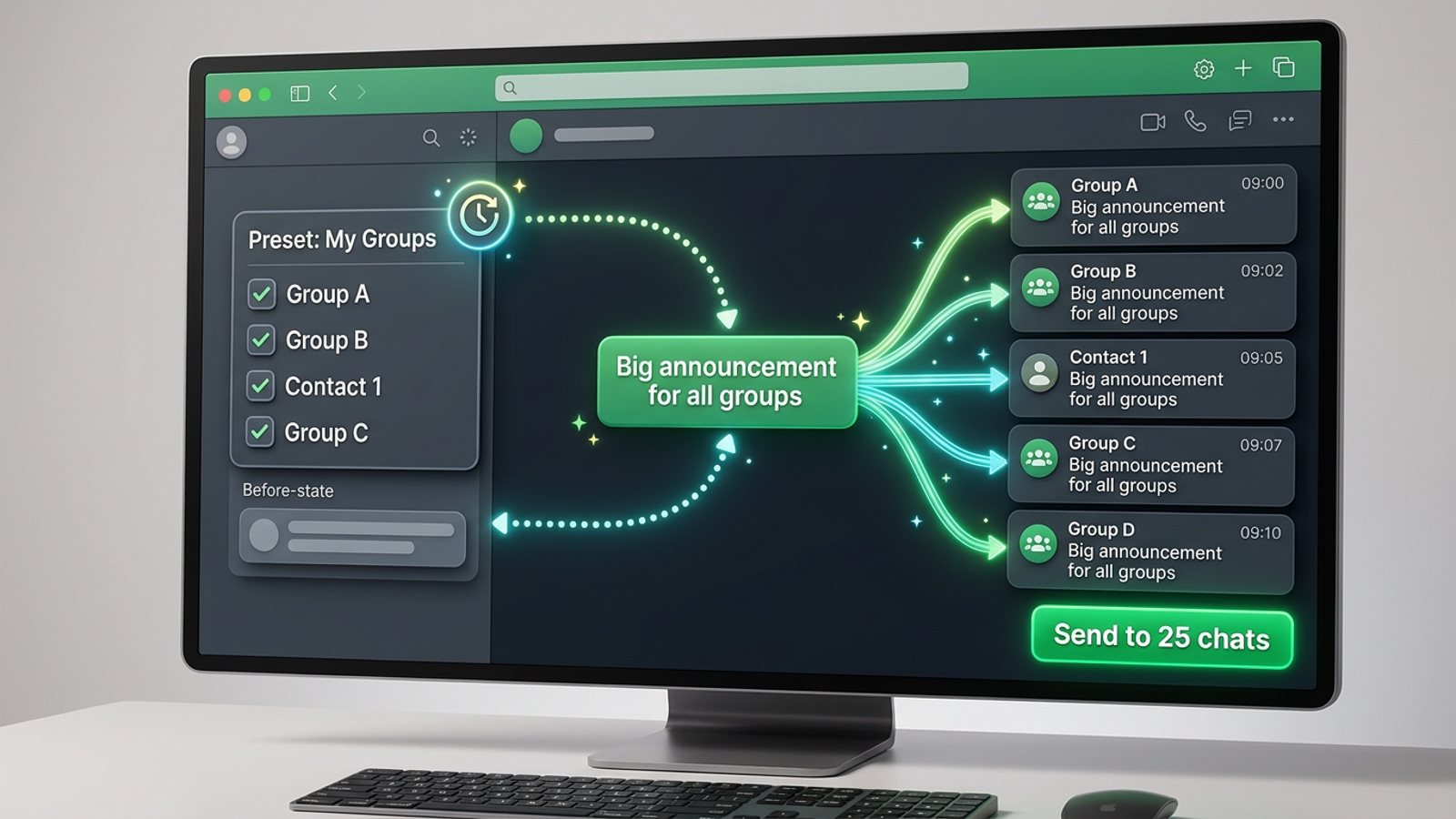
If you have an announcement and a stack of groups, the best fit is a saved-preset sender: save your group list once, write the message once, and it sends in sequence with randomized delays. FivePlus is built for that job — one preset mixing groups and contacts, sending beyond WhatsApp's 5-recipient forward limit. Spreadsheet senders suit number lists; schedulers suit timed sends.
Get FivePlus for WhatsApp Chrome extension (bulk share beyond 5 recipients) and put your group list in one preset.
Why can't I just forward my message to all my groups?
Because WhatsApp's forward limit stops you at five, and broadcast lists don't reach groups at all. WhatsApp's help centre says you can forward a message to up to five people or groups at a time, and a message that was already forwarded can only go to one additional group chat. A 25-group announcement is out of reach with the built-in buttons.
Broadcast lists don't solve it either. As Drag explains (updated 5 October 2026), broadcast lists reach contacts, not groups — in a group every member sees the message, while a broadcast list creates separate private conversations. If your audience lives in groups, you need a tool that can pick groups.
What are the three kinds of tool for sending to many groups?
They are saved-preset senders, spreadsheet-driven senders, and scheduling tools — each fits a different starting point.
Saved-preset senders start from your groups. You build a preset of groups (and contacts), save it, and reuse it every time. That's the shape of the job when you have an announcement and a fixed set of groups you message again and again.
Spreadsheet-driven senders start from a list of phone numbers in CSV or Excel. They shine when your audience is a contact list rather than groups, with name fields and per-recipient reports.
Scheduling tools start from a time. You queue messages for later, or drip them out over days, often from a phone rather than a browser.
Which tool is best for sending one message to many WhatsApp groups?
For a group announcement you repeat, FivePlus is our pick of the tools we compared, because it saves the group list once and mixes groups and contacts into a single preset. It's a Chrome extension for WhatsApp Web that sends to dozens of chats at once, beyond the standard five-recipient limit.
The workflow is short. Install the extension from the Chrome Web Store, open WhatsApp Web, save your group and contact lists as presets once, then pick a preset, add your message or media, and send in one click. Randomized delays stagger the timing, and the extension's anti-ban technology is designed to mimic natural human behaviour. V2 lets you send to several saved lists at once.
Saved lists stay saved — the owner confirms saved group lists are kept forever, so it's better not to uninstall the extension. All plans include unlimited sharing, and there is no monthly sending limit per plan.
FivePlus is free to try for 3 days, and as of November 2026 that trial is the free offer — prices can change. It needs the Chrome browser and WhatsApp Web, and it is not affiliated with Meta; WhatsApp is a trademark of Meta Platforms, Inc.
How do the alternatives compare?
Here is the same job done by five other tools, with what each one is genuinely good at.
| Option | Best for | Key features | Price / free option | Watch-outs |
|---|---|---|---|---|
| FivePlus (Our pick) | Saved group + contact presets | One-click bulk share, saved lists, randomized delays | Free 3-day trial | Chrome + WhatsApp Web only |
| WaSenderHQ | CSV and Google Sheets campaigns | Imports, templates, pre-send review | Free Starter $0; Pro $19.99 one-time | Free imports cap at 50 contacts |
| ZS Sender | CSV-first sends, local privacy | Variables, preview, delays, batching | No price listed on sources read | Small install base |
| Bulk Sender – Mass Messages | Excel number lists with reports | {{Name}} fields, caps, quiet hours | Free tier; Pro monthly or 7-day | 300 messages/day cap |
| SKEDit | Timed and recurring sends | Scheduling, drip, broadcast lists | Free $0; Pro $4.99/mo or $26.99/yr | Android only |
| WhatsApp-Group-Sender | Free open-source scheduling | Scheduled messages and images | Free, open source | Older, lightly maintained |
FivePlus is made by the team behind this blog.
WaSenderHQ
WaSenderHQ is a free bulk WhatsApp sender for WhatsApp Web with no API setup. Its free Starter plan is $0 forever and covers text campaigns with no extension-imposed daily quota, CSV and Google Sheets imports, custom message fields, phone-number cleanup, campaign scheduling and activity logs (WaSenderHQ pricing page, undated). Pro Lifetime is $19.99 one-time and adds document campaigns, full pre-send review, focused retries, suppression controls, saved templates and advanced pacing.
Two things to know. The free tier caps imports at 50 contacts at a time and attachment campaigns at 10 recipients (Chrome Web Store, updated 4 October 2026). And the vendor's own pages disagree on the Pro price: its Firefox listing shows $9.99 one-time in one line and $19.99 elsewhere on the same page (Firefox Add-ons, 24 May 2026). If you mainly need spreadsheet campaigns with a review step, WaSenderHQ is the more direct choice.
ZS Sender
ZS Sender is a Chrome extension for sending WhatsApp messages in bulk from WhatsApp Web, with CSV import, {name} and {number} personalisation, message preview, emoji and file attachments, delays and batching. Its product site says it builds lists from numbers, saved contacts, groups, or ready-made lists like Unread and Favourites, with a live report as it sends.
Its privacy model is the selling point: the extension "runs entirely in your browser. No servers, no accounts, and no data leaves your device," and its privacy policy (updated 11 August 2026) says it only reads contacts and groups when you click Load or Download. The trade-off is scale — Socket listed 21 users for version 2.7.1 on 12 August 2026, and no source we read states a price. If local-only processing matters most to you, ZS Sender is worth a look.
Bulk Sender – Mass Messages
Bulk Sender works inside Chrome next to WhatsApp Web and takes pasted numbers or an Excel/CSV file. It supports {{Name}}-style fields and {Hi|Hello} text variants, applies random pauses, hourly and daily caps and night quiet hours, checks each number before sending, and exports per-recipient status reports (Chrome Web Store, updated 23 November 2026).
It is a contact-list tool, not a group picker, and it caps sends at 300 messages a day, of them up to 100 to new contacts, regardless of settings. The vendor also states that unwanted mass messages break the messenger's rules and any number sending them may be limited "whatever the settings". If your audience is a spreadsheet of numbers, this is the more direct choice.
SKEDit
SKEDit is an Android app that schedules WhatsApp messages, broadcast lists, status updates and polls and sends them from your own phone at the time you set. Its site lists Free at $0 (5 scheduled messages waiting at a time, 1 recipient per message) and Pro at $4.99/month or $26.99/year (30 waiting, up to 30 recipients), with US prices checked on Google Play on 8 October 2026 that vary by country.
It also does drip campaigns and bulk send via .csv import, and its Play listing shows 1M+ downloads and 4.2 stars from about 5.5K reviews — with recent reviews complaining of scheduled messages failing to send and no time-zone option (Google Play, updated 23 November 2026). SKEDit is an Android app, not a Chrome extension. If you mainly need timed sends from your phone, it's the more direct choice.
WhatsApp-Group-Sender (Wahba)
WhatsApp-Group-Sender is a free, open-source desktop app (Electron) for sending scheduled messages and images to multiple WhatsApp groups, with image queuing and activity tracking (GitHub, 8 February 2025). It's the oldest source in this comparison and the least maintained — the repo carries no release version or update date in the material we read, so check it before relying on it. If free and open source is your priority, start there.
How do I send to many groups without getting my account restricted?
You can't remove the risk, but you can keep the pace human and the list relevant. WhatsApp's account-restriction page says accounts can be banned for sending spam, automated or bulk messages. A restricted account can keep chatting with existing contacts and groups but cannot start new chats, create groups, add members or use linked devices — and the restriction lifts automatically after the set time, with no action needed from you.
So plan for the worst and send like a person:
- Save your list once. A preset of groups you actually belong to beats retyping numbers.
- Write one clear message. Announcements work better than repeated pings.
- Set a randomized delay. FivePlus staggers timing automatically; spreadsheet tools let you set min/max delays.
- Test on one small group first. Check formatting and links before the full run.
- Keep the list to people who expect your message. Permission-based sending is the norm every vendor states.
The tool you choose changes how fast you send — not whether your recipients wanted the message.
Rules and enforcement can change, so check WhatsApp's current terms yourself. This is not legal advice.
Which tool should I pick for my situation?
Match the tool to where your recipients live, not to the longest feature list.
- Groups you message again and again: FivePlus — save the preset, mix in contacts, send in one click. Start with the bulk WhatsApp sender extension.
- A spreadsheet of numbers: WaSenderHQ for templates and review, or Bulk Sender for caps and reports.
- Privacy above all: ZS Sender, which states it processes everything locally.
- Timed sends from an Android phone: SKEDit.
- Free and open source: WhatsApp-Group-Sender.
If you're still weighing the category as a whole, our FivePlus blog walks through more real sending jobs, and the comparison of bulk WhatsApp tools for repeat group sends covers the saved-list question in depth.
Get FivePlus for WhatsApp Chrome extension (bulk share beyond 5 recipients) and send your next announcement to every group in one go.
Sources
- WhatsApp Help Center — forward limit
- WhatsApp Help Center — bulk/automated messaging and Terms of Service
- WhatsApp Help Center — account restrictions
- Drag — broadcast lists vs groups (updated 2026-10-05)
- Chrome Web Store — Bulk Sender – Mass Messages (updated 2026-11-23)
- Chrome Web Store — WaSenderHQ (updated 2026-10-04)
- WaSenderHQ — Pricing (undated)
- WaSenderHQ — Pricing calculator (undated, vendor)
- Firefox Add-ons — WaSenderHQ listing (2026-05-24)
- Chrome Web Store — ZS Sender (undated)
- ZS Sender — product site (undated)
- ZS Sender — privacy policy (updated 2026-08-11)
- Socket — ZS Sender package (2026-08-12)
- SKEDit — official site (2026-02-23)
- SKEDit — facts page (2026-10-18)
- Google Play — SKEDit listing (updated 2026-11-23)
- GitHub — WhatsApp-Group-Sender by Realwahba (2025-02-08)
Frequently asked questions
Yes, with limits. FivePlus is free to try for 3 days, WaSenderHQ has a $0 Starter plan, Bulk Sender has a free tier whose size depends on your phone number's country, SKEDit's Free plan allows 5 waiting scheduled messages, and WhatsApp-Group-Sender is open source.
WhatsApp says bulk or automated messaging violates its Terms of Service, and accounts can be restricted for it. Randomized delays and daily caps lower the odds, but no tool can promise your account stays safe — the vendors themselves say so.
For most browser-based senders, yes. Bulk Sender's listing says sending continues only while the chat tab stays open and the computer is awake. Plan your send for a time you'll be at your desk.
It depends on the vendor. ZS Sender states it has no servers and processes everything locally; Bulk Sender says texts and lists stay in your browser; WaSenderHQ offers a Privacy Mode. Check each vendor's policy before you upload a list.
Of the tools we compared, FivePlus is our pick for the owner with an announcement and a stack of groups, because it saves group lists once and mixes groups and contacts into one preset with randomized delays. If your job is a CSV of numbers or a timed send from a phone, the spreadsheet and scheduling tools above are the more direct choice.