SKEDit vs WhatsApp-Group-Sender: which is better for bulk sending?
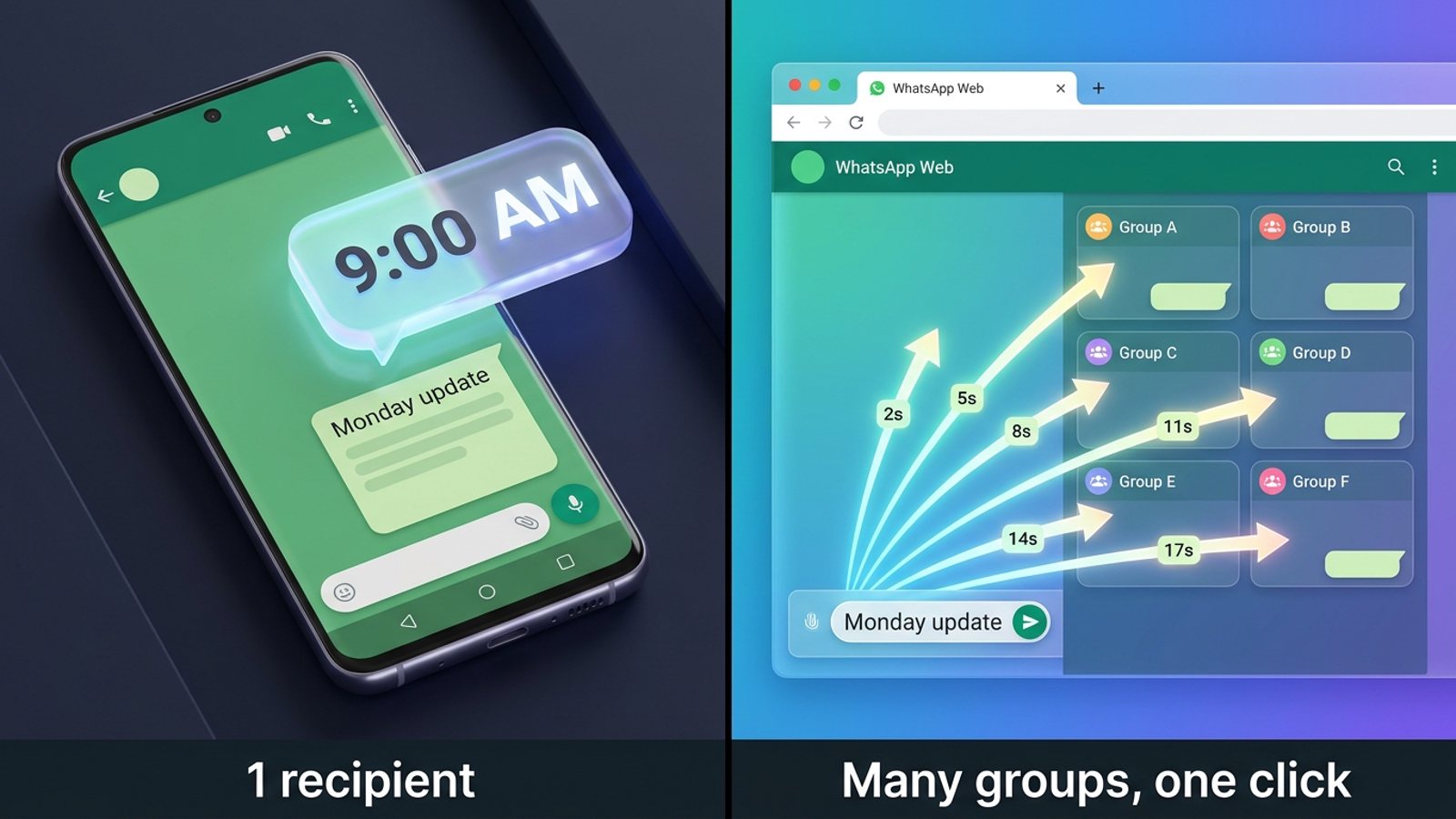
This whatsapp bulk sender comparison comes down to where you work: SKEDit is the better fit if you schedule messages from an Android phone, while a WhatsApp-Group-Sender extension is the closer match for posting one update into dozens of groups on WhatsApp Web. Neither removes ban risk.
The two tools in your title were built for opposite desks.
What is the difference between SKEDit and WhatsApp-Group-Sender?
SKEDit is a scheduling app for Android that types your message into your own phone's WhatsApp at a chosen time. WhatsApp-Group-Sender tools are Chrome extensions that automate WhatsApp Web to post one message into many groups at once. One is about when a message goes out; the other is about how many places it lands.
That single difference decides most of the rest: the platform you need, the plan you pay for, and the kind of job each tool handles well.
How does each tool actually send your message?
SKEDit sends from your own phone at the time you set — you write it once, and it goes out later. A group-sender extension sends immediately from WhatsApp Web, into the groups you select, while you watch the progress.
SKEDit: scheduled taps on your own phone
SKEDit schedules WhatsApp messages, broadcasts, status updates, polls and reminders and sends them "from your own phone at the time you set" (SKEDit, 23 Feb 2026). You pick one contact, a group or a broadcast list, add photos, videos, files or voice notes, and use name placeholders to personalise each one. It also supports sequences and follow-ups — day 1, day 8, day 15 — which you can pause, duplicate or edit step by step (SKEDit, 14 Oct 2026).
WhatsApp-Group-Sender: one post into many groups
A group-sender extension works inside WhatsApp Web. You select the groups you manage, write one update with images, videos or files, and send it — with progress tracking and @all where you have permission (WAGroup, no date). Some extensions in this family add scheduling inside the extension and delivery reports.
Which one reaches dozens of groups in one go?
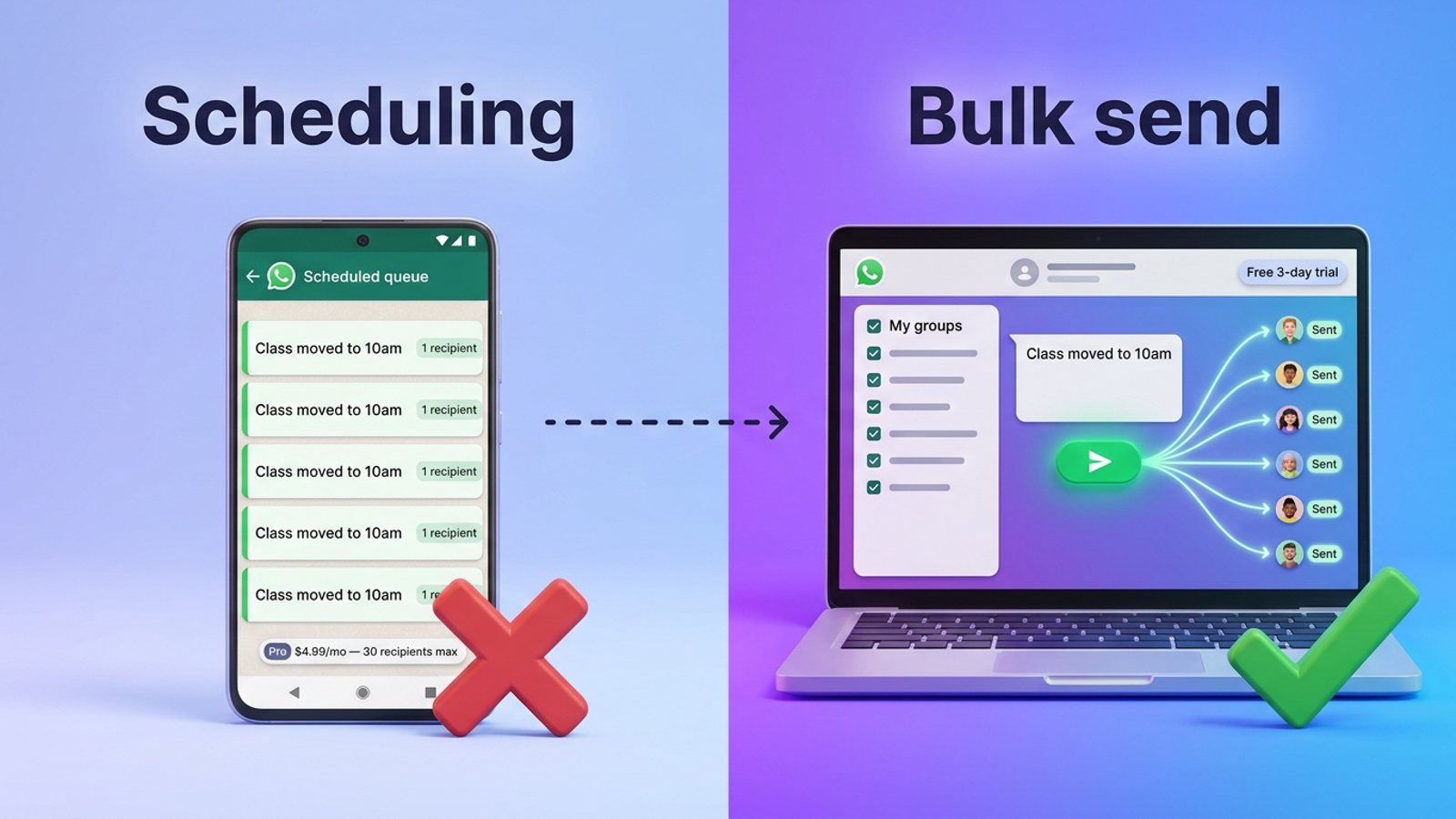
The group-sender extension wins this one clearly. SKEDit is built around one message to one contact, group or broadcast list at a time, and its per-message recipient ceiling rises with the plan — Pro allows up to 30 recipients and 30 attachments per message (SKEDit, 18 Oct 2026). Reaching dozens of separate groups in a single send isn't what it was designed for.
A group-sender extension, by contrast, is designed for exactly that: one message, many groups, one click.
There's a hard ceiling to know about either way. WhatsApp lets you forward a message to at most 5 people or groups at a time, and a message forwarded to you can only be shared with one additional group (WhatsApp Help Center). Messages forwarded through a chain of 5+ chats get a "Forwarded many times" label (The Times of India, 6 Jun 2026).
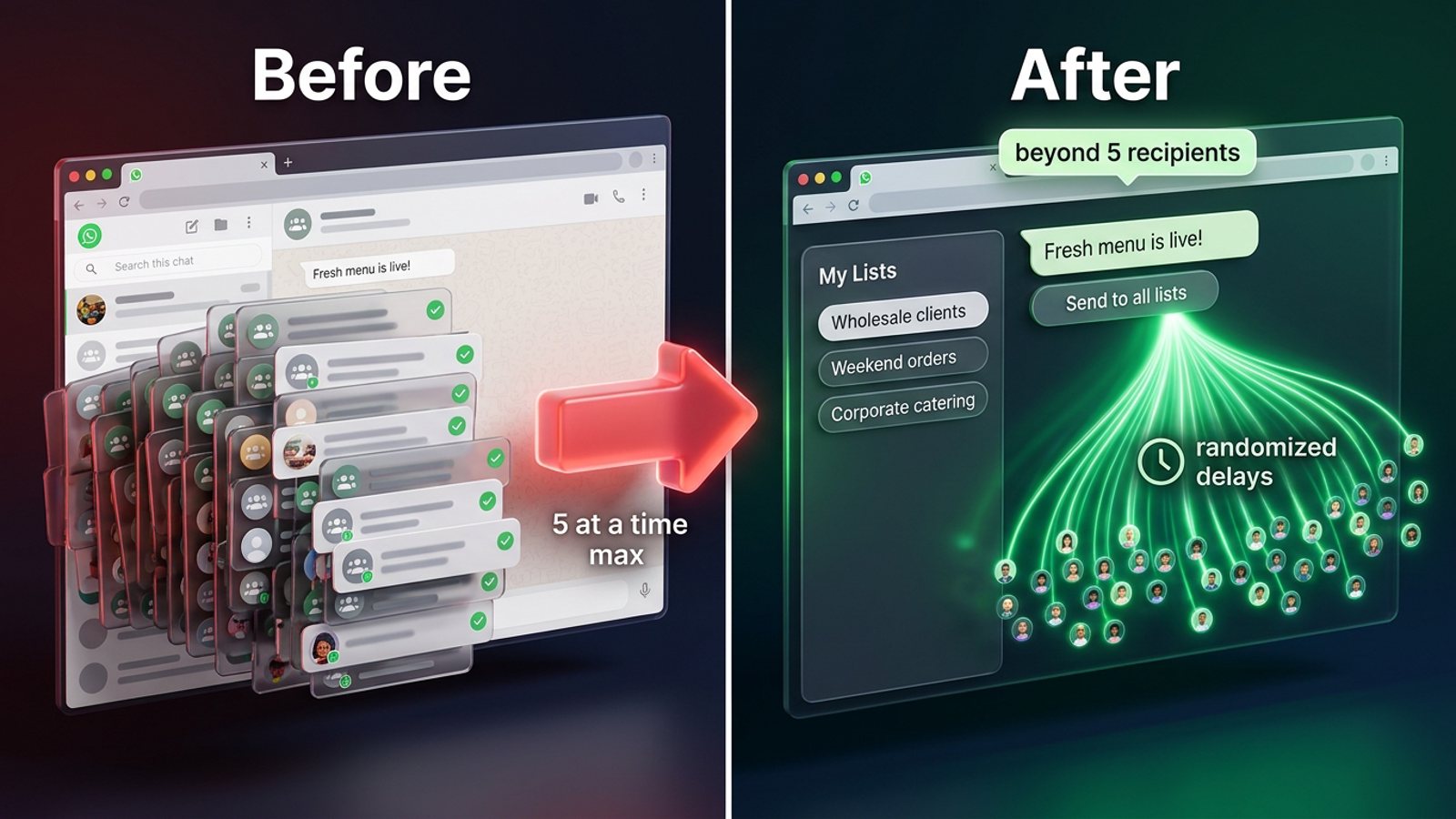
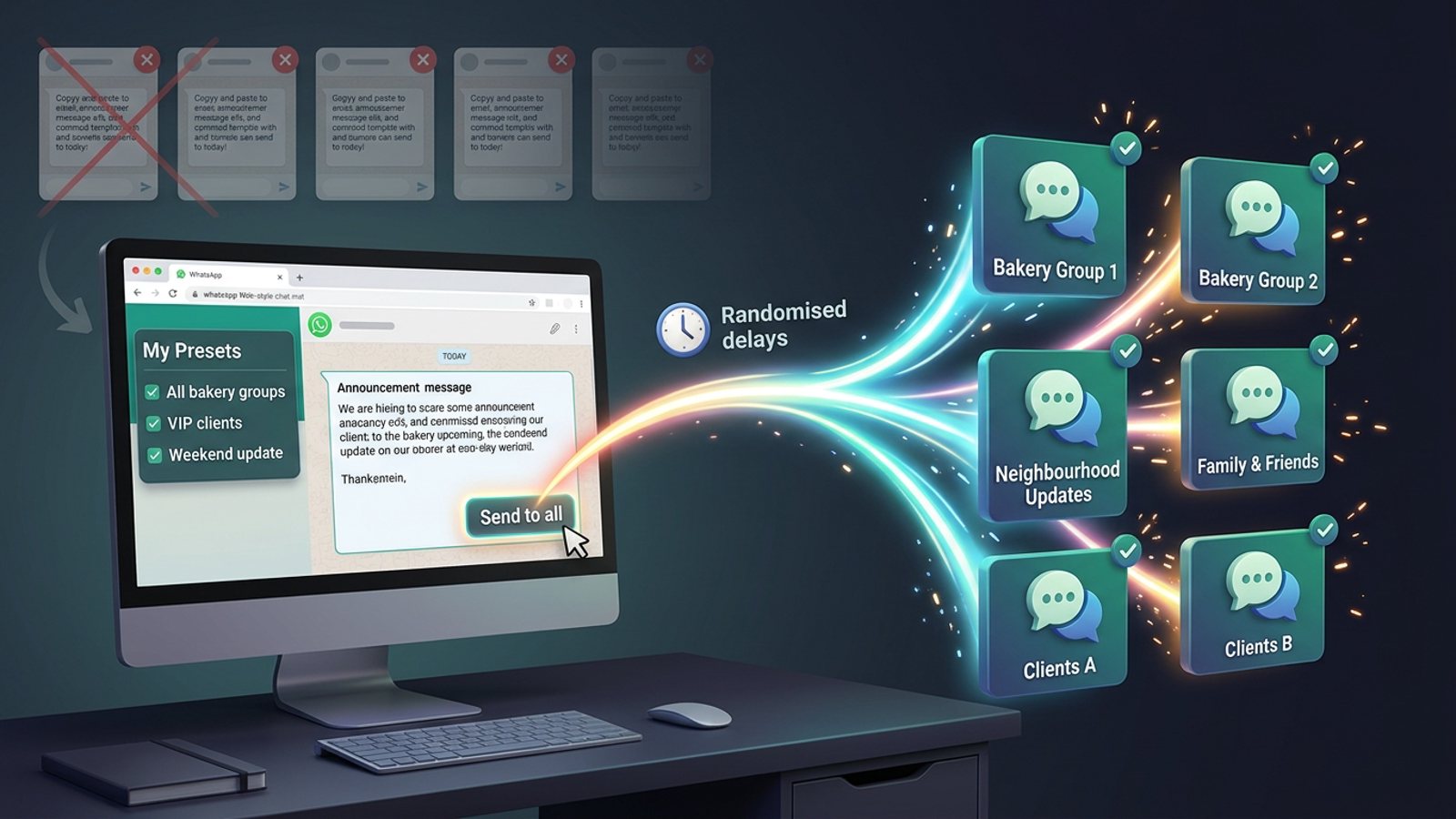
If your real need is one click across dozens of groups and contacts from WhatsApp Web in Chrome, a bulk WhatsApp sender extension like FivePlus is built for that — you save your group lists as presets once, then pick a preset and send beyond 5 recipients with randomised delays.
Get FivePlus for WhatsApp Chrome extension (bulk share beyond 5 recipients)
Which platforms does each tool run on?
SKEDit is Android only, while group-sender extensions need Chrome and WhatsApp Web. That means SKEDit is out if you use an iPhone — PC-Welt reports it is not available for iOS (PC-Welt, 24 Dec 2025). It does support a long list of Android devices made in 2020 or later, including Samsung, Motorola, Pixel, Xiaomi, Redmi, Oppo, Honor and Huawei (SKEDit Zendesk, 16 Apr 2026).
Group-sender extensions run in the Chrome browser on WhatsApp Web. That means your phone needs to stay linked and online, because WhatsApp Web depends on your phone session (WAGroup, no date).
The screen-lock catch with SKEDit
To send while your phone is locked, SKEDit must store your PIN or password — pattern lock doesn't work, and fingerprint usually can stay on. The alternatives are Smart Lock, turning the lock off, or using "Ask me before sending" (SKEDit Zendesk, 9 Oct 2026). That's a real trade-off to weigh before you install.
What do SKEDit and WhatsApp-Group-Sender cost?
SKEDit publishes clear prices; the group-sender family is a mixed bag of free tiers and paid upgrades. SKEDit's own facts page (checked 13 Oct 2026) lists Free at $0 with up to 5 pending scheduled messages, Pro at $4.99/month or $26.99/year, and Max at $8.99/month or $59.99/year. Those are US prices on Google Play as of 8 Oct 2026, and prices vary by country (SKEDit, 18 Oct 2026).
Third-party listings conflict with those numbers — one review site lists a $2.99/month Basic plan, another lists different free-tier limits (Software Advice; Financesonline, 27 Jul 2026). Treat SKEDit's own page as the source.
For group-sender extensions, WAGroup says "Free to install" (WAGroup, no date). One group-sending extension lists a free tier of 10 messages/day with a premium unlimited plan (Falcon Apps, no date). Another lists a free tier of 50 messages/day, Pro at $4.99/month for one number and Pro Max at $9.99/month for five numbers (Chrome Web Store listing, updated 20 Nov 2026). These are examples from different vendors, not one official price list.
Source: SKEDit facts page
SKEDit vs WhatsApp-Group-Sender vs FivePlus: which should you pick?
FivePlus is our pick of the tools we compared for one-click bulk sharing from WhatsApp Web in Chrome, because it is built around saved presets and randomised delays rather than scheduling or phone automation.
| Option | Best for | Key features | Price / free option | Watch-outs |
|---|---|---|---|---|
| FivePlus (Our pick) | One-click sends to dozens of groups and contacts on WhatsApp Web | Saved group lists, multiple presets in V2, randomised delays, mixes people and groups | Free to try for 3 days | Chrome and WhatsApp Web only; 24-hour free use |
| SKEDit | Scheduling from an Android phone | Timed sends, sequences, attachments, name placeholders, multi-channel | Free tier; Pro $4.99/mo, Max $8.99/mo (as of Oct 2026) | Android only; per-message recipient ceiling |
| WhatsApp-Group-Sender extensions (e.g. WAGroup) | Posting one update into many groups you manage | Group selection, attachments, progress tracking, @all where permitted | "Free to install" (WAGroup) | WhatsApp Web only; quality varies widely |
| WhatsApp broadcast lists | Private one-to-many to clients who saved your number | Each recipient sees a 1:1 chat | Free with WhatsApp | 256-contact cap; can't include groups |
| Manual copy-paste | A handful of chats, lowest risk | Full control, no cost | Free | Blocked beyond 5 chats per forward |
FivePlus is made by the team behind this blog. Its prices and plan details come from its own product page, and prices can change.
A word on the alternatives: if you mainly need a message to fire at 9 am tomorrow from your phone, SKEDit is the more direct choice. If you need a private, personal-feeling message to 200 clients, a broadcast list is the cleaner route — though it's capped at 256 contacts per list, delivery often falls below list size, and in the free WhatsApp Business app only contacts who saved your number receive it (ChatbotX, 29 Jul 2026; Metrik, 24 Sep 2026).
Will bulk sending get your WhatsApp account banned?
No tool can promise otherwise. WhatsApp states its products "are not intended for bulk or automated messaging, both of which have always been a violation of our Terms of Service" (WhatsApp Help Center). It says it has disabled millions of abusive accounts and that some companies try to evade its detection.
Enforcement on the Business Platform works in steps: a warning, then sending restrictions of 1, 3, 5, 7 or 30 days, then account lock, then permanent disablement (Meta for Developers). WhatsApp's Business Messaging Policy also requires opt-in before a business messages someone and requires honouring opt-outs (MEFMobile, 18 Oct 2026).
What you can do is pace your sends. A group-sender guide recommends configurable delays, commonly 20–60 seconds between group sends, plus pause and resume, so the pattern doesn't look automated (MSG.AI blog, 1 Oct 2026). FivePlus uses randomised delays for the same reason: staggered timing instead of a burst.
The tool you choose matters far less than how you pace it: slow, staggered sends from a list you actually belong to beat any promise of a risk-free blast.
How do you set each tool up?
- Decide where you work. Phone first thing in the morning → SKEDit. Desktop with many groups → a group-sender extension or FivePlus.
- Read WhatsApp's rules. No tool makes bulk sending officially allowed.
- For SKEDit: install on Android, grant permissions, save your PIN or set up Smart Lock if you want locked-phone sends, write the message with attachments and name fields, pick the contact, group or list and a time, then check the sent/pending/failed view.
- For a group-sender extension: open WhatsApp Web, install the extension, select groups you can post in, write once, set a delay between groups and send, then check the progress report.
- For FivePlus: install from the Chrome Web Store, open WhatsApp Web, save your group and contact lists as presets once, then pick a preset and send in one click.
If you're still weighing a spreadsheet-style sender against saved presets, our breakdown of spreadsheet sender vs saved-preset extension walks through the trade-offs. And if you're comparing other scheduling-first tools, see WhatsApp Message Sender vs WA Bulk Sender Pro.
Ready to stop tapping group by group? Get FivePlus for WhatsApp Chrome extension (bulk share beyond 5 recipients) and set up your first preset in a few minutes. You can also browse the FivePlus blog for more sending guides.
Sources
- About forwarding limits (WhatsApp Help Center)
- Ограничения пересылки сообщений (WhatsApp Help Center)
- Unauthorized use of automated or bulk messaging on WhatsApp (WhatsApp Help Center)
- WhatsApp Business Platform policy and spam enforcement (Meta for Developers)
- WhatsApp Business Account Bans: Common Causes and How to Appeal (MEFMobile, 18 Oct 2026)
- WhatsApp forward messages explained (The Times of India, 6 Jun 2026)
- SKEDit facts: plans, prices, platforms and limits (SKEDit, 18 Oct 2026)
- SKEDit: Schedule WhatsApp Messages and Auto-Reply on Android (SKEDit, 23 Feb 2026)
- Programar mensajes de WhatsApp en Android (SKEDit, 14 Oct 2026)
- Programmer vos messages WhatsApp sur Android (SKEDit, 14 Oct 2026)
- Getting Started with SKEDit (SKEDit Zendesk, 16 Apr 2026)
- Managing Screen Lock: Send Messages While Your Phone Is Locked (SKEDit Zendesk, 9 Oct 2026)
- How to Schedule Messages to Unsaved Numbers (SKEDit Zendesk, 28 Apr 2026)
- Whatsapp-Nachrichten zeitverzögert verschicken (PC-Welt, 24 Dec 2025)
- SKEDit Review (Software Advice)
- Compare SKEDit vs FreeBusy (Financesonline, 27 Jul 2026)
- Free WhatsApp Bulk Group Sender (WAGroup)
- WhatsApp Group Sender Chrome Extension: Send to Multiple Groups on WhatsApp Web (MSG.AI blog, 1 Oct 2026)
- WA Bulk Message Sender (Chrome Web Store, updated 20 Nov 2026, vendor listing)
- WA Bulk Message Sender extension page (Falcon Apps)
- Broadcast list vs group and 256 limit (Metrik blog, 24 Sep 2026)
- WhatsApp broadcast limits 2026 (ChatbotX, 29 Jul 2026)
Frequently asked questions
No. The built-in limit is 5 people or groups per forward, and a message forwarded to you can only go to one additional group (WhatsApp Help Center).
It schedules per message to one contact, a group or a broadcast list. The recipient count per message rises with the plan — Pro allows up to 30 (SKEDit, 18 Oct 2026).
No. It is an Android app; PC-Welt reports it is not available for iOS (PC-Welt, 24 Dec 2025).
Yes. WhatsApp Web depends on your linked phone session, so your phone needs to stay connected (WAGroup, no date).
Of the tools we compared, FivePlus is our pick for that job: it saves your group lists as presets and sends beyond 5 recipients in one click from WhatsApp Web in Chrome, with randomised delays. If you mainly need scheduled sends from an Android phone, SKEDit is the more direct choice.