Is there a cheaper alternative to Bytepaper One for WhatsApp Web?

Bytepaper One has no published monthly price to beat: business.digital (17 March 2026) and OMR Reviews (pricing edited February 2024) both list Bytepaper's platform plans as quoted on request. Cheaper WhatsApp Web options that do publish prices include FivePlus (free 3-day trial, unlimited sharing on all plans), SafePace (free tier, then $4.99/month) and WaSenderHQ (free edition, Pro listed at a one-time $19.99).
You send the same announcement to a dozen client groups every week. Bytepaper One looked like the answer until you tried to find the price. Here is what you actually pay for, and what a cheaper bytepaper one alternative looks like on WhatsApp Web.
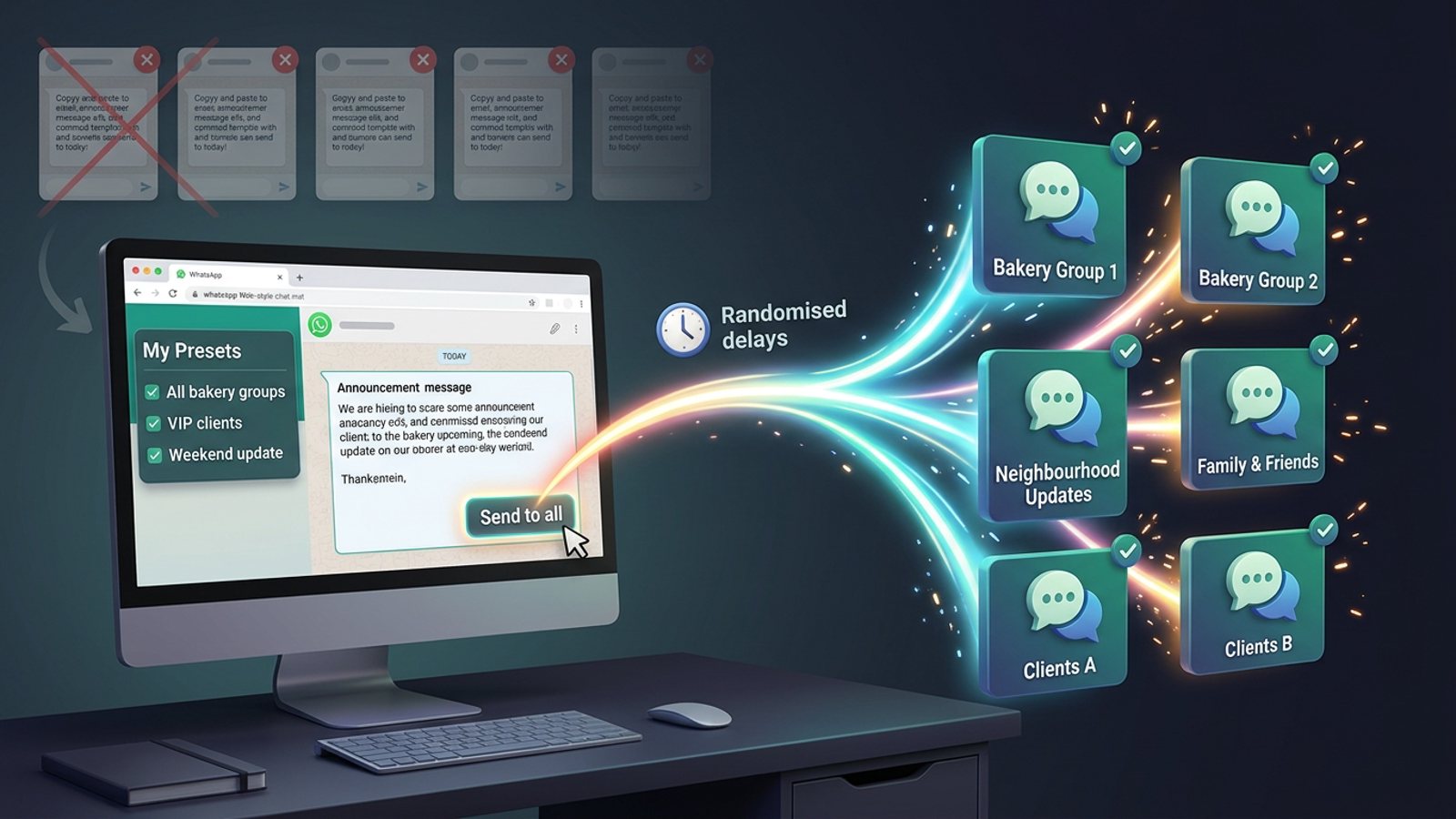
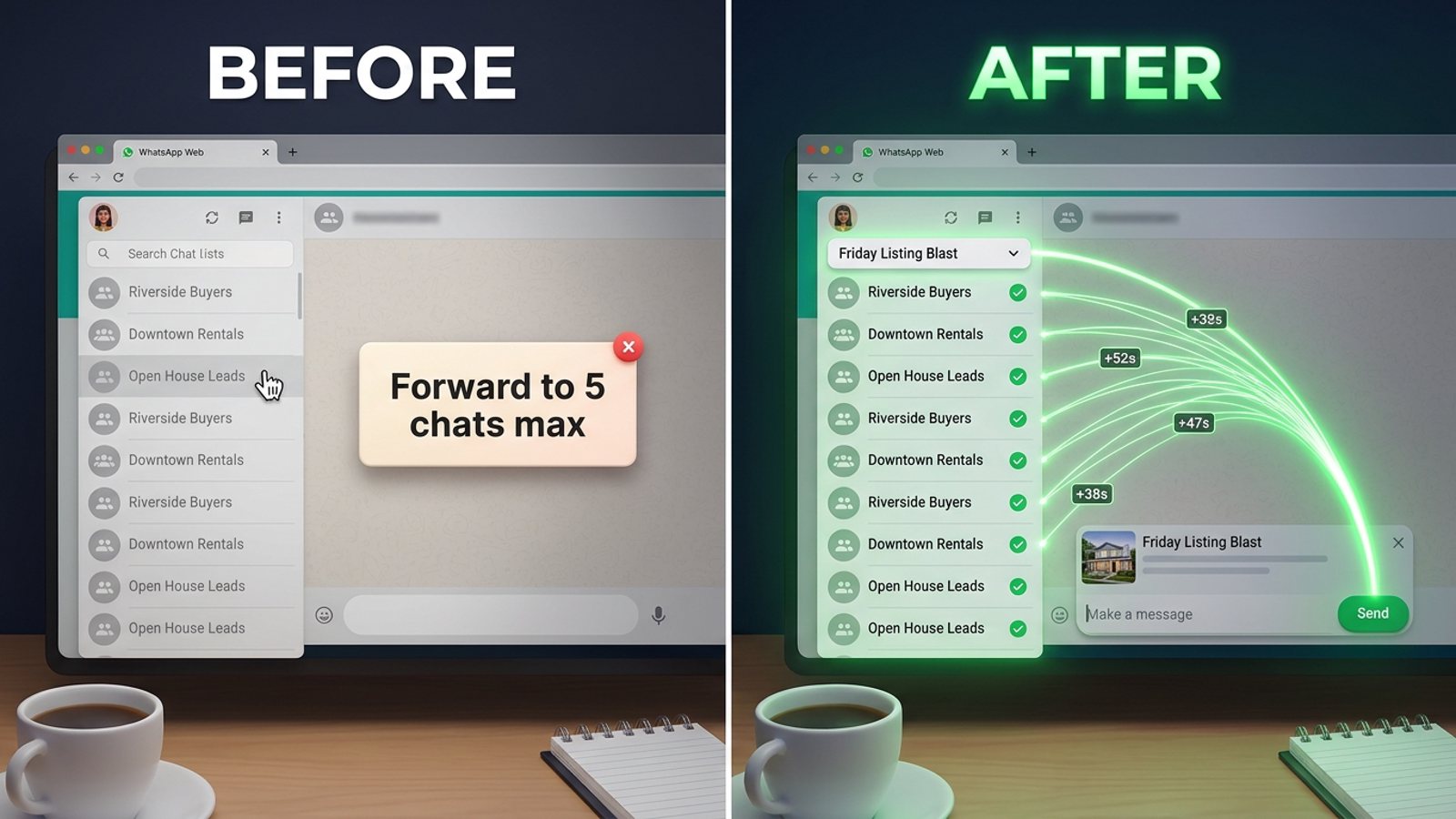
If you just want the shortcut: get FivePlus for WhatsApp Chrome extension and share to more than 5 groups and contacts in one go, with randomized delays built in.
Why is there no published Bytepaper One price to compare?
Because Bytepaper sells its platform by quote, not by a listed monthly fee. business.digital (17 March 2026) reports that Bytepaper offers tiered plans — 5 Users, 10 Users, Tailored — on request, with a 10-day trial without a credit card and no free entry plan. OMR Reviews (pricing section edited February 2024) shows the same plans marked "on request" and describes a pay-per-use model on the WhatsApp Cloud APIs, with platform fees only.
The free part is the app, not the platform. The Bytepaper One iOS app is listed as free on the Apple App Store (14 October 2025) and is iPhone-only, described as a way to chat with teams and clients on WhatsApp, with group creation, broadcast to multiple recipients, automated messages and chatbot connection.
So "cheaper" is the wrong first question. The right one is: cheaper than what number? Until you have a quote in hand, you are comparing a custom-priced platform with tools that publish their prices.
What are you actually paying for with a WhatsApp Web tool?
You are paying for one of three pricing models, and they behave very differently at scale.
Zapext (16 July 2026) lays out the split: extension-style tools typically charge a fixed subscription with no per-message cost, while the official WhatsApp Business API route carries a monthly platform fee plus per-message charges — Zapext cites about US$0.06 per marketing message in Brazil. Periskope (18 February 2026) notes that since 1 July 2025 the Business API charges per delivered template message rather than per 24-hour conversation.
WA Smart Sender (8 November 2026) frames the trade-off plainly: a WhatsApp Web extension runs in Chrome on your computer, uses the number already on your phone, and is "fast and cheap" compared with the official API, which is supported and built to scale.
The three models side by side
- Fixed subscription, no per-message fee. Typical of Chrome extensions. Your cost stays flat whether you send 50 messages or 5,000.
- Platform fee plus per-message charges. The official API and Business Solution Providers. Costs climb with volume.
- Custom quote. Bytepaper's model, per business.digital and OMR Reviews. You cannot compare it on a headline number without asking for a quote.
What does FivePlus cost, and what do you get for it?
FivePlus is free to try for 3 days, and every plan includes unlimited sharing with no monthly sending limit — as of November 2026, prices can change. That is the whole cost story: you are not buying a message quota, you are buying the ability to send beyond five recipients at once.
What that looks like in practice: you save your group and contact lists as presets once, then pick a preset, choose a message or media, and send in one click. V2 lets you send to multiple saved lists at once, and you can mix people and groups into one preset for maximum reach.
Account safety is part of what you pay for. FivePlus uses anti-ban technology that mimics natural human behavior, and randomized delays stagger message timing to avoid spam flags.
The honest limits, straight from the product: it requires the Chrome browser and WhatsApp Web, and free use is limited to a 24-hour trial. FivePlus is not affiliated with Meta; WhatsApp is a trademark of Meta Platforms, Inc.
Which cheaper Bytepaper One alternative fits your job?
Match the tool to the job before you match it to a price. wasurge.com (updated 29 July 2026) points out there is no built-in way in WhatsApp to post one message to several groups at once — you open each group individually — and that a Web extension selecting multiple groups and posting in sequence with delays is "the only practical method for more than a handful."
Here is how the options compare, job-first choosing. FivePlus is made by the team behind this blog.
| Option | Best for | Key features | Price / free option | Watch-outs |
|---|---|---|---|---|
| FivePlus (Our pick) | Sending to more than 5 groups and contacts in one go | Saved presets, multiple lists at once (V2), randomized delays, anti-ban | Free 3-day trial; unlimited sharing on all plans, no monthly send limit (as of Nov 2026, prices can change) | Chrome + WhatsApp Web required; trial is 24 hours |
| Bytepaper One | Sales automation with chatbots and a shared team inbox | Chatbots, broadcast, group management, Cloud API integration | iOS app free; platform quoted on request; 10-day trial | Quoted on request; iPhone-only app; Cloud-API platform, not a Web extension |
| SafePace | A low-cost metered extension | Paced sending, personalization | Free tier 50 messages/day per number; Pro $4.99/mo (as of Nov 2026) | Daily caps; vendor states no bulk method is zero-risk |
| WaSenderHQ | A one-time payment instead of a subscription | Unlimited broadcasts on free edition, CSV/Sheets import, scheduler | Free edition; Pro listed one-time $19.99 (as of May 2026) | Listing shows $19.99 and $9.99 in different places — confirm before paying |
| WhatsApp broadcast lists | Reaching opted-in saved contacts at zero cost | Built into WhatsApp | Free | Not group posting; reach limited to contacts who have you saved |
A word on the last row: a developer note in the zaileys docs (17 November 2026) explains that a broadcast call "doesn't create a WhatsApp broadcast list" because it sends ordinary one-to-one messages — broadcast lists and group posting are different mechanics, and only one of them gets your announcement into a group.
If you mainly need chatbots and a shared inbox for a sales team, Bytepaper's platform is the more direct choice — that is a different product category from a Web extension. If you mainly need to post the same message into many groups from your laptop, an extension is the cheaper shape of tool.
How do you switch without wasting money?
Run the free tiers first, then commit. That is the whole method.
- Write down your real job. Posting into many groups, messaging many saved contacts, or full sales automation. Bytepaper-style platforms target the third; broadcast lists and extensions target the first two.
- Compare pricing models, not headline numbers. Flat subscription versus platform fee plus per-message versus custom quote.
- Read what the free tier actually allows. SafePace's free tier caps at 50 messages per day per number (Chrome Web Store listing, updated 20 November 2026). Message Pilot Free caps at 10 contacts per bulk send, 3 groups per group send and 3 total sends (Chrome Web Store, undated). FivePlus's free use is a 24-hour trial.
- Confirm your setup. Chrome on a desktop, WhatsApp Web signed in on your existing number.
- Build your list with consent and an opt-out list. MEFMobile (18 October 2026) lists contacting people without valid opt-in, ignoring opt-outs, and sustained negative feedback (blocks and reports) among common ban triggers.
- Re-read the rules before a big send. WhatsApp's Messaging Guidelines (updated 23 September 2026) prohibit bulk-messaging and auto-messaging automation used to harm WhatsApp or its users, and Meta's policy enforcement documentation (updated 21 May 2026) describes escalation from warnings to temporary bans and eventual permanent disablement.
If you want to see the workflow before paying anything, try FivePlus free for 3 days and send one real announcement to your saved lists.
Is a free WhatsApp Web extension actually free?
Usually not in the way you hope — the free tier is a cap, not a gift. SafePace gives 50 messages a day per number free. Message Pilot Free gives 10 contacts and 3 groups per send, and 3 sends total. WaSenderHQ advertises unlimited broadcasts on its free edition. FivePlus gives you a 24-hour trial, then unlimited sharing on all plans with no monthly send limit (as of November 2026, prices can change).
The pattern: free tiers are fine for testing whether the workflow suits you, and rarely fine for a weekly send to 30 groups.
Do you need the WhatsApp Business API to message many groups?
No. wasurge.com (29 July 2026) and WA Smart Sender (8 November 2026) both describe WhatsApp Web extensions as a route that needs no Business API. The extension works through WhatsApp Web in Chrome, using the number already on your phone.
That matters for cost. The official API route is supported and built to scale, but it brings a monthly platform fee and per-message charges — and Meta's messaging limits start at 250 unique contacts per 24 hours, according to WhatChimp (7 November 2026). For a broker or coach posting to their own groups, the extension model is the cheaper shape.
Sources
- WhatsApp Messaging Guidelines (WhatsApp, last updated 23 September 2026)
- WhatsApp Business Platform policy and spam enforcement (Meta for Developers, updated 21 May 2026)
- WhatsApp Business Ban: Causes, Appeal Steps and Prevention (MEFMobile, 18 October 2026)
- Bytepaper: Funktionen, Preise & Bewertung 2026 (business.digital, 17 March 2026)
- Bytepaper Details & Reviews (OMR Reviews EN, pricing edited February 2024)
- Bytepaper homepage (Bytepaper, page dated 30 March 2022)
- Bytepaper One app listing (Apple App Store, 14 October 2025)
- How to Send Messages to Multiple WhatsApp Groups at Once (wasurge.com, updated 29 July 2026)
- WhatsApp Web Extension or Official API: How to Choose (WA Smart Sender, 8 November 2026)
- How much does it cost to send bulk messages on WhatsApp? The 3 models (Zapext, 16 July 2026)
- WhatsApp bulk message sender: free vs official tools 2026 (WhatChimp, 7 November 2026)
- Best WhatsApp Business API Alternatives in 2026 (Periskope, 18 February 2026)
- WA Bulk Message Sender: Personalized, Auto-Paced | SafePace (Chrome Web Store, updated 20 November 2026)
- WaSenderHQ (Firefox add-on page, 24 May 2026)
- Message Pilot Free (Chrome Web Store, undated)
- Sending Message to WhatsApp Groups (Picky Assist Help Desk, 10 June 2024)
- Broadcast & schedule (zaileys GitHub docs, 17 November 2026)
Frequently asked questions
The Bytepaper One iOS app is listed as free on the Apple App Store (14 October 2025) and is iPhone-only. The platform behind it is quoted on request, per business.digital (March 2026) and OMR Reviews, with a 10-day trial without a credit card and no free entry plan.
business.digital (17 March 2026) notes that 128 of 390 providers in its category only give prices in conversation, and places Bytepaper in that group. That is a secondary source, not Bytepaper's own statement — treat it as context, not a verdict.
Of the tools we compared, FivePlus is our pick for group posting from a laptop: unlimited sharing on all plans with no monthly send limit, saved presets, and randomized delays, with a free 3-day trial (as of November 2026, prices can change). If you only message opted-in contacts, WhatsApp's free broadcast lists cost nothing. If you need chatbots and a team inbox, Bytepaper's platform is the more direct choice.
Yes, that risk exists with any tool. WhatsApp's Messaging Guidelines (updated 23 September 2026) prohibit bulk-messaging automation used to harm users, and SafePace's listing states plainly that no bulk method is zero-risk. Keep lists opted in, honour opt-outs, and pace your sends.
In FivePlus, saved group lists are saved forever, so the practical advice is not to uninstall the Chrome extension if you want to keep them. For other tools, check their own documentation before you cancel.